# Welcome

Welcome to the Hop User Documentation!

Get started with these topics:

{% content-ref url="/pages/BSl2pzhnCgAjC9MIuqiy" %}
[Basics](/basics/a-short-explainer)
{% endcontent-ref %}

{% content-ref url="/pages/bOQwhowACQMo7w8a5pTm" %}
[Governance](/governance/into-to-hop-dao)
{% endcontent-ref %}

{% content-ref url="/pages/eAwEDPQrreuFfIYu8L9X" %}
[FAQ](/basics/faq)
{% endcontent-ref %}

### Looking for the Developer Docs?

Check out the v1 docs for the current version of Hop.

{% content-ref url="/spaces/-MOYaoULYuKq7wLWewmU" %}
[Developer Docs](https://docs.hop.exchange/developer-docs/)
{% endcontent-ref %}

The Hop v2 protocol and docs are still a work-in-progress and only on testnet.

{% content-ref url="/spaces/fT1PRS93wyRip1PZsMC6" %}
[Developer Docs v2](https://docs.hop.exchange/v2/)
{% endcontent-ref %}


# A Short Explainer

Hop is a scalable rollup-to-rollup general token bridge. It allows users to send tokens from one rollup or sidechain to another almost immediately without having to wait for the networks challenge period.\
\
It works by involving market makers (referred to as Bonders) who front the liquidity at the destination chain in exchange for a small fee.\
\
This credit is extended by the Bonder in form of hTokens which are then swapped for their native token counterpart in an AMM on the destination chain.

The end result allows users to seamlessly transfer tokens from one network to the next.

The hTokens exist to allow the protocol to mint & burn tokens programmatically to move them across chains more easily but also to shorten the native exit time of each scaling solution and allow Bonders to be more capital efficient. Bonders unlock their fronted capital every 24hrs.

### Hop is trustless

Users have on-chain guarantees that they will receive their funds even in the event where Bonders are offline. In the rare event where this happens, users have to wait until the on-chain proof is propagated to the destination chain to withdraw their tokens manually. In the worst case users will face a slow experience but their funds can't be taken by the Hop bridge.

### Liquidity is automatically rebalanced

By virtue of having AMM's on each chain, liquidity always flows to where its most needed. If a lot of user funds are bridged from say Optimism to Ethereum, arbitrageurs will be economically incentivized to bridge the other way to pocket a premium and thereby rebalance the pools.

### Hop is powered by a set of Bonders

Bonders run local nodes to verify if the state transitions on the source chain are accurate and decide to "bond" the transfer by locking up 110% of the `TransferSum` as collateral. This allows them to mint hTokens at the destination chain which are sent to the user to provide instant liquidity. The Bonder unlocks the capital after a 24hr challenge period during which anyone can challenge the Bonder. If a challenge is successful the Bonder capital is slashed.\
\
For more info about Hop V1 please refer to our [whitepaper](https://hop.exchange/whitepaper.pdf).


# What is special about Hop?

#### Intro to Bridges

Every bridge relies on a mechanism to transfer data across chains. In some way or another, it needs to be proven that a given transfer on a source chain is valid and that the bridge protocol can release tokens to the user on the destination chain. This is how the native settlement times can be bypassed and how assets can be transferred between L2's even though they are not directly connected.

Bridges differ in *how they transfer data between chains* and this is what defines their security model for the most part.&#x20;

Most bridges rely on some **off-chain actors** like a multisig or oracle to certify that a transfer happened. This means there's an off-chain attack vector. Keys can be compromised. And this is not an abstract threat. Over [$3 billion of capital](https://assets.ctfassets.net/4rilomtvvae4/5DgOdTmxer4KBlLsOTXapd/b19f517260fa1f0d25c87b79fd88944c/2022_Year_in_Review_-_Arcane_Research.pdf) locked in bridges have been hacked in 2022 and the majority of these hacks were due to key compromises.

#### How Hop is Different

Hop has been built with maximal security in mind. There are no single point of failures or trusted off-chain actors. Instead the security is 100% rooted on-chain.

Hop compresses origin messages (i.e transfers) into Bundles and uses the native message bridges to transfer these Bundles between chains. This system is refered to as using a "Hub-and-Spoke" model where Ethereum is the main hub through which everything is routed and each scaling solution is a spoke. For example, to send data between Optimism and Arbitrum, Hop will send a Bundle down to Ethereum through the native Optimism bridge and then up to Arbitrum again using the native bridge. This means the **validity of a transfer can be proven on-chain**!

Now this way to transfer data is maximally secure but you might have noticed that it's also slower as it depends on the native message bridges' exit times (40 mins for Polygon PoS and Gnosis Chain and up to 7 days for ORU's).&#x20;

This is why the Bonders exist. They verify transactions off-chain and front the liquidity for the users on the destination chain. By doing so they take the liquidity lock-up upon them and have their liquidity unlocked once the on-chain proof (aka Bundle) arrives at the destination.

#### Why Security is Important

This security model gives Hop a competitive advantage. All else equal, bridges with weaker security model will need to pay higher interest rates to attract liquidity than trustless bridges. Over the long term, as the markets understanding of bridges matures, it is highly likely that trustless bridges will be able to offer lower bridging fees than centralized bridges.

The security of its Core Messenger will also be appreciated as Hop continues to venture into interoperability use cases beyond asset bridging such as: cross-chain governance, NFT bridging, omnichain tokens etc.


# How to bridge with Hop

In this section, we'll explain how to bridge tokens from one network to another through Hop.

### **Step 1: Choose parameters**

Choose the chain you want to send tokens from, the asset you want to transfer, the amount which you want to transfer and the destination chain.

Here is what it looks like:

1. **Send:** choose the "send" tab in the header menu (it's the [app.hop.exchange](https://app.hop.exchange/) home page)&#x20;
2. **Asset:** pick a token in the asset dropdown
3. **From & To**: choose the source chain and destination
4. **Size:** enter the amount of tokens you want to send

<figure><img src="/files/3wFpY83gNTtuharQntZB" alt=""><figcaption></figcaption></figure>

### **Step 2: Approve Token**

Next, if it's the first time you're sending this particular asset through Hop, you will need to grant a one-time approval. This grants Hop's smart contracts the authorization to move the tokens on your behalf.

<figure><img src="/files/TYdW4iwjkBocFPeO8BdJ" alt=""><figcaption></figcaption></figure>

### **Step 3: Send Token**

And finally, once the approval tx is confirmed, you can hit the "send" button which will initiate the transfer. A modal will show the status of your transaction while it's in-flight. Once you see ticks on both `Source` and `Destination` chain your tokens will have arrived. The modal is only meant as a help you can safely close it at any time. Your transfer will proceed regardless.

<figure><img src="/files/rCQ8ywBHdBNNHW6P7J27" alt=""><figcaption></figcaption></figure>


# How long does a transfer take?

It depends which network you are sending to and from. As a general rule of thumb, L1 to L2 transfers take the same amount of time than sending via the native bridge. For example, depositing from Ethereum to Polygon takes approximately 22 minutes via the Polygon bridge and the same amount of time with the Hop bridge. This is because Hop **itself** uses the native bridges for L1 -> L2 deposits.\
\
The advantages with Hop come about when you transfer **the other way around** from L2 to L1 or from one L2 to another L2.\
\
Here, the rule of thumb is that an exit will take as many blocks to be considered final (safe from [reorgs](https://www.paradigm.xyz/2021/07/ethereum-reorgs-after-the-merge/)) on the sending chain. Some chains determine finality based on L1 consensus. The time-to-finality for these chains is not constant, so the values below will be an average based on the `safe` status of a block that a transaction is included in.\
\
\&#xNAN;*FYI: Hop has a* [*multichain block explorer*](https://explorer.hop.exchange/) *which allows you to track the status of your transaction as well as all your past transactions.*

### L2 to Any

* Optimism: \~25 minutes (finality)
* Arbitrum: \~12 minutes (finality)
* Nova: \~12 minutes (finality)
* Polygon: \~60 minutes (1600 blocks) (due to ongonig chain reorg issues)
* Gnosis: \~4 minutes (L2 finality)
* Base: \~25 minutes (finality)

### Ethereum to Any

* Optimism: \~2 minutes (optimistic finality)
* Arbitrum: \~10 minutes (finality)
* Nova: \~10 minutes (finality)
* Polygon: \~20 min (finality)
* Gnosis: \~30 min (light client finality)
* Base: \~2 minutes (optimistic finality)


# Fees

There is no simple answer for this question as the overall cost of your transfer will depend on various factors.

<figure><img src="/files/CJl3gSpT8kGlZYNdf0wy" alt=""><figcaption></figcaption></figure>

\
**1. AMM swap fees (0% - 0.04%)**

Most bridges have an AMM that will charge between 0.01% -0.04%. The HOP bridge does not have an AMM so there is no AMM fee applied.\
\
When you transfer e.g USDC from Optimism to Arbitrum your USDC will be converted into hUSDC in the USDC AMM on Optimism incurring a **0.01% - 0.04% fee**.\
\
Then this hUSDC will be burned and a Bonder will bond your transfer by locking his collateral and mint you some new hUSDC on Arbitrum. \
\
This hUSDC will now be converted in the Arbitrum USDC AMM for canonical USDC costing **another 0.01% - 0.04%.** \
\
L2 <> L2 -> 0.02% - 0.08% swap fees (because two swaps)\
L2 -> L1 -> 0.01% - 0.04% (because only one swap)\
\
**2. Slippage (?%)**\
\
Depending on the liquidity in the AMM's the rate for conversions between hTokens and canonical tokens can fluctuate and eat into the cost of your transfer. With more liquidity in the Hop protocol and actors arbitraging the pools this should become less and less of a problem.\
\
**3. Bonder fee (0.05-0.30%)**\
\
The Bonder takes a fee for fronting the liquidity of your transfer at the destination chain and taking on risk.\
\
The fee varies per asset and per route based on the transaction volume and other factors due to economies of scale. If there is a lot of demand for an asset, Bonder fees can be lowered while still breaking even.

\
**4. Destination chain tx fee (gas fees)**\
\
The funds need to be sent from the Bonder to your wallet and users need to pay for this gas cost.\
This gas cost is factored into the fee the user pays on the origin chain and displayed before sending.\
\
**5. Minimum fee ($0.25)**\
\
To prevent spamming there is a minimum fee of $0.25 per Hop transfer. I.e if the total fee paid by the user is < $0.25 it will be rounded up to $0.25.\
\
\
\ <br>


# Providing Liquidity & Rewards

In this section, we describe how you can begin providing liquidity in Hop and earn liquidity mining rewards. As mentioned, Hop has AMM's on each chain it supports. These AMM's effectively create markets between the canonical wrapped assets of the native bridges (e.g $USDC on Optimism) and between the Hop bridge tokens with the shortened challenge times (e.g $hUSDC on Optimism).\
\
When an individual provides liquidity to a pool, the individual receives an LP token which represents their individual share of the pool. This share becomes more valuable over time as it accrues fees generated from transfers.\
\
For example, imagine you provide 1 ETH into the $ETH pool on Arbitrum and receive 0.98 HOP-ETH-LP tokens. 1 year later you withdraw your liquidity from the pool (by burning the 0.98 HOP-ETH-LP tokens) and you receive 1.1 $ETH back. This means you will have earned 10%.

## How to Provide Liquidity (Step by Step)

First, you need to of course make sure you have assets on the network you want to provide liquidity on. As an example, if you want to provide liquidity in the $ETH pool on Arbitrum you will need to send $ETH to Arbitrum via Hop or alternatively through the [native Arbitrum bridge ](https://bridge.arbitrum.io/)(takes same time but Hop is often cheaper).&#x20;

### Step 1: Choose your Pool

Choose a pool based on the highest yield or the asset& network of your choice. Once you've decided you need to click on "Add liquidity" in the row of choice.

<figure><img src="/files/bqLvzgunCjEYLq4mzfJC" alt=""><figcaption></figcaption></figure>

### Step 2: Choose Amount

Clicking "Add liquidity" will lead you to the specific pool page of your choice. You'll see the 24hr volume, TVL as well as its APR.\
\
\&#xNAN;*In some cases you will need to* [*wrap*](https://academy.binance.com/en/articles/what-is-wrapped-ether-weth-and-how-to-wrap-it?ref=AZTKZ9XS\&utm_source=BinanceTwitter\&utm_medium=GlobalSocial\&utm_campaign=GlobalSocial) *your $ETH (same for $MATIC) to turn it into an ERC-20 token before depositing it into the pool. You will see a little prompt "Click here to Wrap or Unwrap" to do so.*

You will see for each pool there's always two input fields. One for the "canonical" asset (e.g $ETH) and one for the Hop bridge token (e.g $hETH).\
\
Enter the amount you want to deposit into the input field of each token. You can provide single-sided (i.e only one asset) in which case you leave the other input field empty or provide both tokens in the ratio you like.

<figure><img src="/files/aw9HjHWAMCrdjnBfMjM7" alt=""><figcaption></figcaption></figure>

### Step 3: Approve & Deposit

To start depositing your token(s), click the "Preview" button. A modal will appear showing you an overview of your transaction one last time before you actually deposit. If everything looks good you can hit the "Deposit & Stake" button. \
\
\&#xNAN;*If you don't wish to stake your LP tokens and earn $HOP liquidity mining rewards you can click the grey "Deposit" button just below. This will simply deposit your tokens but not stake the LP tokens.*

<figure><img src="/files/Vd0WqpvLBkJtol2QfPvu" alt=""><figcaption></figcaption></figure>

Assuming you have chosen to "Deposit & Stake" a wizard will walk you through all the necessary transactions and steps to stake your LP tokens. This will involve Approvals, Deposits and Stake transactions so expect to sign several transactions in your wallet. The good thing is, this happens on Layer-2 so the transactions are cheap and fast.

<figure><img src="/files/e647Ie7xqQOiWLqtzYfS" alt=""><figcaption></figcaption></figure>

\
\
Congrats you are now a liquidity provider in a Hop AMM and earning bridge fees + $HOP rewards  🥳


# Transfer failures

Transfers can take up to 15-20mins depending on the route (see [Hop transfer times](https://help.hop.exchange/hc/en-us/articles/4406099772045-How-long-does-a-Hop-transfer-take-)).\
\
If you've waited this long but still think there's something wrong with your transfer it's likely one of these two reasons:\
\
1\) you received hTokens instead of native tokens and need to swap manually\
\
2\) the transfer actually arrived but your wallet doesn't show it<br>

### 1. Receiving hTokens

In rare circumstances it can happen that the user receives **hTokens** instead of **native tokens** (e.g hUSDC instead of USDC) at the destination. This happens because the final "swap" at the destination times out after a set deadline, meaning the Hop token doesn't get converted in the AMM of the destination chain. \
\
In these instances the user needs to convert their Hop tokens manually in the "Convert" tab to get the native token.

<figure><img src="/files/X3Mj9TINolT2RZ3yNd4q" alt=""><figcaption></figcaption></figure>

Even more rarely, it can happen that there's no Bonder to "bond" your transfer and front the liquidity on the destination chain. This can can happen either because the Bonder is out of collateral (in which case you have to wait) or because of issues in the Bonder node infrastructure (in which case software needs to be rebooted or patched).\
\
If there is no Bonder liquidity at the destination chain there should be a warning in the Hop UI to let you know of the situation.\
\
If you still somehow send tokens while there is no Bonder liquidity your transaction will be pending until there is **new Bonder liquidity**.

### 2. Tokens don't show up in wallet despite transfer being marked as successful

Often it turns out that these users had received their funds but the transfer was simply not displayed in the transaction list of Metamask or other wallet. This is because, unlike a standard peer-to-peer token transfer, tokens are disbursed by a smart contract and these are not indexed by Metamask. However, your balance is still credited (increased) by the amount of your transfer.\
\
We'll show you two things:\
\
**1) How to find out if the tokens have arrived using a block explorer**\
\
**2) How to manually add a token to the Metamask user interface** \
\
Metamask is just an interface that connects to the Blockchain for you. Sometimes this interface can be buggy and sometimes it doesn't automatically show specific tokens especially on Layer-2 chains.\
\
The best way to find out if your tokens have arrived is by going to a block explorer. The Blockchain is the single source of truth and a block explorer shows you all the data belonging to your account.\
\
For example if you want to see if your funds on have arrived on Optimism you would go to [Optimistic Etherscan](https://optimistic.etherscan.io/).\
\
Paste your wallet address in the big search bar of the home page of the block explorer site and you will see a new page showing data of your account. \
\
In the token dropdown you will see all the tokens that are held in your wallet. **If you see your tokens there you can be assured that everything went well and that it's simply a matter of Metamask not showing your tokens.**

<figure><img src="/files/FNn7gIYqRZelCCE5shEF" alt=""><figcaption></figcaption></figure>

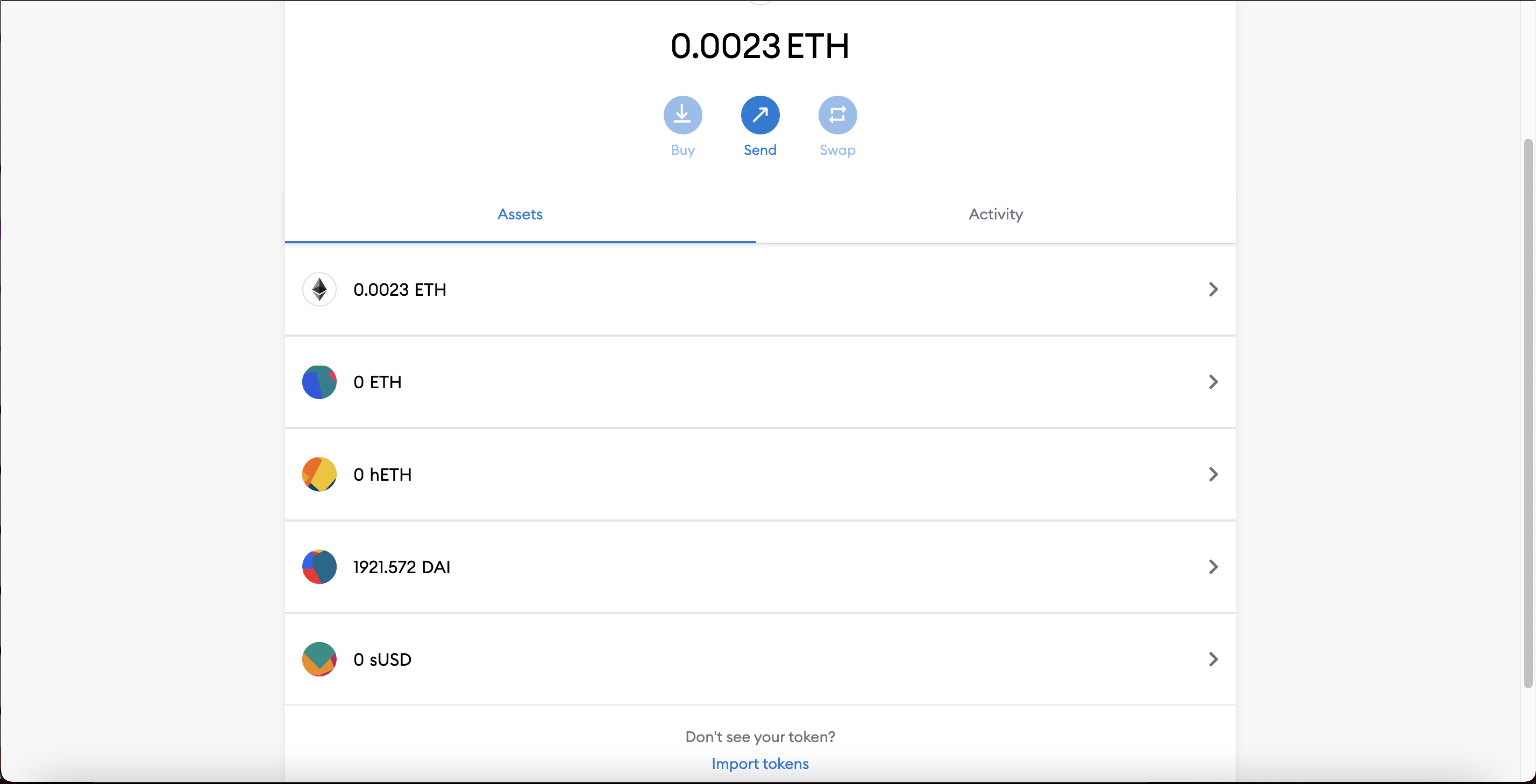
Now that you know the token is there, let's import it manually into Metamask so that the interface shows it too. To do that go into the "Assets" tab and scroll to the bottom where you'll see a "Import tokens" link.

<figure><img src="/files/tBPegpr01cnaZXCuoeUC" alt=""><figcaption></figcaption></figure>

You will then see a form which requires you to paste the address of the token you want to add. You can find the address of a token by typing it's ticker symbol (e.g "USDC) into the block explorer of the chain you are on ( e.g Optimistic Etherscan) or by looking it up on popular directories such as [Coingecko](https://www.coingecko.com/en). \
\
**NOTE: Tokens have different addresses on each chain they exist on ! E.g USDC address on Ethereum is different than USDC on Optimism!**\
\
Once you paste the address the other fields like Token Symbol and Token Decimal will auto-populate.\
\
Click on "Add Custom Token" and you're done. Yo will now see your token in Metamask :-)

<figure><img src="https://help.hop.exchange/hc/article_attachments/4413626776205/Screenshot_2021-11-15_at_17.16.59.png" alt=""><figcaption></figcaption></figure>


# Manual Withdrawals

As a trustless bridge, Hop allows users to force exit their tokens in the rare event where Bonders (market makers) don’t bond a user’s transfer fast enough.\
\
This can happen because:\
\
1\) A Bonder fee was set too low (e.g if sent via a third-party app which miscalculates the Bonder fee)\
\
2\) Bonder is offline or misses on-chain events ( e.g because of RPC node issues)\
\
3\) Bonder is out of liquidity to bond Transfers or Transfer Roots.\
\
When this happens Hop offers users a fallback option to withdraw their tokens manually at the destination chain **albeit not as fast as it would arrive in a normal transfer** involving a fully functioning Bonder.\
\
In order to withdraw, the Transfer Root bundle containing the proof of your transaction must be propagated to the destination, and this **could take a few hours or days** depending on the asset and route, so withdrawing **immediately after sending won't work**.\
\
**Step 1: Paste your transaction hash**\
Go to the [withdraw ](https://app.hop.exchange/#/withdraw?token=ETH)[page UI](https://app.hop.exchange/#/withdraw?token=ETH) and paste the transaction hash of your transfer on the origin chain into the TransferID field.

![manual\_withdraw\_1.png](https://help.hop.exchange/hc/article_attachments/7449225280781/manual_withdraw_1.png)

**Step 2: Withdraw your transfer**

If the Transfer Root containing your transaction has reached the destination chain you will see a pop-up. Click the “withdraw” button and confirm the transaction in your wallet.\
![manual\_withdraw\_2.png](https://help.hop.exchange/hc/article_attachments/7449268621325/manual_withdraw_2.png)

**Step 3: Swap your hTokens for native tokens**

Upon showing your valid transfer proof the Hop bridge will mint hTokens for you (e.g hUSDC or hETH). So if you want native $USDC or $ETH you’ll need to manually convert your hTokens in the Hop AMM.\
\
Head to the “Convert” section in the Hop app, select the network and asset and choose the “via AMM” option to do the swap from hTokens into native tokens.\
\
NOTE: this final swap is only necessary if you sent to a Layer-2 network. If you sent to Ethereum you will **directly** receive native tokens, so no swap needed.\
![Screenshot\_2022-07-05\_at\_22.14.23.png](https://help.hop.exchange/hc/article_attachments/7449261671437/Screenshot_2022-07-05_at_22.14.23.png)


# USDC.e Manual Withdrawals

With the Hop USDC bridge upgraded to utilize Circle's CCTP and the deprecation of the USDC.e bonder, transfers involving USDC.e now require manual withdrawal processing.

Hop allows you to withdraw `hUSDC.e` from the pool and transfer it to L1 at a 1:1 ratio. However, transferring `hUSDC.e` to L1 requires completing the full exit process, which takes at least 7 days after the root commit before the withdrawal can be finalized. To proceed, follow these steps:

**Step 1: Initiate the bridge to L1**

Go to the [Convert page UI](https://app.hop.exchange/#/convert/hop), select origin chain and ensure the convert method is set to "via Hop Bridge".

Initiate the transfer by clicking the "Convert" button.

![image](https://github.com/user-attachments/assets/4b62d9b4-0c72-4ec5-bccd-622ab8c14636)

**Step 2: Submit "Commit transfers" transaction**

Visit the [Relay page UI](https://app.hop.exchange/#/relay) and paste the transaction hash of your transfer on the origin chain into the Transfer ID field.

This will initiate the "Commit Transfers" transaction.

![image](https://github.com/user-attachments/assets/6c4864c1-3e08-43ac-8811-7be57a85937c)

**Step 3: Submit "Prove Withdrawal" transaction**

On the same [Relay page UI](https://app.hop.exchange/#/relay) page, initiate the "Prove Withdrawal" transaction on L1 by clicking the "Relay" button again.

Alternatively, use [superchainrelayer.xyz](https://superchainrelayer.xyz/) for OP stack chains to complete this step. Paste the transaction hash of the "Commit Transfers" transaction from Step 2 and click "Prove Tx".

**This will initiate a 7-day exit period.**

![image](https://github.com/user-attachments/assets/8686e83d-b811-4a43-aff0-c085142d6360)

**Step 4: Submit "Finalize Withdrawal" transaction**

Visit the [Relay page UI](https://app.hop.exchange/#/relay) and paste the transaction hash of your transfer on the origin chain into the Transfer ID field.

This action initiates the "Finalize Withdrawal" transaction.

Alternatively, use [superchainrelayer.xyz](https://superchainrelayer.xyz/) for OP stack chains to complete this step. Paste the transaction hash of the "Commit Transfers" transaction from Step 2 and click "Finalize Tx".

![image](https://github.com/user-attachments/assets/e3570586-7f5e-4a3c-a213-472129d8ca48)

**Step 5: Withdraw your transfer**

Go to the [Withdraw page UI](https://app.hop.exchange/#/withdraw) and paste the transaction hash of your transfer on the origin chain into the Transfer ID field.

Click the "Withdraw" button and confirm the transaction processed the withdrawal transfer to your wallet.

![image](https://github.com/user-attachments/assets/b90be264-ccd0-4070-ac35-9a26c2c5a649)


# FAQ

### Which interfaces can I use to use Hop Protocol?

## Can I access Hop Protocol through other interfaces than Hop.Exchange?

The Hop **protocol** is trustless and decentralized because it lives entirely on-chain. Anyone running an Ethereum node can **interact with the contracts directly** which will perform as programmed for as long as Ethereum exists.&#x20;

Users can also access the Hop Protocol for bridging assets through other web interfaces such as bridge aggregators aggregators, or other DAPPs that have integrated Hop natively in their smart contracts.\
\
List:\
\- [IPFS-hosted Hop UI](https://hop-exchange.ipns.dweb.link/)\
\- [Swing (Bridge Aggregator)](https://app.swing.xyz/bridge)\
\- [Movr (Bridge Aggregator)](https://app.fund.movr.network/)\
\- [Li Finance (Bridge Aggregator)](https://li.finance/)

## How do the $OP on-boarding rewards work?

The Optimism Foundation granted 1m $OP tokens to Hop as a reward for being one of the early projects building on Optimism. Hop is using these tokens to subsidize bridging costs into Optimism by -80%. Every time a user bridges from Ethereum to Optimism (or from a L2 to Optimism) 80% of the transaction fee will be re-imbursed in $OP tokens. These $OP tokens can be claimed in the "Rewards" section of the app after the countdown period on the Rewards UI has ended (currently 14 days). \
\
These $OP rewards are calculated off-chain and then need to be verified and published on-chain by the 🔐community-multisig. The community multisig is not managed by Hop Labs but by community members who have full-time jobs in other projects and live in different timezones and continents. That's why it can take a couple of days after the countdown has ended before the rewards are actually claimable.

### How to vote in Hop governance?

To participate in Hop governance with your $HOP tokens you need to first delegate your voting power to yourself. This requires an on-chain transaction and costs some gas. If you prefer you can also delegate your voting power to one of the existing delegates.

Once you have delegated you will be able to vote for the **next** governance vote, not the one currently live.

Delegating and voting can be done through one of the many governance portals such as: <https://www.tally.xyz/governance/eip155:1:0xed8Bdb5895B8B7f9Fdb3C087628FD8410E853D48>

### More FAQs

Check out the FAQ subpages on the left side navigation.&#x20;

Additional FAQs available on Developer Docs [FAQ](/developer-docs/other/faq)

{% content-ref url="/spaces/-MOYaoULYuKq7wLWewmU/pages/-MbkbKhilJQSKwI7sydw" %}
[FAQ](/developer-docs/other/faq)
{% endcontent-ref %}


# How to manually withdraw your tokens on the destination chain?

As a trustless bridge, Hop allows users to force exit their tokens in the rare event where Bonders (market makers) don’t bond a user’s transfer fast enough.\
\
This can happen because:\
\
1\) A Bonder fee was set too low (e.g if sent via a third-party app which miscalculates the Bonder fee)\
\
2\) Bonder is offline or misses on-chain events ( e.g because of RPC node issues)\
\
3\) Bonder is out of liquidity to bond Transfers or Transfer Roots.\
\
When this happens Hop offers users a fallback option to withdraw their tokens manually at the destination chain **albeit not as fast as it would arrive in a normal transfer** involving a fully functioning Bonder.\
\
In order to withdraw, the Transfer Root bundle containing the proof of your transaction must be propagated to the destination, and this **could take a few hours or days** depending on the asset and route, so withdrawing **immediately after sending won't work**.\
\
**Step 1: Paste your transaction hash**\
Go to the [withdraw ](https://app.hop.exchange/#/withdraw?token=ETH)[page UI](https://app.hop.exchange/#/withdraw?token=ETH) and paste the transaction hash of your transfer on the origin chain into the TransferID field.

![manual\_withdraw\_1.png](https://help.hop.exchange/hc/article_attachments/7449225280781/manual_withdraw_1.png)

**Step 2: Withdraw your transfer**

If the Transfer Root containing your transaction has reached the destination chain you will see a pop-up. Click the “withdraw” button and confirm the transaction in your wallet.

\
![manual\_withdraw\_2.png](https://help.hop.exchange/hc/article_attachments/7449268621325/manual_withdraw_2.png)

**Step 3: Swap your hTokens for native tokens**

Upon showing your valid transfer proof the Hop bridge will mint hTokens for you (e.g hUSDC or hETH). So if you want native $USDC or $ETH you’ll need to manually convert your hTokens in the Hop AMM.\
\
Head to the “Convert” section in the Hop app, select the network and asset and choose the “via AMM” option to do the swap from hTokens into native tokens.\
\
NOTE: this final swap is only necessary if you sent to a Layer-2 network. If you sent to Ethereum you will **directly** receive native tokens, so no swap needed.

\
![Screenshot\_2022-07-05\_at\_22.14.23.png](https://help.hop.exchange/hc/article_attachments/7449261671437/Screenshot_2022-07-05_at_22.14.23.png)<br>


# How to use Hop with a Gnosis Safe?

If you have funds in a Gnosis Safe smart contract wallet and want to use Hop to bridge funds between networks you can do so via the Gnosis Safe Mobile app in combination with Wallet Connect or through the Gnosis Safe Web App on Desktop.\
\
This guide will show you how to do it via the Gnosis Safe Web App. \
\
\&#xNAN;***Important: If you send to your own Gnosis Safe App on another network verify the address!***\
\
**1) Go to "Apps" and search for Hop**\
You can also bookmark the Hop app if you want it to appear on the App homescreen in the future.

\
![Screenshot\_2022-03-23\_at\_18.54.17.png](https://help.hop.exchange/hc/article_attachments/5016265937805/Screenshot_2022-03-23_at_18.54.17.png)&#x20;

\
**2) Connect Wallet, Choose Destination Network and Amount to Send**\
Once the Hop app opens within Gnosis Safe you'll see that the Connected Wallet will be your Gnosis Safe Address. You can see that by verifying that the address in the top right of the Hop app corresponds with your Safe address.\
![Screenshot\_2022-03-23\_at\_18.56.15.png](https://help.hop.exchange/hc/article_attachments/5018485594509/Screenshot_2022-03-23_at_18.56.15.png)\ <br>

**3) Set Recipient**\
Enter the address that you want to send funds to. If you want to send to your Gnosis Safe App on another chain, **it's super important that you enter the right address.** Don't assume that your Gnosis Safe App on the other chain will be the same than the chain you're sending from!\
\
**In 99.9% of the cases the address will be different.**\
\
![Screenshot\_2022-03-23\_at\_19.59.15.png](https://help.hop.exchange/hc/article_attachments/5018262737805/Screenshot_2022-03-23_at_19.59.15.png)\
\
**4) Confirm Transaction**\
Hit on "send" in the Hop UI and then "Submit" when the Gnosis Safe transaction modal pops up. If it requires multiple signatures your wallet (Metamask, Rainbow etc.) will prompt you for a signature.\
\
If you're in a position to execute the transaction because you're the last signer, your wallet will prompt you for an execution. You will need gas in the wallet you're executing from (Metamask, Rainbow etc.) to pay for the transaction fees.

\
![Screenshot\_2022-03-23\_at\_18.59.02.png](https://help.hop.exchange/hc/article_attachments/5018031473549/Screenshot_2022-03-23_at_18.59.02.png)<br>


# My funds are stuck on a Layer-2 network because I can't pay the gas needed for transactions

If this happened to you do not despair, it's a common problem users face after bridging funds to a new network.\
\
On every network you need to own the native gas token to pay for transaction fees. On Optimistic rollups like Arbitrum and Optimism the gas token is $ETH and on sidechains like Polygon and Gnosis chain the gas token is $MATIC and $xDAI respectively.\
\
Below you will find some centralized exchanges (CEX) and fiat on-ramps to quickly get your hands on some of the needed cryptocurrencies on each network without paying high fees.

\
**Arbitrum ($ETH)**\
\- [Binance](https://www.binance.com/) (CEX)\
\- [Crypto.com](https://crypto.com/) (CEX)\
\- [Huobi](https://www.huobi.com/en-us/) (CEX)\
\- [Transak (Fiat on-ramp)](https://global.transak.com/)

**Optimism ($ETH)**\
\- [Binance](https://www.binance.com/) (CEX)\
\- [Crypto.com](https://crypto.com/) (CEX)\
\- [Huobi](https://www.huobi.com/en-us/) (CEX)\
\- [Transak (Fiat on-ramp)](https://global.transak.com/)

\
**Polygon ($MATIC)**\
\- [Binance](https://www.binance.com/) (CEX)\
\- [Crypto.com](https://crypto.com/) (CEX)\
\- [Huobi](https://www.huobi.com/en-us/) (CEX)\
\- [Ramp Network (Fiat on-ramp)](https://ramp.network/buy/)\
\- [Transak (Fiat on-ramp)](https://global.transak.com/)

*Tip: There's also the option to make a gasless swap of any token into $MATIC on* [*Polygon Wallet*](https://wallet.polygon.technology/gas-swap)

**Gnosis chain ($xDAI)**\
\- [Ramp Network (Fiat on-ramp)](https://ramp.network/buy/)\
\- [Mt Pelerin (Wallet w. Fiat on-ramp)](https://www.mtpelerin.com/)

*Tip: There are so-called "Faucets" like* [*Stakely*](https://stakely.io/faucet/xdai-chain) *or* [*Gimlu*](https://faucet.gimlu.com/gnosis) *which give you a tiny amount of **free xDAI** to pay for 1-2 transactions if you are stuck*<br>


# Can I access Hop Protocol through other interfaces than Hop.Exchange?

The Hop **protocol** is trustless and decentralized because it lives entirely on-chain. Anyone running an Ethereum node can **interact with the contracts directly** which will perform as programmed for as long as Ethereum exists.&#x20;

Users can also access the Hop Protocol for bridging assets through other web interfaces such as bridge aggregators aggregators, or other DAPPs that have integrated Hop natively in their smart contracts.\
\
List:\
\- [IPFS-hosted Hop UI](https://hop-exchange.ipns.dweb.link/)\
\- [Swing (Bridge Aggregator)](https://app.swing.xyz/bridge)\
\- [Movr (Bridge Aggregator)](https://app.fund.movr.network/)\
\- [Li Finance (Bridge Aggregator)](https://li.finance/)

<br>


# Why can I not access Hop.exchange?

As a US-based team Authereum Labs Inc. abides by the [ODAC sanction list](https://sanctionssearch.ofac.treas.gov/) and restricts access to the following countries on the [hop.exchange](https://app.hop.exchange/) user interface:

* Cuba
* Iran
* North Korea
* Syria
* Belarus
* Burundi
* Central African Republic
* Democratic Republic of the Congo
* Lebanon
* Libya
* Nicaragua
* Somalia
* South Sudan
* Sudan and Darfu
* Venezuela
* Yemen
* Zimbabwe
* Ethiopia
* Myanmar
* Burundi
* Liberia
* Côte d’Ivoire
* Iraq


# Hop labels my transaction as completed but I can't "see" my tokens in Metamask

It often happens that users come into the Hop discord and claim that they didn't receive their funds because it's not showing in Metamask.\
\
Often it turns out that these users had received their funds but they were just not displayed in the Metamask UI. \
\
We'll show you two things:\
\
**1) How to find out if the tokens have arrived using a block explorer**\
\
**2) How to manually add a token to the Metamask user interface** \
\
Metamask is just an interface that connects to the Blockchain for you. Sometimes this interface can be buggy and sometimes it doesn't automatically show specific tokens especially on Layer-2 chains.\
\
The best way to find out if your tokens have arrived is by going to a block explorer. The Blockchain is the single source of truth and a block explorer shows you all the data belonging to your account.\
\
For example if you want to see if your funds on have arrived on Optimism you would go to [Optimistic Etherscan](https://optimistic.etherscan.io/).\
\
Paste your wallet address in the big search bar of the home page of the block explorer site and you will see a new page showing data of your account. \
\
In the token dropdown you will see all the tokens that are held in your wallet. **If you see your tokens there you can be assured that everything went well and that it's simply a matter of Metamask not showing your tokens.**

\
![Screenshot\_2021-11-15\_at\_17.05.25.png](https://help.hop.exchange/hc/article_attachments/4413620116109/Screenshot_2021-11-15_at_17.05.25.png)\
\
Now that you know the token is there, let's import it manually into Metamask so that the interface shows it too. To do that go into the "Assets" tab and scroll to the bottom where you'll see a "Import tokens" link.\
\
![Screenshot\_2021-11-15\_at\_17.16.59.png](https://help.hop.exchange/hc/article_attachments/4413626776205/Screenshot_2021-11-15_at_17.16.59.png)\
\
You will then see a form which requires you to paste the address of the token you want to add. You can find the address of a token by typing it's ticker symbol (e.g "USDC) into the block explorer of the chain you are on ( e.g Optimistic Etherscan) or by looking it up on popular directories such as [Coingecko](https://www.coingecko.com/en). \
\
**NOTE: Tokens have different addresses on each chain they exist on ! E.g USDC address on Ethereum is different than USDC on Optimism!**\
\
![Screenshot\_2021-11-15\_at\_17.24.20.png](https://help.hop.exchange/hc/article_attachments/4413634085389/Screenshot_2021-11-15_at_17.24.20.png)\
\
Once you paste the address the other fields like Token Symbol and Token Decimal will auto-populate.\
\
Click on "Add Custom Token" and you're done. You will now see your token in Metamask.

<br>


# Do I need to pay transaction costs on the destination chain before I receive my tokens?

No you **don't need to complete any action** on the destination chain to receive the transferred tokens. They are sent directly into your wallet in one transaction.\
\
However, you do need some funds in your wallet to pay for **future transactions** you intend to do on the Layer-2 network.\
\
For example, if you send $USDC to Arbitrum and you plan to sell that $USDC on Uniswap Arbitrum for $AAVE, you will need $ETH to pay for the Arbitrum network costs. On Optimism network costs are also charged in $ETH.\
\
On xDAI you will need $xDAI to pay for gas costs and on Polygon you need $MATIC.


# What are the fees for transfering tokens with Hop?

There is no simple answer for this question as the overall cost of your transfer will depend on various factors.\
\
![Screenshot\_2021-09-20\_at\_13.35.26.png](https://help.hop.exchange/hc/article_attachments/4409648170893/Screenshot_2021-09-20_at_13.35.26.png)\
\
**1. AMM swap fees (0.04%)**\
\
When you transfer e.g USDC from Optimism to Arbitrum your USDC will be converted into hUSDC in the USDC AMM on Optimism costing **a 0.04% fee**.\
\
Then this hUSDC will be burned and a Bonder will bond your transfer by locking his collateral and mint you some new hUSDC on Arbitrum. \
\
This hUSDC will now be converted in the Arbitrum USDC AMM for canonical USDC costing **another 0.04%.** \
\
L2 <> L2 -> 0.08% swap fees (because two swaps)\
L2 -> L1 -> 0.04% (because only one swap)\
\
**2. Slippage (?%)**\
\
Depending on the liquidity in the AMM's the rate for conversions between hTokens and canonical tokens can fluctuate and eat into the cost of your transfer. With more liquidity in the Hop protocol and actors arbitraging the pools this should become less and less of a problem.\
\
**3. Bonder fee (0.06-0.25%)**\
\
The Bonder takes a fee for fronting the liquidity of your transfer at the destination chain and taking on risk.\
\
The fee varies per asset and per route based on the transaction volume and other factors due to economies of scale. If there is a lot of demand for an asset, Bonder fees can be lowered while still breaking even.\
\
\
**4. Destination chain tx fee (gas fees)**\
\
The funds need to be sent from the Bonder to your wallet and users need to pay for this gas cost.\
This gas cost is factored into the fee the user pays on the origin chain and displayed before sending.\
\
**5. Minimum fee ($1)**\
\
To prevent spamming there is a minimum fee of $1 per Hop transfer. I.e if the total fee paid by the user is < $1 it will be rounded up to $1.\
\
\&#xNAN;*\* Overview of Bonder fees*\
\
![bonder\_fees.png](https://help.hop.exchange/hc/article_attachments/4416476354189/bonder_fees.png)\ <br>

<br>


# What is Hop Protocol?

Hop is a scalable rollup-to-rollup general token bridge. It allows users to send tokens from one rollup or sidechain to another almost immediately without having to wait for the networks challenge period.\
\
It works by involving market makers (referred to as Bonder) who front the liquidity at the destination chain in exchange for a small fee.\
\
This credit is extended by the Bonder in form of hTokens which are then swapped for their native token counterpart in an AMM.

&#x20;

The end result allows users to seamlessly transfer tokens from one network to the next.\ <br>

{% embed url="<https://youtu.be/rzU95Yr5sg0>" %}

<br>


# How safe is Hop?

It's hard to quantify security of a protocol but the core team of Hop has worked diligently on the protocol for over one year before releasing it to the public. The Hop core team has extensive experience in smart contract development. Before building Hop they were working as smart contract auditors for several years auditing popular protocols such as Augur, OpenZeppelin, Decentraland and DyDx and consequently built one of the first smart contract wallets in the Ethereum space called [Authereum](https://authereum.com/). High gas costs pushed them to the Layer-2 space and eventually building Hop protocol but the bottom line is that Hop is built by some of the most skilled developers in the space.\
\
Moreover, Hop has undergone audits by [Solidified](https://github.com/hop-protocol/contracts/blob/cf9f2765f2cfe8b51e3f4c54f3d451a2300ce379/audits/052021_Solidified.pdf) and [Monoceros Alpha](https://github.com/hop-protocol/contracts/blob/cf9f2765f2cfe8b51e3f4c54f3d451a2300ce379/audits/042021_MonocerosAlpha.pdf). A third audit by Trail of Bits is planned for September.\
\
Moreover, Hop is completely non-custodial, meaning both liquidity provider's funds in the AMM and user funds that are sent through the Hop Bridge are never held in custody by a single party. Contracts are currently managed by a multi-sig with a one day timelock, which means that any changes to the code are delayed by one day before being implemented.


# How long does a Hop transfer take?

It depends which network you are sending to and from. As a general rule of thumb, L1 to L2 transfers take the same amount of time than sending via the native bridge. For example, depositing from Ethereum to Polygon takes 8 minutes via the Polygon bridge and the same amount of time with the Hop bridge. This is because Hop **itself** uses the native bridges for L1 -> L2 deposits.\
\
The advantages with Hop come about when you transfer **the other way around** from L2 to L1 or from one L2 to another L2.\
\
Here, the rule of thumb is that an exit will take as many blocks to be considered final (safe from [reorgs](https://www.paradigm.xyz/2021/07/ethereum-reorgs-after-the-merge/)) on the sending chain.\
\
**Deposits from L1**\
Ethereum -> Gnosis Chain: **∼5 minutes**\
\
Ethereum -> Optimism **∼10 minutes**\
\
Ethereum -> Arbitrum **∼16 minutes**<br>

Ethereum -> Polygon: **∼18 minutes**

\
**Withdrawals Arbitrum**&#x20;

Arbitrum -> Ethereum: **∼1 min** \
\
Arbitrum -> Any other L2: **∼1min**

&#x20;

**Withdrawals Optimism**&#x20;

Optimism -> Ethereum: **∼1 min**\
\
Optimism -> Any other L2: **∼1min**

\
**Withdrawals from Gnosis chain**

Gnosis chain -> Ethereum: **∼1 minutes** \
\
Gnosis chain -> Any other L2: **∼1min**\
\
**Withdrawals from Polygon**\
Polygon-> Ethereum: **∼4.5 minutes** \
\
Polygon-> Any L2 : **∼4.5 minutes**&#x20;


# I sent a token but it's not arriving at the destination

A normal L1 <> L2 transfer takes up to 15 minutes and a L2 <> L2 transfer up to 5 minutes (see [Hop transfer times](https://help.hop.exchange/hc/en-us/articles/4406099772045-How-long-does-a-Hop-transfer-take-)).\
\
In rare circumstances it can happen that the user receives **hTokens** instead of **native tokens** (e.g hUSDC instead of USDC) at the destination. This happens because the "swap" times out after a set deadline, meaning the Hop token doesn't get converted in the AMM of the destination chain. In these instances the user needs to convert their Hop tokens manually in the "Convert" tab to get the native token.\
\
Even more rarely, it can happen that there's no Bonder to "bond" your transfer and front the liquidity on the destination chain. This can can happen either because the Bonder is out of collateral (in which case you have to wait) or because of issues in the Bonder node infrastructure.\
\
If there is no Bonder liquidity at the destination chain there should be a warning in the Hop UI to let you know of the situation.\
\
If you still somehow send tokens while there is no Bonder liquidity your transaction will be pending until there is **new Bonder liquidity**.\
\
![Screenshot\_2021-09-20\_at\_14.52.35.png](https://help.hop.exchange/hc/article_attachments/4409642810893/Screenshot_2021-09-20_at_14.52.35.png)

<br>


# How do $OP on-boarding rewards work?

The Hop DAO received 1m $OP tokens as part of the initial Optimism airdrops to projects building early on Optimism.\
\
These funds have been allocated to an on-boarding scheme where users receive 80% of the bridge fees paid back to them in $OP tokens almost completely removing the friction to bridge into Optimism and making Hop the cheapest route to bridge into Optimism.\
\
The amount is based on a fixed percentage of the *source transaction fee* (based on gas cost on Ethereum) + *Bonder fee* + *AMM fee*. Moreover, it's capped at 20 $OP per transfer.\
\
![DeepinScreenshot\_select-area\_20220922084309.png](https://help.hop.exchange/hc/article_attachments/9375994244237/DeepinScreenshot_select-area_20220922084309.png)\
\
The rewards can be collected in the "rewards" section of the Hop home page. \
\
"Claimable" rewards are all [$OP](https://twitter.com/search?q=%24OP\&src=cashtag_click) that you can claim immediately.

\
"Pending" rewards are all [$OP](https://twitter.com/search?q=%24OP\&src=cashtag_click) that you’ll be able to claim once the merkle root is published for the week.\
\
There’s no rush to claim your “claimable” rewards. Rewards continue to add up as you do new transfers on Hop so it’s completely up to you when you want to claim. \
\
![DeepinScreenshot\_select-area\_20220920223720.png](https://help.hop.exchange/hc/article_attachments/9376929756941/DeepinScreenshot_select-area_20220920223720.png)

<br>


# What do I need in order to provide liquidity on Hop?

To provide liquidity on Hop you need to add either **Hop tokens** (e.g hUSDC) or the equivalent native tokens (e.g USDC) into one of the Hop AMM liquidity pools. There is one Hop AMM for every asset and every network that Hop supports.\
\
You can deposit either one of the assets into the pool or [provide both tokens together](https://help.hop.exchange/hc/en-us/articles/4406108992141-Do-I-need-to-add-Hop-tokens-and-native-tokens-in-equal-weights-). \
\
Once you will have deposited funds into the pool you will receive LP tokens that represent your ownership share of the pool.\
\
Liquidity providers earn swap fees on every transfer that goes through the Hop bridge, as they facilitate conversions of Hop tokens into native tokens.\
\
1\. Deposit native tokens\
\
If you have native tokens on the network that you want to provide liquidity on you can simply deposit them into the pool you want to join on: <https://app.hop.exchange/pool?token>\
\
In the UI you will see whether you pay a "penalty" or receive a "premium" based on the tokens that you intend to provide.\
\
For example, in the image below the user provides 95 USDC and 0 hUSDC and incurs a negative price impact i.e negative slippage.\
\
![Screenshot\_2021-08-24\_at\_23.41.20.png](https://help.hop.exchange/hc/article_attachments/4407798935693/Screenshot_2021-08-24_at_23.41.20.png)

2\. Deposit Hop tokens

If you deposit Hop tokens (e.g hUSDC) you will often receive slightly positive slippage because there is often less Hop tokens in the AMMs than native tokens.\
\
To provide liquidity in Hop tokens you need to bridge the tokens from Ethereum to the destination chain by using the "[Convert](https://app.hop.exchange/convert/amm)" section and choose the "via Hop Bridge" option.\
\
For example, to get 1000 hUSDC on Optimism you would need to send 1000 USDC from Ethereum to Optimism via the Hop Bridge.

![Screenshot\_2021-08-24\_at\_23.51.16.png](https://help.hop.exchange/hc/article_attachments/4407802683149/Screenshot_2021-08-24_at_23.51.16.png)


# Do I need to add Hop tokens and native tokens in equal weights?

No. It's perfectly fine to only provide one of the two tokens into the pool. You will still receive the same LP tokens as if you added two tokens.\
\
However, if you do decide to add two tokens you will notice that the interface might ask you to provide them in unequal ratios. Unlike AMM’s that use the [constant product formula](https://cryptotesters.com/blog/what-is-uniswap) (like Uniswap V2 or Sushiswap) liquidity is not added in equal weights with Hop. It can happen for example, that the Hop Pool interface asks you to put 7500 hUSDC and 10,000 USDC to become a liquidity provider.\
\
\
![Screenshot\_2021-07-30\_at\_17.00.03.png](https://help.hop.exchange/hc/article_attachments/4406102389645/Screenshot_2021-07-30_at_17.00.03.png)

This might be confusing to you because in a traditional AMM this would imply that hUSDC trades at a premium. However, when you actually try to **swap** hUSDC for USDC to arbitrage this seemingly skewed rate, the rate is actually close to 1.

This is caused by the stableswap pricing formula that the Hop AMM’s use but rest assured, you shouldn't face any impermanent loss. Even if you withdraw the tokens at a different ratio than when you deposited, you will still hold the same **dollar value** since 1hUSDC = 1 USDC ([how does hUSDC hold its peg?](https://help.hop.exchange/hc/en-us/articles/4406108935693)).\
\
So even if you deposit 7,500 hUSDC and 10,000 USDC and after one month you withdraw 9000 USDC and 8500 hUSDC (ignoring trading fees) you hold the same dollar value!


# How does a Hop token hold its peg with its native counterpart (e.g 1hUSDC = USDC)?

As mentioned previously, every Hop token minted on a L2 network is collateralised 1:1. The collateral is locked in the Hop bridge contract on L1.\
\
For example, if you have 1 hUSDC, 1 USDC is locked in the Bridge Contract on Ethereum mainnet. You can always redeem your 1 hUSDC at a 1:1 ratio in the convert section if you choose the “via Hop Bridge” in the Convert section.\
\
![Screenshot\_2021-07-30\_at\_17.03.08.png](https://help.hop.exchange/hc/article_attachments/4406102531597/Screenshot_2021-07-30_at_17.03.08.png)


# How do I get Hop tokens (hTokens)?

To mint Hop tokens you need to lock your asset in the Hop Bridge contract on Ethereum mainnet. Hop will then mint the equivalent amount of Hop tokens on the destination chain of your choice. For example, if you lock USDC you receive hUSDC.\
\
To do it, head to the “[Convert](https://app.hop.exchange/convert/amm)” section in the navigation bar and select the option “via Hop Bridge”. Then transfer your assets from Ethereum mainnet to the destination network (e.g Polygon) by clicking on “Send”. After 10-15 minutes you should receive your Hop tokens in your wallet on the destination network of your choice.

![Screenshot\_2021-07-30\_at\_15.22.46.png](https://help.hop.exchange/hc/article_attachments/4406095366029/Screenshot_2021-07-30_at_15.22.46.png)

<br>


# Can I buy hTokens on L2?

If you don’t wan’t to go through Ethereum mainnet to get Hop tokens you can alternatively buy them directly from the AMM by going into the “[Convert](https://potent-alibi-4f9.notion.site/176a6fe1e5f84c62a783e576eefd4d07#6073489d06ae4756a97c6e1dcf024820)” section and choosing the “via AMM” option.\
\
However, you might pay more (or less) for the Hop token this way depending on how the market prices the Hop token.\
\
![Screenshot\_2021-07-30\_at\_15.24.48.png](https://help.hop.exchange/hc/article_attachments/4406095421069/Screenshot_2021-07-30_at_15.24.48.png)

The only way to receive Hop tokens at a guaranteed 1:1 ratio is by minting them “via Hop Bridge”.

<br>


# Why does my LP token balance show less than I deposited?

You deposited $20,000 and recieve 18,000 LP tokens. This is normal and not a reason for concern. The LP tokens reflect your relative ownership of the pool are not meant to reflect 1:1 the amount of tokens you deposited. The dollar value of your LP tokens changes constantly as the trading pool earns swap fees.

Say you provide liquidity to the pool and receive 1000 LP tokens in return, and let's assume that 1 LP token is worth 1$ at the time you deposit. From the moment you deposit the value of each LP token keeps increasing due to fees accumulated in the liquidity pool. One month later when you decide to withdraw your funds in the pool, you will send back your 1000 LP tokens and receive **more** than $1000 in the token you deposited. This is because the liquidity pool has earned trading fees during this 1 month period and so every single one of your 1000 LP tokens is now worth a little more than 1$.

**Advanced**

You can calculate yourself how much your LP tokens are worth at any point in time by checking the total number of LP tokens that exist for the pool.

1\) Go to the contract page of the LP token on a block explorer ( e.g[ LP token of USDC - hUSDC pool](https://polygonscan.com/token/0x9d373d22fd091d7f9a6649eb067557cc12fb1a0a)) and check the total supply of LP tokens in circulation

&#x20;

2\) Let this number be N (at the time of writing it's 4,378,343)

&#x20;

3\) Check how many USDC and hUSDC are in the liquidity pool on a block explorer (e.g[ hUSDC - USDC pool](https://polygonscan.com/address/0x5c32143c8b198f392d01f8446b754c181224ac26))

&#x20;

4\) Calculate your share of tokens in the pool based on your LP tokens

&#x20;

\=> Say the number of USDC tokens is U and the number of hUSDC tokens is H. If you own x LP tokens they then represent x/N \* U USDC tokens and x/N \*H hUSDC tokens.

**Example**:

Your LP tokens: 100

Total LP tokens: 4,378,343

USDC in pool: 2, 338,561

hUSDC in pool: 2,125,578

&#x20;

**Calculation:**

1\) 100/4,378,343 \* 2, 338,561 = 53.41 USDC

2\) 100/4,378,343 \* 2,125,578 = 48.54 hUSDC

&#x20;

So in this example your LP tokens are worth $102.


# How does a rogue chain affect my LP position on another chain?

A rogue chain/L2 can only negatively affect the Liquidity Providers on that specific chain. If for instance, blockchain validators on one chain would collude and create tokens out of thin air, they could cause price movements and slip pools on that chain only.

The Hop LPs on other L2s cannot be affected by this because Hop’s accounting system makes sure that Hop tokens maliciously minted on one chain can not simply be exchanged for Hop tokens on another L2.\
\
The bonder can be affected negatively if they bond a transfer that was created maliciously on the rogue chain, but the LPs will not be affected.

<br>


# Who can become a Bonder?

For the time being, Bonders must be whitelisted by the Hop Bridge smart contract. We are working on decentralizing the Bonder role completely.\
\
It requires locking up capital and running a [Bonder node](https://docs.hop.exchange/hop-node).

<br>


# What is a "Transfer bond"?

A transfer bond is the bonding of a transfer root which distributes the transfer root from layer-1 to layer-2 destination rollup chains. Only the bonder role can do this and it requires a positive credit balance. Someone may challenge this transfer root if they believe it contains invalid transfers.

<br>


# What is a "Transfer root"?

A Transfer Root object represents a bundle of transfers. A Transfer Root is composed of a Merkle root of the transfer IDs and a list of total amounts for each destination rollup chain.

![Screenshot\_2021-07-30\_at\_17.24.49.png](https://help.hop.exchange/hc/article_attachments/4406103253773/Screenshot_2021-07-30_at_17.24.49.png)

<br>


# What does “The Bonder” do?

A Bonder must stake (lock-up) collateral to be used as credit for transfers in order to guarantee liquidity on the destination rollup. In other words they advance liquidity on the destination chain to make the transfer instant for the user as opposed to having to wait a couple of days if they were to use the native rollup bridges. In exchange, they take a small fee (0.02%).\
\
The Bonder’s stake is treated like credit. The **credit** is **subtracted** when individual transfers are **bonded** and **re-credited** when **transfers are settled**.\
\
Transfers are settled when the bonded transfer root is propagated from layer-2 to layer-1 after the rollup/sidechain challenge period.

<br>


# What happens if The Bonder bonds fraudulent transactions?

If the bonder attests to an invalid transfer root either maliciously or because of buggy software, anyone can challenge it. Imagine for example, The Bonder produces an invalid transfer root sending (minting) themselves 10,000 hUSDC on a different network. If this goes undetected the market would be flooded with fake (un-backed) hUSDC causing LP's a loss. \
\
However, the Hop protocol provides economic incentives for challenging a fraudulent transaction. The Bonder has to lock up 110% of the total value of the transfer root they bond as collateral -- in the event where a fraudulent transaction is detected 10% go to the challenger receives and the value of the fraudulent transaction is covered by The Bonder's stake. \
\
The challenge logic lives [here](https://github.com/hop-protocol/contracts/blob/master/contracts/bridges/L1_Bridge.sol#L268) and there's an open-source [Challenge Watcher](https://github.com/hop-protocol/hop/blob/develop/packages/hop-node/src/watchers/ChallengeWatcher.ts) that anyone can run.\
In the very near future, we are going to set up a notification system to Tweet if a bonder is fraudulent so that *anyone* can see and challenge a transfer root.


# Into to Hop DAO

[Hop was built](https://hop.mirror.xyz/Qn_O1-U2Vn6-6gNxC0A3CSFRkORSlIAIz-QCf8X4avM) to be core Ethereum infrastructure and serve as a public good.&#x20;

Hop DAO governs the ongoing growth and direction of Hop Protocol including all the day-to-day functions:

* The layer-2 networks and non-Ethereum chains that Hop supports
* The tokens that can be bridged with Hop
* The Bonder whitelist
* The distribution of $HOP incentives
* Grants for facilitating the growth of the Hop ecosystem
* Management of the treasury funds
* Ongoing funding for Hop Labs and other service providers
* The future roadmap
* And more ✨

In summary, the Hop DAO controls every aspect of the protocol. If you want to change something learn how to get involved in the following articles.


# How to Vote

To participate in Hop governance with your HOP tokens you need to first delegate your voting power to yourself. \
\
This requires an on-chain transaction and costs some gas. If you prefer you can also delegate your voting power to one of the [existing delegates](https://www.tally.xyz/gov/hop/delegates). \
\
Once you have delegated you will be able to vote for the **next** governance vote. \
\
Both actions can be done here: <https://www.tally.xyz/gov/hop> \
\
Currently you need to hold the tokens on Ethereum as Hop uses the same governance contracts as most DAO's like Uniswap, ENS, Compound etc. \
\
However, multichain governance is an active area of research.


# Becoming a Delegate

Once you have delegated tokens to yourself or have received delegations from other people you are **automatically** a Hop delegate technically speaking.<br>

It is best practice to follow these steps and write a short application in the Hop governance forum [delegate post](https://forum.hop.exchange/t/apply-as-a-hop-dao-delegate/) and complete your Delegate profile (bio, profile picutre etc.) on Tally.

## Delegate Incentivization Trial

There is currently a delegate incentivization trial happening, that aims to attract and retain both entities and individuals who actively participate in governance on behalf of HOP token-holders.\
\
The Program lasts for 6 months and can be renewed by the DAO.

**Minimum Participation Requirement**: To remain eligible for delegate incentives, a delegate must maintain at least a 90% participation rate. Participation is measured as voting in any “temperature check” or on-chain governance vote.

**Minimum Communication Requirement**: To remain eligible for delegate incentives, a delegate must maintain at least a 90% communication rate. Participation is measured as providing for any “temperature check” or on-chain governance vote a summary, voting position, and justification for that position. A missed vote will still require communication to avoid a lower communication rate.

**Measurement Period**: Both minimum requirements will be measured on a 6-month basis, which is also the intended length of this trial. If this program is renewed, participation and communication requirements will continue to be measured on a rolling 6-month (182-day) basis.

**Minimum Delegation Threshold**: To remain eligible for delegate incentives, a delegate must maintain at least 90,000 HOP voting weight.


# Liquidity mining

As one of its first actions, the Hop DAO enacted a liquidity mining campaing to attract liquidity in the bridge AMM's.\
\
Maintaining a high level of AMM liquidity is important for keeping bridging costs low and rates competitive. Higher AMM liquidity allows users to bridge large amounts with less slippage.

This is especially important for arbitrageurs. Bridge arbitrageurs make tight margins and need to offset their gas costs. Being able to transact in larger volumes with less slippage allows arbitrageurs to keep price differences across networks closer. Smaller price differences mean better rates for all users.

The campaign is issuing 2,200,000 HOP every month (around 2.6% annualized) split across the ETH, USDC, DAI, and USDT bridges.\
\
The split is based on the % of total volume a given bridge AMM receives and can be adjusted by the Hop governance.

<figure><img src="/files/mpqoFYiZw84Y4JOywsys" alt=""><figcaption></figcaption></figure>

<br>


# Token Distribution

There initial supply of Hop tokens at DAO launch was 1,000,000,000 HOP tokens and they were distributed as follows:

* 8% airdropped to early network participants
* 60.5% to the Hop DAO treasury
* 22.45% to the initial development team (3 year vesting, 1 year cliff)
* 2.8% saved for future team members
* 6.25% to investors (3 year vesting, 1 year cliff)

Since then the DAO has allocated Hop tokens from the DAO treasury to a series of initiatives such as a liquidity mining campaign to incentivize liquidity in the bridge AMM's, the formation of a grant committee, a delegate incentivization program and much more.\
\
The % of circulating supply in the hands of community members can be tracked on [Coingecko](https://www.coingecko.com/en/coins/hop-protocol).

<figure><img src="/files/SBfGw3TvTS2IBhqUtin3" alt=""><figcaption></figcaption></figure>


# Protocol Fees & Public Good Funding

Per [HIP-16](https://forum.hop.exchange/t/rfc-protocol-fees-and-a-commitment-to-public-goods-funding/566), the Hop DAO has decided to introduce a protocol fee along with the introduction of the V2 Core Messenger. The fee switch will be enabled separately on every module built on the Core Messenger (messaging, token bridge, nft bridge, etc.) to help cover general costs in the DAO. \
\
HIP-16 also recognizes the importance of public goods and commits to direct a share of the fees collected to the funding of public goods. This aligns Hop closely with the Ethereum community and further enshrines it as public infrastrucutre.\
\
Details of this initiative are still being fleshed out and we invite anyone to participate in this discussion.&#x20;


# Roadmap

Per [HIP-14](https://forum.hop.exchange/t/rfc-protocol-fees-and-a-commitment-to-public-goods-funding/566), the DAO has decided to make the development of a V2 Core Messenger its priority for 2023. The V1 Asset Bridge has proven Hop's multichain infrastructure. This next phase opens it up for a whole ecosystem of applications ecosystem to be built on top.

### What is the Core Messenger?

The Hop Core Messenger is a simple, trustless messaging protocol that can be used to build powerful cross-chain applications.

How it works

* The Core Messenger uses a hub-and-spoke model
* Messages are aggregated into bundles
* The bundle is hashed and sent to the destination
* Native bridges with Ethereum are used to pass the bundle hash
* At the destination, messages in the bundle can be unpacked and executed

Because the native bridges can sometimes be slow, the Hop Core Messenger is best used for messages that require trustlessness and high-security but are not time sensitive (e.g. value settlement, dispute resolution, DAO governance, etc.).

Faster messaging models such as collateralized messaging and optimistic messaging (as seen in Hop V1) can be easily implemented on top of the Core Messenger for application-specific or generalized use cases.

### What can be built on top of the V2?

The Hop Roadmap foresees a myriad of modules to be built on top of this simple & trustless Messenger.

Modules will enable cross-chain functionality such as:

* Messaging
* Token transfers
* NFT transfers
* Omnichain tokens
* And many more custom use cases ✨

Among other things, the V2 will introduce much larger economies of scale as the amount of messages that can be added into Bundles increases the more applications develop on top of it. This will decrease costs and improve the capital efficiency of the asset bridge which is still the bread and butter vertical for Hop.


# Important Links

A list of important links related to Governance:

* [Snapshot](https://snapshot.org/#/hop.eth) (off-chain voting)
* [Tally.xyz](https://www.tally.xyz/gov/hop) (on-chain voting)
* [Governance forum](https://forum.hop.exchange/)
* [Treasury](https://deepdao.io/organization/f50de02c-382c-4527-b462-eaf4ac538c18/organization_data/finance) breakdown
* [Governor](https://etherscan.io/address/0xed8Bdb5895B8B7f9Fdb3C087628FD8410E853D48) contract
* [Timelock](https://etherscan.io/address/0xeeA8422a08258e73c139Fc32a25e10410c14bd7a) contract
* [Community multisig](https://app.safe.global/oeth:0xC988107688b750dee6237B85A3ca49ba0a65DaB0/home) (Optimism)
* [Community multisig](https://app.safe.global/eth:0x60224984338DeDe521C56DEE7a09e446A5a163f4/balances) (Ethereum)&#x20;
* [Grant Committee multisig](https://app.safe.global/apps?safe=eth:0x1ECC9Ee9980348a2373c1F2EFbfDF520a389f35C\&appUrl=https%3A%2F%2Fapps.gnosis-safe.io%2Fsafe-claiming-app) (Ethereum)
* [Discord](https://discord.gg/hopprotocol)
* [Community call schedule](https://calendar.google.com/event?action=TEMPLATE\&tmeid=cm5qMDg2cWVqcXJzbWNtMDZycTIxdDE4dHBfMjAyMjEwMTlUMTYwMDAwWiBjX2ltdnJsN28zcjRsb2JjNGQ3dHR0NDRsZXVvQGc\&tmsrc=c_imvrl7o3r4lobc4d7ttt44leuo%40group.calendar.google.com\&scp=ALL) (GCal)


# Links to Stats Dashboards

### Hop Volume

See high level transfer volume across chains

{% embed url="<https://volume.hop.exchange/>" %}

#### Additional Hop Stats

* Cumulative/Daily/Weekly/Monthly time ranges
* Detailed Transfer Volume by source/destination chain and token
* AMM fees for different pools
* Integration partners
* Unique wallets that have bridged
* Top accounts by volume
* Total transfers

{% embed url="<https://stats.hop.exchange/>?" %}

### Token Terminal

View key metrics on [Token Terminal](https://tokenterminal.com/terminal/projects/hop-protocol)

* Circulating market cap
* Revenue (30d, annual)
* Fully diluted market cap
* Total value locked
* P/F ratio (fully diluted)
* Transfer volume (annualized)
* P/S ratio (fully diluted)
* Fees (30d)
* Treasury
* Fees (annualized)
* Daily active users (30d average)
* Code commits (30d sum)

{% embed url="<https://tokenterminal.com/terminal/projects/hop-protocol>" %}

### DefiLlama

View pool stats on [DefiLlama](https://defillama.com/protocol/hop-protocol)

* Total Value Locked by chain
* Yields by pools

{% embed url="<https://defillama.com/protocol/hop-protocol>" %}

### CoinGecko

View token stats on [CoinGecko](https://www.coingecko.com/en/coins/hop-protocol)

{% embed url="<https://www.coingecko.com/en/coins/hop-protocol>" %}


# Welcome

Welcome to the Hop Protocol v1 Developer documentation!

The Hop v1 docs are for the current version of Hop.

### Looking for the v2 Docs?

The Hop v2 protocol is still a work-in-progress and only on testnet.

{% content-ref url="/spaces/fT1PRS93wyRip1PZsMC6" %}
[Developer Docs v2](https://docs.hop.exchange/v2/)
{% endcontent-ref %}

### Looking for the User Docs?

{% content-ref url="/spaces/libLZBZV7uqIA565p5dQ" %}
[User Docs](https://docs.hop.exchange/)
{% endcontent-ref %}


# Welcome

A JavaScript SDK is available for using and integrating with Hop.

Check out the links below to get started.

{% content-ref url="/pages/-MXk-UHfKtHYVsJFZy8y" %}
[Getting started](/developer-docs/js-sdk/getting-started)
{% endcontent-ref %}

{% content-ref url="/pages/-MXcSPsyoGMeMTuCrsIv" %}
[API Reference](/developer-docs/js-sdk/api-reference)
{% endcontent-ref %}


# Getting started

## Install module

Using NPM:

```bash
npm install @hop-protocol/sdk
```

Using Yarn:

```bash
yarn add @hop-protocol/sdk
```

## CDN

[jsDeliver](https://www.jsdelivr.com/) CDN:

```html
<script src="https://cdn.jsdelivr.net/npm/@hop-protocol/sdk@latest/hop.js"></script>
```

[unpkg](https://unpkg.com/) CDN:

```html
<script src="https://unpkg.com/@hop-protocol/sdk@latest/hop.js"></script>
```

## Import module

Import as ES6 module (e.g. Using TypeScript, babel, webpack):

```javascript
import { Hop } from '@hop-protocol/sdk'
```

Import as commonJS module (e.g. Using Node.js directly or no ES6 modules):

```javascript
const { Hop } = require('@hop-protocol/sdk')
```

## Instantiate SDK

```javascript
import { Hop } from '@hop-protocol/sdk'

const hop = new Hop('mainnet')
```

Supported networks are `mainnet` and `goerli`, however the assets and chains available on [goerli](https://goerli.hop.exchange) is limitted.

#### Instantiate with ethers Signer for sending transactions:

```javascript
import { Hop } from '@hop-protocol/sdk'
import { Wallet, providers } from 'ethers'

const provider = new providers.getDefaultProvider('mainnet')
const signer = new Wallet(privateKey, provider)
const hop = new Hop('mainnet', signer)
```

Example: Using window web3 provider as signer:

```javascript
import { Hop } from '@hop-protocol/sdk'
import { Wallet } from 'ethers'

const provider = new ethers.providers.Web3Provider(window.ethereum, 'any')
const signer = provider.getSigner()

const hop = new Hop('mainnet', signer)
```

## SDK with Node.js

Basic example that instantiates sdk with signer

```javascript
require('dotenv').config()
const { Hop } = require('@hop-protocol/sdk')
const { Wallet, providers } = require('ethers')

const privateKey = process.env.PRIVATE_KEY
const provider = new providers.getDefaultProvider('mainnet')
const signer = new Wallet(privateKey, provider)

const hop = new Hop('mainnet', signer)
console.log(hop.version)
```

Create `.env` file

```bash
PRIVATE_KEY=<your private key>
```

Running example

```bash
$ node example.js
0.0.1-beta.198
```

## Demo

A simple Hop SDK Demo:

<https://sdk-demo.hop.exchange/>

## Examples

### Unit conversion using ethers

The SDK accepts amounts as inputs as big number and most SDK methods return outputs as big numbers, so it's important to know how to convert to and from big numbers.

```javascript
import { parseUnits, formatUnits } from 'ethers/lib/utils'

const decimals = 6

const amountBN = parseUnits('1', decimals)
console.log(amountBN.toString()) // 1000000

const amount = formatUnits('1000000', decimals)
console.log(amount.toString()) // 1.0
```

#### Token decimals

| Symbol | Decimals |
| ------ | -------- |
| USDC   | 6        |
| USDT   | 6        |
| DAI    | 18       |
| MATIC  | 18       |
| ETH    | 18       |
| WBTC   | 8        |
| FRAX   | 18       |
| HOP    | 18       |

### Send tokens across chains

Note: when sending (or generally dealing with amounts in sdk), use values in big number format, e.g. 1 ETH = "1000000000000000000"

#### Send L1->L2

```javascript
import { Hop, Chain } from '@hop-protocol/sdk'

const hop = new Hop('mainnet')
const bridge = hop.connect(signer).bridge('USDC')

// send 100 USDC tokens from Ethereum -> Polygon
const tx = await bridge.send('100000000', Chain.Ethereum, Chain.Polygon)
console.log(tx.hash)
```

Note: there is no bonder fee when sending L1->L2 because transfers go through the native messaging bridge and don't require bonding.

#### Send L2->L1

```javascript
import { Hop, Chain } from '@hop-protocol/sdk'

const hop = new Hop('mainnet')
const bridge = hop.connect(signer).bridge('USDC')

// send 100 USDC tokens from Polygon -> Ethereum
const tx = await bridge.send('100000000', Chain.Polygon, Chain.Ethereum)
console.log(tx.hash)
```

Note: a bonder fee is required when sending L2->L1. It'll calculate it the bonder fee if don't is not explicitly specified. See [specifying a custom fee](https://docs.hop.exchange/js-sdk/getting-started#specifying-custom-bonder-fee) for more info.

#### Send L2->L2

```javascript
import { Hop, Chain } from '@hop-protocol/sdk'

const hop = new Hop('mainnet')
const bridge = hop.connect(signer).bridge('USDC')

// send 100 USDC tokens from Polygon -> Gnosis
const tx = await bridge.send('100000000', Chain.Polygon, Chain.Gnosis)
console.log(tx.hash)
```

Note: a bonder fee is required when sending L2->L2. It'll calculate it the bonder fee if don't is not explicitly specified. See [specifying a custom fee](https://docs.hop.exchange/js-sdk/getting-started#specifying-custom-bonder-fee) for more info.

#### Send ETH

Sending ETH is the same as sending any other ERC-20. The sdk handles inputting the tx `value` based on input amount.

Example

```typescript
const bridge = hop.connect(signer).bridge('ETH')

// send 1 ETH from Polygon -> Gnosis
const tx = await bridge.send('1000000000000000000', Chain.Polygon, Chain.Gnosis)
```

#### Get send calldata only

```typescript
import { Hop, Chain } from '@hop-protocol/sdk'

const hop = new Hop('mainnet')
const bridge = hop.connect(signer).bridge('USDC')

// get tx calldata for sending 100 USDC tokens from Polygon -> Gnosis
const tx = await bridge.populateSendTx('100000000', Chain.Polygon, Chain.Gnosis)
console.log(tx) // { data: '0xdeace8f5000000000000000000000000000000000000000000000000000000000000000a0000000000000000000000002a6303e6b99d451df3566068ebb110708335658f00000000000000000000000000000000000000000000000000000000000f42400000000000000000000000000000000000000000000000000000000000000000000000000000000000000000000000000000000000000000000000006227bdad00000000000000000000000000000000000000000000000000000000000000000000000000000000000000000000000000000000000000000000000000000000', to: '0x3666f603Cc164936C1b87e207F36BEBa4AC5f18a' }
```

#### Using BigNumber as amount input

```javascript
import { Hop, Chain } from '@hop-protocol/sdk'
import { parseUnits } from 'ethers/lib/utils'

const hop = new Hop('mainnet')
const bridge = hop.connect(signer).bridge('USDC')

// send 100 USDC tokens from Ethereum -> Polygon
const decimals = 6
const amount = parseUnits('100', decimals)
const tx = await bridge.send(amount, Chain.Ethereum, Chain.Polygon)
console.log(tx.hash)
```

#### Specifying custom bonder fee

By default, the sdk will use the recommended bonder fee if one is not specified. You can set a custom bonder fee in the `bonderFee` field. See [getSendData(...)](https://docs.hop.exchange/js-sdk/getting-started#get-all-send-data-info) for more info on the fee breakdown.

```javascript
import { Hop, Chain } from '@hop-protocol/sdk'

const hop = new Hop('mainnet')
const bridge = hop.connect(signer).bridge('USDC')

const amountBN = '10000000'
const source = Chain.Polygon
const destination =  Chain.Gnosis

// send 100 USDC tokens from Polygon -> Gnosis
const { totalFee } = await bridge.getSendData(amountBN, source, destination)
const tx = await bridge.send(amountBN, source, destination, {
  bonderFee: totalFee
})
console.log(tx.hash)
```

#### Sending to a custom recipient

```javascript
import { Hop, Chain } from '@hop-protocol/sdk'

const hop = new Hop('mainnet')
const bridge = hop.connect(signer).bridge('USDC')

// send 100 USDC tokens from Polygon -> Gnosis
const tx = await bridge.send('100000000', Chain.Polygon, Chain.Gnosis, {
  recipient: '0x123...'
})
console.log(tx.hash)
```

#### Specifying custom min amount out

```javascript
import { Hop, Chain } from '@hop-protocol/sdk'

const hop = new Hop('mainnet')
const bridge = hop.connect(signer).bridge('USDC')

// send 100 USDC tokens from Polygon -> Gnosis
const tx = await bridge.send('100000000', Chain.Polygon, Chain.Gnosis, {
  amountOutMin: '99863953' // must take account fee and slippage
})

console.log(tx.hash)
```

Note: The `amountOutMin` will be `0` if one is not specified. You can use the result from `getSendData(...)` to calculate the estimated `amountOutMin` value.

Note: Do not set `destinationAmountOutMin` and `destinationDeadline` when sending to L1. There is no AMM on L1 so these parameters should not be used, otherwise the calculated transferId will be invalid the transfer will be unbondable.

#### Specify custom deadline

```javascript
import { Hop, Chain } from '@hop-protocol/sdk'

const hop = new Hop('mainnet')
const bridge = hop.connect(signer).bridge('USDC')

// send 100 USDC tokens from Polygon -> Gnosis
const deadline = Math.floor((Date.now() / 1000) + (24 * 60 * 60)) // expire after one day
const tx = await bridge.send('100000000', Chain.Polygon, Chain.Gnosis, {
  deadline
})

console.log(tx.hash)
```

Note: the deadline will be 7 days if one is not specified. The `deadline` is required for L2->L1 transfers and L2->L2 transfers for the AMM swap at the origin chain. Additionally, `destinationDeadline` is also required for L2->L2 transfers to swap the hTokens for the canonical tokens at the destination.

Note: Do not set `destinationDeadline` and `destinationAmountOutMin` for L2->L1 since there is no L1 AMM at the destination.

### Get approval address for sending over bridge

```javascript
import { Hop, Chain } from '@hop-protocol/sdk'
import { constants } from 'ethers'

const hop = new Hop('mainnet')
const bridge = hop.connect(signer).bridge('USDC')

// get address to approve for sending over Ethereum -> Polygon Hop bridge
const approvalAddress = await bridge.getSendApprovalAddress(Chain.Ethereum)
console.log(approvalAddress)

const token = bridge.getCanonicalToken(Chain.Ethereum)
const amountToApprove = constants.MaxUint256
const tx = await token.approve(approvalAddress, amountToApprove)
console.log(tx.hash)
```

### Get approval address for sending hTokens over bridge

```javascript
import { Hop, Chain } from '@hop-protocol/sdk'
import { constants } from 'ethers'

const hop = new Hop('mainnet')
const bridge = hop.connect(signer).bridge('USDC')

// get address to approve for sending over Ethereum -> Polygon Hop bridge
const isHToken = true
const approvalAddress = await bridge.getSendApprovalAddress(Chain.Ethereum, isHToken)
console.log(approvalAddress)
```

### Get allowance for bridge approval address

```javascript
import { Hop, Chain } from '@hop-protocol/sdk'
import { constants } from 'ethers'

const hop = new Hop('mainnet')
const bridge = hop.connect(signer).bridge('USDC')

const approvalAddress = await bridge.getSendApprovalAddress(Chain.Ethereum)
const token = bridge.getCanonicalToken(Chain.Ethereum)
const allowance = await token.allowance(approvalAddress)
console.log(allowance)
```

### Check allowance and send approval

```typescript
import { Hop, Chain } from '@hop-protocol/sdk'
import { constants } from 'ethers'
import { parseUnits, formatUnits } from 'ethers/lib/utils'

const hop = new Hop('mainnet')
const bridge = hop.connect(signer).bridge('USDC')

const approvalAddress = await bridge.getSendApprovalAddress(Chain.Ethereum)
const token = bridge.getCanonicalToken(Chain.Ethereum)
const allowance = await token.allowance(approvalAddress)
const transferAmount = parseUnits('1', 6) // 1 USDC
if (allowance.lt(transferAmount)) {
    const tx = await token.approve(approvalAddress, transferAmount)
    console.log(tx.hash)
    await tx.wait()
}
// ...
```

### Estimate tokens amount out from swap

Call this to estimate how many tokens the swap will provide (does not take account slippage or bonder fee):

```javascript
import { Hop, Chain } from '@hop-protocol/sdk'

const hop = new Hop('mainnet')
const bridge = hop.connect(signer).bridge('USDC')

// estimate tokens amount out for 100 USDC
const amountOut = await bridge.getAmountOut('1000000', Chain.Polygon, Chain.Gnosis)
console.log(amountOut) // 998608
```

### Estimate tokens that will be received at destination

Call this to estimate how you'll receive at the destination. This is what the UI uses to show user the estimated tokens amount out.

```javascript
import { Hop, Chain } from '@hop-protocol/sdk'

const hop = new Hop('mainnet')
const bridge = hop.connect(signer).bridge('USDC')

// get estimated tokens out when sending 100 USDC Polygon -> Gnosis
const { estimatedReceived } = await bridge.getSendData('10000000', Chain.Polygon, Chain.Gnosis)
console.log(estimatedReceived.toString()) // 98866001
```

The `estimatedReceived` value takes account the bonder fee and destination transaction fee.

### Estimate amountOutMin

Call this to estimate the minimum amount of tokens you should receive at the destination when including slippage.

```javascript
import { Hop, Chain } from '@hop-protocol/sdk'

const hop = new Hop('mainnet')
const bridge = hop.bridge('USDC')

// get estimated min tokens out with slippage of 0.5% when sending 100 USDC Polygon -> Gnosis
const data = await bridge.getSendData('10000000', 'polygon', 'gnosis')
const { amountOut } = data
const slippage = 0.5
const amountOutMin = bridge.calcAmountOutMin(amountOut, slippage)
console.log(amountOutMin.toString()) // 9935445
```

Note: Do not set `destinationAmountOutMin` and `destinationDeadline` when sending to L1 because there's is no AMM on L1.

### Estimate total bonder fee

The total bonder fee is `bonderFee`+ `destinationTxFee`

Make sure to use the total bonder fee when sending a transfer over the Hop bridge.

```javascript
import { Hop, Chain } from '@hop-protocol/sdk'

const hop = new Hop('mainnet')
const bridge = hop.connect(signer).bridge('USDC')

// estimate total bonder fee for sending 100 UDSC Polygon -> Gnosis
const totalBonderFee = await bridge.getTotalFee('10000000', Chain.Polygon, Chain.Gnosis)
console.log(toalBonderFee.toString()) // 998239
```

The method `bridge.getTotalFee(...)` is a simple wrapper for `const { totalFee } = await bridge.getSendData(...).`

The following examples below are for retrieving the individual fees if you're interested in the breakdown of the total bonder fee.

#### Estimate base bonder fee:

The base bonder fee is the fee the bonder takes for fronting liquidity at the destination. The bonder receives this fee when bonding the transfer at the destination.

```javascript
import { Hop, Chain } from '@hop-protocol/sdk'

const hop = new Hop('mainnet')
const bridge = hop.connect(signer).bridge('USDC')

// estimate base bonder fee for sending 100 UDSC Polygon -> Gnosis
const totalBonderFee = await bridge.getBonderFee('10000000', Chain.Polygon, Chain.Gnosis)
console.log(toalBonderFee.toString()) // 1000000
```

#### Estimate bonder destination transaction fee:

The bonder destination transaction fee is the regular chain transaction fee that the bonder pays to get transaction included in block. The sender of the transfer must compensate the bonder for this fee which is why this fee exists. The destination transaction fee returned here is in terms of the asset being transferred.

```javascript
import { Hop, Chain } from '@hop-protocol/sdk'

const hop = new Hop('mainnet')
const bridge = hop.connect(signer).bridge('USDC')

// estimate bonder destination tx fee for sending USDC Polygon -> Gnosis
const destinationTxFee = await bridge.getBonderFee(Chain.Polygon, Chain.Gnosis)
console.log(destinationTxFee.toString()) // 772
```

#### Get all send data info:

```javascript
import { Hop, Chain } from '@hop-protocol/sdk'

const hop = new Hop('mainnet')
const bridge = hop.connect(signer).bridge('USDC')

// get all send data info for sending 100 USDC Polygon -> Gnosis
const sendData = await bridge.getSendData('10000000', Chain.Polygon, Chain.Gnosis)
console.log(sendData)
/*
{ amountOut: BigNumber { _hex: '0x05f3cd91', _isBigNumber: true },
  rate: 0.998639,
  priceImpact: -0.06402805611223007,
  requiredLiquidity: BigNumber { _hex: '0x05f7a763', _isBigNumber: true },
  lpFees: BigNumber { _hex: '0x013880', _isBigNumber: true },
  adjustedBonderFee: BigNumber { _hex: '0x0f386a', _isBigNumber: true },
  adjustedDestinationTxFee: BigNumber { _hex: '0x01d6', _isBigNumber: true },
  totalFee: BigNumber { _hex: '0x0f3a40', _isBigNumber: true },
  estimatedReceived: BigNumber { _hex: '0x05e49351', _isBigNumber: true } }
}
*/
```

Return values of `getSendData`

| Property                   | Type      | Description                                                                                                                                                                                 |
| -------------------------- | --------- | ------------------------------------------------------------------------------------------------------------------------------------------------------------------------------------------- |
| `amountOut`                | BigNumber | The estimated amount out but without taking account slippage or fees. Use the value `estimatedReceived` if you're looking for the final estimated out amount which takes account fees.      |
| `rate`                     | Number    | The ratio between `amountIn` and `amountOut`                                                                                                                                                |
| `priceImpact`              | Number    | Price impact percentage. Depositing underpooled assets will give you bonus LP tokens. Depositing overpooled assets will give you less LP tokens (shown as negative price impact).           |
| `requiredLiquidity`        | BigNumber | The amount of required liquidity the bonder must have in order for this transfer to go through. Use `getFrontendAvailableLiquidity(...)` to check total available liquidity before sending. |
| `lpFees`                   | BigNumber | The AMM swap fees for `amountIn`                                                                                                                                                            |
| `adjustedBonderFee`        | BigNumber | Small fee bonder takes for fronting liquidity at the destination when bonding transfer. There is a bonderFee going L2->L2 or L2->L1. There is no bonder fee going L1->L2.                   |
| `adjustedDestinationTxFee` | BigNumber | The destination transaction fee that the bonder has to pay when bonding transfer. The sender pays this fee in terms of the token being sent.                                                |
| `totalFee`                 | BigNumber | The total fee consists of bonderFee + destinationTxFee. Use this `totalFee` value for the `bonderFee` parameter when sending transfer going L2->L2 or L2->L1.                               |
| `estimatedReceived`        | BigNumber | The estimated amount that will be received at destination when slippage and all fees (bonderFee + destinationTxfee) are accounted for. This is what the UI displays.                        |

The `getSendData` logic can [viewed in github here](https://github.com/hop-protocol/hop/blob/develop/packages/sdk/src/HopBridge.ts) if you would like to know how it works or implement in another language.

### Get available liquidity for transfer

A transfer can only be bonded if the availale liquidity amount is greater than or equal to the transfer amount. The transfer bond at the destination may be delayed if it is sent when there is low or no available liquidity.

```javascript
import { Hop, Chain } from '@hop-protocol/sdk'

const hop = new Hop('mainnet')
const bridge = hop.connect(signer).bridge('USDC')

// get total available liquidity for Polygon -> Gnosis
const availableLiquidity = await bridge.getFrontendAvailableLiquidity(Chain.Polygon, Chain.Gnosis)
console.log(availableLiquidity.toString()) // 38142941773
```

### Get pool deposit price impact percent

```typescript
import { Hop, Chain } from '@hop-protocol/sdk'
import { parseUnits, formatUnits } from 'ethers/lib/utils'

const hop = new Hop('mainnet')
const bridge = await hop.bridge('USDC').connect(signer)
const amm = bridge.getAmm(Chain.Polygon)
const canonicalTokenAmount = parseUnits('100', 6) // 100 USDC
const hTokenAmount = parseUnits('1', 6) // 1 hUSDC
const impactBn = await amm.getPriceImpact(canonicalTokenAmount, hTokenAmount)
const impactPercent = ((formatUnits(impactBn.toString(), 18)) * 100).toFixed(4)
console.log(`${impactPercent}%`) // 0.0489%
```

Depositing underpooled assets will give you bonus LP tokens. Depositing overpooled assets will give you less LP tokens (shown as negative price impact).

### Get transfer status

```javascript
import { Hop } from '@hop-protocol/sdk'

const hop = new Hop('mainnet')
const bridge = hop.bridge('USDC')
const sourceTxHash = '0x198cf61a0dfa6d86e9b3b2b92a10df33acd8a4b722c8d670b8c94638d590d3c5180'
const status = await bridge.getTransferStatus(sourceTxHash)
console.log(status)
/*
{
  "transferId": "0x198cf61a0dfa6d86e9b3b2b92a10df33acd8a4b722c8d670b8c94638d590d3c5180"
  "sourceChainSlug": "ethereum",
  "destinationChainSlug": "optimism",
  "bonded": true
  ...
}
*/
```

### Watch for receipt events

```javascript
import { Hop, Chain } from '@hop-protocol/sdk'

const hop = new Hop('mainnet')
const bridge = hop.connect(signer).bridge('USDC')
const tx = await bridge.send('1000000', Chain.Ethereum, Chain.Gnosis)

hop
  .watch(tx.hash, Token.USDC, Chain.Ethereum, Chain.Gnosis)
  .on('receipt', data => {
    const { receipt, chain } = data
    console.log(receipt, chain)
  })
})
```

Note: You can also utilize TheGraph for quering for transaction receipts at the destination. See [Hop TheGraph docs](https://docs.hop.exchange/thegraph-subgraphs).

### Set custom provider RPC URLs

```javascript
import { providers } from 'ethers'
import { Hop } from '@hop-protocol/sdk'

const hop = new Hop('mainnet')

hop.setChainProviders({
  ethereum: new providers.StaticJsonRpcProvider('https://mainnet.infura.io/v3/84842078b09946638c03157f83405213'),
  polygon: new providers.StaticJsonRpcProvider('https://polygon-rpc.com'),
  gnosis: new providers.StaticJsonRpcProvider('https://rpc.gnosischain.com'),
  optimism: new providers.StaticJsonRpcProvider('https://mainnet.optimism.io'),
  arbitrum: new providers.StaticJsonRpcProvider('https://arb1.arbitrum.io/rpc'),
  nova: new providers.StaticJsonRpcProvider('https://nova.arbitrum.io/rpc)'),
  base: new providers.StaticJsonRpcProvider('https://goerli.base.org')
})
```

### Withdraw an unbonded transfer at the destination

Get the populated withdraw transfer transaction data:

```javascript
import { Hop } from '@hop-protocol/sdk'

const sourceChain = 'optimism'
const destinationChain = 'ethereum'
const transferIdOrTxHash = '0xbc24dd151ced6ad0d725c753b513a2164e669868faeebea8224dd0b92e751df7'

const sdk = new Hop('mainnet')java
const bridge = sdk.bridge('ETH')
const txData = await bridge.populateWithdrawTransferTx(sourceChain, destinationChain, transferIdOrTxHash)
console.log(txData) // { "data": "0x...", "to": "0x..." }
```

Send transaction to withdraw transfer:

```javascript
import { Hop } from '@hop-protocol/sdk'

const sourceChain = 'optimism'
const destinationChain = 'ethereum'
const transferIdOrTxHash = '0xbc24dd151ced6ad0d725c753b513a2164e669868faeebea8224dd0b92e751df7'

const sdk = new Hop('mainnet')
const bridge = sdk.bridge('ETH')
const tx = await bridge.withdrawTransfer(sourceChain, destinationChain, transferIdOrTxHash)
console.log(tx.hash)
```

Note: A transfer can be withdrawn only after the transfer root has been set at the destination chain, which may take a few hours or days depending on the chain.

The UI to withdraw transfers is found at <https://app.hop.exchange/#/withdraw>

### More examples

If you'd like to see more examples or have any feedback, message us on [Discord](https://discord.gg/PwCF88emV4)!

### SDK API Reference

{% content-ref url="/pages/-MXcSPsyoGMeMTuCrsIv" %}
[API Reference](/developer-docs/js-sdk/api-reference)
{% endcontent-ref %}

### Contract addresses

{% content-ref url="/pages/02lttlH9GJ7mqVFIh6Ti" %}
[Contract Addresses](/developer-docs/smart-contracts/contract-addresses)
{% endcontent-ref %}


# API Reference

API Reference has been moved to GitHub:

{% embed url="<https://github.com/hop-protocol/hop/tree/develop/packages/sdk/docs>" %}


# API Endpoints

API examples

> This API is a simple wrapper around the SDK offered for convenience on getting estimated bonder fee and transfer status.

Although this API is offered as a free service, it's recommended to host your own API server ([see docs here](https://github.com/hop-protocol/hop/tree/develop/packages/api)) to not have any rate limit restrictions.

## Endpoints

## GET /v1/quote

> Get estimated bonder fee to use for transfers

Input query parameters:

| Parameters  | Description                                                                                                      |
| ----------- | ---------------------------------------------------------------------------------------------------------------- |
| `amount`    | (required) Amount in smallest use (eg. `amount=1000000` which is 1 USDC)                                         |
| `token`     | (required) Token symbol (eg. `token=USDC`)                                                                       |
| `fromChain` | (required) From chain slug (eg. `fromChain=optimism`)                                                            |
| `toChain`   | (required) To chain slug (eg. `toChain=polygon`)                                                                 |
| `slippage`  | (required) Slippage percentage (eg. `slippage=0.5` which is 0.5%)                                                |
| `network`   | (optional) Ethereum network to use. Options are `mainnet` (default), `goerli` for testnet (eg. `network=goerli`) |

Chain options are: `ethereum`, `optimism`, `arbitrum`, `polygon`, `gnosis`, `nova`, `base`

Example request

```bash
curl "https://api.hop.exchange/v1/quote?amount=1000000&token=USDC&fromChain=optimism&toChain=arbitrum&slippage=0.5"
```

Example response

```json
{
  "amountIn": "1000000",
  "slippage": 0.5,
  "amountOutMin": "743633",
  "destinationAmountOutMin": "742915",
  "bonderFee": "250515",
  "estimatedRecieved": "747908",
  "deadline": 1679862208,
  "destinationDeadline": 1679862208
}
```

Output response:

| Parameters                | Description                                                                                                                                                                                     |
| ------------------------- | ----------------------------------------------------------------------------------------------------------------------------------------------------------------------------------------------- |
| `amountIn`                | Specified amount in.                                                                                                                                                                            |
| `slippage`                | Specified slippage.                                                                                                                                                                             |
| `amountOutMin`            | The minimum amount out to receive from AMM at origin chain (or destination chain if sending from L1), taking account AMM fees, slippage, and total bonder fee.                                  |
| `destinationAmountOutMin` | The minimum amount out to receive from AMM at destination chain, taking account, AMM fees, slippage, and total bonder fee. Note: There is no AMM on L1, so this should be 0 when sending to L1. |
| `bonderFee`               | The suggested bonder fee for the amount in. The bonder fee also includes the cost of the destination transaction fee.                                                                           |
| `estimatedReceived`       | The estimated amount you'll receive at the destination taking account all fees and slippage.                                                                                                    |
| `deadline`                | A default deadline of 7 days to perform swap at origin AMM (or destination AMM if sending from L1).                                                                                             |
| `destinationDeadline`     | A default deadline of 7 days to perform swap at destination AMM. Note: There is no AMM on L1, so this should be 0 when sending to L1.                                                           |

## GET /v1/transfer-status

> Get transfer status for tx

Input query parameters:

| Parameters     | Description                                                                               |
| -------------- | ----------------------------------------------------------------------------------------- |
| `transferHash` | (optional\*) Origin transfer transaction hash                                             |
| `transferId`   | (optional\*) Transfer ID                                                                  |
| `network`      | (optional) Ethereum network to use. Options are `mainnet` (default), `goerli` for testnet |

\* Must use at lease one option, either `transactionHash` or `transferId`.

Example request

```
curl "https://api.hop.exchange/v1/transfer-status?transactionHash=0xbe6953dac8149e3f4d3a5719445170fb9835c461a980cbdaf9ad5cce10c9d27c"
```

Example response

```json
{
  "transferId": "0x5a15b2abd4d0f2e5d0ea3d5fc93758374b14940096487d70f7c95b5393fc9c89",
  "transactionHash": "0xbe6953dac8149e3f4d3a5719445170fb9835c461a980cbdaf9ad5cce10c9d27c",
  "sourceChainId": 10,
  "sourceChainSlug": "optimism",
  "destinationChainId": 42161,
  "destinationChainSlug": "arbitrum",
  "accountAddress": "0xd813a52b1158fc08f69ba52ca72ca4360e255ba3",
  "amount": "2996498",
  "amountFormatted": 2.996498,
  "amountUsd": 3.004011668430896,
  "amountOutMin": "2503144",
  "deadline": 1662159408,
  "recipientAddress": "0xd813a52b1158fc08f69ba52ca72ca4360e255ba3",
  "bonderFee": "479123",
  "bonderFeeFormatted": 0.479123,
  "bonderFeeUsd": 0.4803243928791597,
  "bonded": true,
  "bondTransactionHash": "0x659225113a0711d73bd576d2edb916b1031d4fb3e422a08ee8e0f863c4fb5af7",
  "bonderAddress": "0xa6a688f107851131f0e1dce493ebbebfaf99203e",
  "token": "USDC",
  "timestamp": 1661554612
}
```

Output response:

| Parameters             | Description                                                                                                                          |
| ---------------------- | ------------------------------------------------------------------------------------------------------------------------------------ |
| `transferId`           | Transfer ID                                                                                                                          |
| `transactionHash`      | Origin transaction hash                                                                                                              |
| `sourceChainId`        | Chain ID of origin chain                                                                                                             |
| `sourceChainSlug`      | Chain slug of origin chain                                                                                                           |
| `destinationChainId`   | Chain ID of destination chain                                                                                                        |
| `destinationChainSlug` | Chain slug of destination chain                                                                                                      |
| `accountAddress`       | Address of transfer originator                                                                                                       |
| `amount`               | Original amount transferred in smallest unit (eg. wei)                                                                               |
| `amountFormatted`      | Original amount transferred in human readable format                                                                                 |
| `amountUsd`            | Original amount transferred in USD                                                                                                   |
| `amountOutMin`         | The minimum amount out specified for AMM swap                                                                                        |
| `deadline`             | Deadline timestamp specified in transfer                                                                                             |
| `recipientAddress`     | Address of recipient set for transfer                                                                                                |
| `bonderFee`            | The bonder fee amount specified in transfer in smallest unit in terms of token transferred (eg. wei)                                 |
| `bonderFeeFormatted`   | The bonder fee amount specified in transfer in human readable format                                                                 |
| `bonded`               | True if this transfer has been bonded (received) at the destination. Will be false if the transfer is still pending or is unbondable |
| `bondTransactionHash`  | Bond (received) destination transaction hash                                                                                         |
| `bonderAddress`        | Address of bonder for this transfer                                                                                                  |
| `token`                | Token symbol of asset bridged                                                                                                        |
| `timestamp`            | Unix timestamp of origin transfer transaction                                                                                        |

## GET /v1/available-routes

> Get available routes

Input query parameters:

| Parameters | Description                                                                               |
| ---------- | ----------------------------------------------------------------------------------------- |
| `network`  | (optional) Ethereum network to use. Options are `mainnet` (default), `goerli` for testnet |

Example request

```
curl "https://api.hop.exchange/v1/available-routes"
```

Example response

```json
[
  {
    "token": "USDC",
    "sourceChain": "ethereum",
    "sourceChainId": 1,
    "destinationChain": "optimism",
    "destinationChainId": 100
  },
  {
    "token": "ETH",
    "sourceChain": "base",
    "sourceChainId": 8453,
    "destinationChain": "arbitrum",
    "destinationChainId": 42161
  },
  ...
]
```

Output response:

| Parameters             | Description            |
| ---------------------- | ---------------------- |
| `token`                | Token Symbol           |
| `sourceChainSlug`      | Source chain slug      |
| `sourceChainId`        | Source chain ID        |
| `destinationChainSlug` | Destination chain slug |
| `destinationChainId`   | Destination chain ID   |

## Using custom RPC providers

You can set query parameter to specify what RPC url to use for a chain.

By default, public RPC urls are used, which are subject to rate limits. You can get better performance by specifying your own custom provider instead.

Input query parameters:

| Parameters         | Description                                                                                                         |
| ------------------ | ------------------------------------------------------------------------------------------------------------------- |
| `rpcUrl[ethereum]` | (optional) Ethereum RPC url (eg. rpcUrl\[ethereum]=<https://mainnet.infura.io/v3/84842078b09946638c03157f83405213>) |
| `rpcUrl[optimism]` | (optional) Optimism RPC url (eg. rpcUrl\[optimism]=<https://mainnet.optimism.io>)                                   |
| `rpcUrl[arbitrum]` | (optional) Arbitrum RPC url (eg. rpcUrl\[arbitrum]=<https://arb1.arbitrum.io/rpc>)                                  |
| `rpcUrl[polygon]`  | (optional) Polygon RPC url (eg. rpcUrl\[polygon]=<https://polygon-rpc.com>)                                         |
| `rpcUrl[gnosis]`   | (optional) Gnosis Chain RPC url (eg. rpcUrl\[gnosis]=<https://rpc.gnosischain.com>)                                 |
| `rpcUrl[nova]`     | (optional) Nova RPC url (eg. rpcUrl\[nova]=<https://nova.arbitrum.io/rpc>)                                          |
| `rpcUrl[base]`     | (optional) Base RPC url (eg. rpcUrl\[base]=<https://goerli.base.org>)                                               |

Example request

```bash
curl -g "https://api.hop.exchange/v1/quote?amount=1000000&token=USDC&fromChain=polygon&toChain=optimism&slippage=0.5&rpcUrl[polygon]=https://polygon-rpc.com&rpcUrl[gnosis]=https://mainnet.optimism.io"
```

## Source code

The API server source code is [available on github](https://github.com/hop-protocol/hop/tree/develop/packages/api).

## Additional endpoints

If you're looking for a complete API to compose bridge transfer transactions, checking approvals, and more; check out this self hosted server [example on github](https://github.com/hop-protocol/hop/tree/develop/packages/sdk-api-example).


# Running a Hop Bonder

Instructions for running a Hop Node

***Notice:** Currently Bonders must be allowed by the Hop Bridge smart contract. Hop V2 will decentralize the Bonder role completely. Reach out to the Hop community on Discord if you are interested on becoming a bonder.*

Welcome to the guide for setting up and running a Hop bonder! By sequentially following these steps, you should be up and running with your own bonder in no time! Click "Next" below to move onto the next step.


# Bonder Requirements

First, you must ensure you meet the minimum requirements to run the bonder. Relatively speaking, the process is not very intensive on any resource, so most modern machines should have no problem running the bonder client.

### Hardware Resources

The **recommended** requirements for Hop Node are:

* 100GB of storage or greater
* 8GB of memory or greater
* Intel i5 processor or newer

The minimum requirements for Hop Node are:

* 10GB of storage or greater
* 1GB of memory or greater
* Intel i3 processor or newer

### Operating system

Hop runs on any operating system as long as Node.js or Docker is supported. Ubuntu is a popular choice. Using Docker is recommended.

### Logging

The Hop Node does put out a lot of logs so it's recommended to use a log management service like [CloudWatch](https://aws.amazon.com/cloudwatch/), [Loggly](https://www.loggly.com/), [Splunk](https://www.splunk.com/), or simply rotate the logs so your node doesn't run out of storage.

#### RPC Provider

It is not a requirement to run your own RPC server on chain supported chain but you can use an existing RPC provider like [Infura](https://infura.io/), [Alchemy](https://www.alchemy.com/), or [Pokt](https://www.pokt.network/) when running the Hop node.

Ensure you have access to at least one endpoint per chain your bonder supports.

#### Exposed ports

No ports need to be exposed. Hop is not P2P based so all inbound ports may be closed.

#### Becoming an authorized bonder

Currently, bonders must be allowed by the Hop Bridge smart contract. Hop V2 will decentralize the Bonder role completely. Reach out to the Hop community on Discord if you are interested on becoming a bonder.


# Choosing a Platform

A bonder can be run on any setup you are comfortable with. The preferred method is to run the bonder locally, but there is nothing stopping you from running it on a virtual private server (VPC) on the Cloud.

To see an example of an EC2 setup, check out the link below.

{% content-ref url="/pages/-MYbz0lgElVPT6\_QJs4l" %}
[EC2 Setup](/developer-docs/hop-node/running-a-hop-bonder/choosing-a-platform/ec2-setup)
{% endcontent-ref %}

When you make your choice, continue onto the next section to prepare for the installation of the bonder client.


# EC2 Setup

Set up a Hop Node on EC2

## Node Creation

Create an EC2 instance to run your Hop Node

#### On the AWS website

1. Go to <https://console.aws.amazon.com/>
2. Sign into your AWS account
3. In the "*services*" search bar, type "EC2" and click on the first result
4. Click "Launch Instance"
5. Select "*Ubuntu Server 22.04 LTS (HVM), SSD Volume Type*"
6. Search for the instance type "m5.large" and select this instance
7. In "*Key pair (login)*" specify the key you want to use for SSH
8. In "*Configure Storage*", use 100GB and choose `gp3`.
9. Click "*Launch instance*"
10. Click "*Launch Instances*"

#### In the Terminal on your local machine

1. Navigate to the directory where you downloaded your *.pem* file (for example, try `cd ~/Downloads`)
2. Run the following commands to set up your Hop Node directory and server access.

i. Create *.ssh* directory if not existing already:

```
mkdir ~/.ssh
```

ii. Move *.pem* file to the ssh directory:

```bash
mv ~/Downloads/hop-node.pem ~/.ssh
```

iii: Change the permission of the *.pem* file for SSH:

```
chmod 400 ~/.ssh/hop-node.pem
```

#### On the AWS website

1. Navigate to your EC2 instances (this should be the page you were on last)
2. Select your instance and click the "*Connect*" button
3. Choose "*SSH client*"
4. Copy the last line labeled "*Example*"

**In the Terminal on your local machine**

1. Paste the command you copied and run it
2. When prompted, type "*yes*" and click enter


# Securing your Server

Things you can do to secure your server running the Bonder

{% hint style="info" %}
Please note that this guide is written for Ubuntu 24.04. It also applies to all of the currently maintained Ubuntu releases.
{% endhint %}

## Securing your Server

These are a number of things you can do to secure an Ubuntu server.

{% hint style="info" %}
**These are examples and it's recommended that do your own research to know what's best for your own server.**
{% endhint %}

#### Update your system

Keep the system up-to-date with the latest patches

```bash
sudo apt update -y && sudo apt full-upgrade -y
sudo apt autoremove -y && sudo apt autoclean
```

#### Set up user configs

Disable the `root` user account and set a password for your account

```bash
sudo passwd -l root # While this is redundant when using Ubuntu, it is good practice to explicitly ensure that the account is disabled
sudo passwd ubuntu
```

#### Harden SSH config

Edit SSH configuration

```bash
sudo vim /etc/ssh/sshd_config
```

In `sshd_config` file, update the values below or ensure that they are already set to these values.

```bash
PermitRootLogin no
PubkeyAuthentication yes
PasswordAuthentication no
PermitEmptyPasswords no
KbdInteractiveAuthentication no # In versions prior to Ubuntu 22.04, this is called `ChallengeResponseAuthentication`
X11Forwarding no
```

At the bottom of the file, add a new line to allow only your user to access the server.

```bash
AllowUsers ubuntu
```

Verify changes and reload service

```bash
sudo systemctl restart ssh
```

#### Install fail2ban

Installing fail2ban will block out anyone who fails to repeatedly log in

```bash
sudo apt install fail2ban -y
```

Create a local configuration file

```bash
sudo vim /etc/fail2ban/jail.local
```

Add the following config

```
[sshd]
enabled = true
port = <22 or your random port number>
filter = sshd
logpath = /var/log/auth.log
maxretry = 3
```

Restart services and show status

```bash
sudo service fail2ban restart
sudo service fail2ban status
```

#### Firewall

All incoming connections can be disallowed. Only outgoing connections need to be allowed.

For example, if using [UFW](#create-new-user-instead-of-using-default-user)

```bash
sudo ufw default deny incoming
sudo ufw allow 22 comment "Allow SSH"
sudo ufw enable
```

#### Reset the server

The base configuration is now set up and enabled. Restart the server now to complete the update and upgrade of packages and associated config.

```bash
sudo reboot
```

#### Add SSH 2FA

Check out the link below

{% content-ref url="/pages/lod6dHfg3nXVwkgozQex" %}
[Add SSH 2FA](/developer-docs/hop-node/running-a-hop-bonder/securing-server/ssh-2fa)
{% endcontent-ref %}


# Add SSH 2FA

Set up SSH 2FA with Google Authenticator

This article goes over installing google authenticator on an Ubuntu server to enable 2FA authentication when performing SSH.

Note: It's recommended that you try setting up 2FA on a test server first, so you are not locked out of your server in case something goes wrong. It's also important to fully test the authentication before going live since a misconfiguration could leave your server less secure.

## Install Google Authenticator

```bash
sudo apt install libpam-google-authenticator -y
```

Run the `google-authenticator` command and follow the on-screen prompts

```bash
google-authenticator
```

First, it will ask you about time-based tokens. Say `y` to this question:

```
Do you want authentication tokens to be time-based: y
```

You will now see a big QR code on your screen, scan it with your Google Authenticator app to add it. You will also see your secret and a few backup codes looking like this:

```
Your new secret key is: IRG2TALMR5U2LK5VQ5AQIG3HA4
Your verification code is 282436
Your emergency scratch codes are:
  29778030
  86888537
  50553659
  41403052
  82649596
 
```

{% hint style="info" %}
Record the emergency scratch codes somewhere safe in case you need to log into the machine but don't have your 2FA app handy. Without the app, you will no longer be able to SSH into the machine!
{% endhint %}

Finally, it will ask you for some more parameters; the recommended defaults are as follows:

```
Do you want me to update your "/<username>/.google_authenticator" file: y
Do you want to disallow multiple uses of the same authentication token: y
By default... < long story about time skew > ... Do you want to do so: n
Do you want to enable rate-limiting: y
```

### Configure OpenSSH

```bash
sudo vim /etc/pam.d/sshd
```

Add to bottom of pam sshd file

```bash
auth required pam_google_authenticator.so
```

Update SSH

```bash
sudo vim /etc/ssh/sshd_config
```

Make sure to have these settings enabled

```bash
KbdInteractiveAuthentication yes # This is called `ChallengeResponseAuthentication` in versions prior to Ubuntu 22.04
UsePAM yes
```

At the bottom of the file, add a new line to require both the SSH key as well as the 2FA code when accessing the server.

```bash
AuthenticationMethods publickey,keyboard-interactive:pam
```

Restart SSH service

```bash
sudo systemctl restart ssh.socket # If you are on a version prior to 24.04, run `sudo service ssh reload` instead
```

Google Authenticator setup is now compete! If you want to disable it at a later time, undo the steps above that modify the `/etc/pam.d/sshd` and `/etc/ssh/sshd_config` files. Ensure you reload the `ssh` service after modification.


# Installing the Bonder

Installing the bonder on your server

There are a number of ways to install the bonder on your server. The recommended way is to use Docker, but feel free to follow any of the guides below to install the bonder.


# Installing the Bonder with Docker (recommended)

Installing the bonder with Docker

### Installing Docker

The first step is to install Docker on your server. The official Docker install [Instructions are here](https://docs.docker.com/config/daemon/systemd/). A concise version of the instructions for installing Docker on an Ubuntu server are below:

```bash
sudo apt-get update
curl -fsSL https://download.docker.com/linux/ubuntu/gpg | sudo apt-key add -
sudo add-apt-repository "deb [arch=amd64] https://download.docker.com/linux/ubuntu focal stable"
sudo apt-get install docker-ce -y
sudo usermod -aG docker $USER
newgrp docker
docker info
```

### Pulling the image

Next, you need to pull the bonder image.

```bash
docker pull hopprotocol/hop-node:mainnet
```

### Adding an alias

To conveniently run the bonder process, add the following line to the end of your `~/.bashrc` file.

```bash
alias hop='docker run -it -v ~/.hop:/root hopprotocol/hop-node:mainnet --config=/root/config.json'
```

Once that is done, source that file with `source ~/.bashrc`.


# Configuring the Bonder

Bonder configuration examples

There are a few steps required to configure your bonder. Follow the steps below to get your bonder up and running in no time.


# Keystore

Hop Node keystore documentation

## Generate Keystore

Use the `keystore generate` command to generate an encrypted keystore:

{% tabs %}
{% tab title="Docker" %}

```bash
hop keystore generate
```

{% endtab %}

{% tab title="Node" %}

```bash
hop-node keystore generate
```

{% endtab %}
{% endtabs %}

It will prompt you for a passphrase:

```bash
Enter new keystore encryption passphrase: ********
Confirm passphrase: ********
```

Then it will display your seed phrase. This only displayed once here so make sure to copy it.

```bash
This is your seed phrase. Write it down and store it safely.

inquiry leisure hurry trade leave gown add sad feel salad seat west scare filter swear siege buyer funny detect noble scene index traffic extend

Press [Enter] when you have written down your mnemonic.
```

Next you will have to paste in the mnemonic you copied to confirm:

```bash
Please type mnemonic (separated by spaces) to confirm you have written it down

: nice grow shine drift recycle survey piano rifle soccer business evidence stand pave belt room size neither volume odor sorry ten flash deliver rack
```

Your keystore should now be generated and stored in the default location`~/.hop/keystore.json`

```bash
Creating your keys
Creating your keystore
Public address: 0x2c2c2420128945403197a768a39fe5a8fda60f39
Your keys can be found at: /home/ubuntu/.hop/keystore.json

Keystore generation is complete.
Press [Enter] to exit.
```

## Keystore passphrase storage

You have a few options to store the keystore passphrase. Two options that are shown below are to use AWS Parameter Store (recommended) or storing it on the server itself. Either option is acceptable, as is anything else you are comfortable with.

{% content-ref url="/pages/KisJN0hdVLBR4opeGGrn" %}
[Keystore AWS Parameter Store (recommended)](/developer-docs/hop-node/running-a-hop-bonder/configuring-the-bonder/keystore/keystore-aws-parameter-store)
{% endcontent-ref %}

{% content-ref url="/pages/5bEt8K77o8jQygh9fwhV" %}
[Keystore Local Passphrase](/developer-docs/hop-node/running-a-hop-bonder/configuring-the-bonder/keystore/keystore-local-passphrase)
{% endcontent-ref %}


# Keystore AWS Parameter Store (recommended)

Follow these steps to set up your keystore passphrase on AWS Parameter Store.

## Add to parameter store

1. Go to *Systems Manager*\*
2. Click on **Parameter Store** under Application Management on left sidebar
3. Click on \**Create parameter* button
4. Steps
   1. Name: */Hop/Bonder/Keystore/Pass*
   2. Check **SecureString** under Type
   3. Enter keystore password in the *Value* text field
   4. Click the **Create parameter** button

## Attach policy to role

1. Go to IAM
2. Click on **Roles** on left sidebar
   1. Filter for your EC2 Role. E.g. *HopNodeEC2Role*
   2. Click on role link
3. Click on **Attach policies button**
4. Click on **Create policy** button (this will open a new tab)
   1. Service: **Systems Manager**
   2. Check **Read**
   3. Check **GetParameter**
   4. Resources
      1. Add ARN
      2. Region: **us-east-1**
      3. Parameter name: *Hop/Bonder/\**
   5. Click on **Next: Tags** button
   6. Click on **Next: Review** button
   7. Policy
   8. Name: *HopNodeParameterStorePolicy*
   9. Click on **Create policy** button
   10. You may now close this tab.
5. Back on main tab
6. Click refresh button
7. Filter for *HopNodeParameterStorePolicy*
8. Check box next to policy name
9. Click the **Attach policy** button

## Config

Update your config `~/.hop/config.json` to use the password from Parameter Store:

***Note**: The entirety of the config file will be explained in the next section, so feel free to move on and return here when you need to add the keystore config.*

```json
{
  "keystore": {
    "location": "~/.hop/keystore.json",
    "parameterStore": "/Hop/Bonder/Keystore/Pass",
    "awsRegion": "us-east-1"
  }
}
```


# Keystore Local Passphrase

Storing the keystore passphrase locally is as simple as adding it to the config file.

***Note**: The entirety of the config file will be explained in the next section, so feel free to move on and return here when you need to add the keystore config.*

Update your config `~/.hop/config.json` to use the passphrase:

```json
{
  "keystore": {
    "location": "~/.hop/keystore.json",
    "pass": "myPassword"
  }
}
```


# Configuration

Bonder configuration examples

The bonder configuration will prepare the networks and assets supported by your bonder. The config is very custom to your bonder, so please read through each item carefully.

Below is an example of a USDC bonder running on Ethereum, Gnosis, Polygon, Optimism, and Arbitrum.

## Configuration example

```javascript
{
  "network": "mainnet",
  "chains": {
    "ethereum": {
      "rpcUrl": "https://mainnet.infura.io/v3/84842078b09946638c03157f83405213",
      "maxGasPrice": 500
    },
    "gnosis": {
      "rpcUrl": "https://rpc.gnosischain.com",
      "customSyncType": "threshold",
      "maxGasPrice": 90
    },
    "polygon": {
      "rpcUrl": "https://polygon-rpc.com",
      "customSyncType": "threshold",
      "maxGasPrice": 5000
    },
    "optimism": {
      "rpcUrl": "https://mainnet.optimism.io",
      "customSyncType": "threshold",
      "maxGasPrice": 500
    },
    "arbitrum": {
      "rpcUrl": "https://arb1.arbitrum.io/rpc",
      "customSyncType": "threshold",
      "maxGasPrice": 500
    }
  },
  "tokens": {
    "USDC": true
  },
  "routes": {
    "ethereum": {
      "polygon": true,
      "gnosis": true,
      "arbitrum": true,
      "optimism": true
    },
    "polygon": {
      "ethereum": true,
      "gnosis": true,
      "arbitrum": true,
      "optimism": true
    },
    "gnosis": {
      "ethereum": true,
      "polygon": true,
      "arbitrum": true,
      "optimism": true
    },
    "arbitrum": {
      "ethereum": true,
      "polygon": true,
      "gnosis": true,
      "optimism": true
    },
    "optimism": {
      "ethereum": true,
      "polygon": true,
      "gnosis": true,
      "arbitrum": true
    }
  },
  "db": {
    "location": "/root/.hop/db"
  },
  "logging": {
    "level": "debug"
  },
  "keystore": {
    "location": "/root/.hop/keystore.json",
    "parameterStore": "/Hop/Bonder/Keystore/Pass",
    "awsRegion": "us-east-1"
  },
  "watchers": {
    "bondTransferRoot": true,
    "bondWithdrawal": true,
    "commitTransfers": true,
    "settleBondedWithdrawals": true,
    "confirmRoots": true,
    "L1ToL2Relay": true
  },
  "commitTransfers": {
    "minThresholdAmount": {
      "USDC": {
        "polygon": {
          "ethereum": 170000,
          "gnosis": 50000,
          "optimism": 130000,
          "arbitrum": 130000
        },
        "gnosis": {
          "ethereum": 170000,
          "polygon": 130000,
          "optimism": 130000,
          "arbitrum": 130000
        },
        "optimism": {
          "ethereum": 170000,
          "polygon": 130000,
          "gnosis": 50000,
          "arbitrum": 130000
        },
        "arbitrum": {
          "ethereum": 170000,
          "polygon": 130000,
          "gnosis": 50000,
          "optimism": 130000
        }
      }
    }
  },
  "fees": {
    "USDC": {
      "ethereum": 14,
      "polygon": 14,
      "gnosis": 25,
      "optimism": 14,
      "arbitrum": 14
    }
  }
}
```

### Properties

| Key               | Value                                                                                                                 |
| ----------------- | --------------------------------------------------------------------------------------------------------------------- |
| `network`         | The Ethereum network to use. (e.g. "*mainnet*', "*goerli*")                                                           |
| `chains`          | Chain configuration such as RPC URLs and max gas prices to use. See chains section below for details.                 |
| `tokens`          | List of tokens and their bridges that bonder will interact with. See tokens section below for details.                |
| `routes`          | Desired routes to bond withdrawals.                                                                                   |
| `db`              | Cache db options. See db section below for details.                                                                   |
| `logging`         | Logging options. See logging section below for details.                                                               |
| `keystore`        | Keystore options. See keystores section below for details.                                                            |
| `watchers`        | List of watchers.                                                                                                     |
| `commitTransfers` | Configuration for committing transfers.                                                                               |
| `fees`            | Set bonder fees for each asset in terms of basis points ([BPS](https://www.investopedia.com/terms/b/basispoint.asp)). |
| `bonders`         | List of other bonders, used for calculating total available liquidity. See bonders section below for details.         |
| `signer`          | Signer options. See signer section below for details.                                                                 |

### `chains`

Specify configuration options for each chain.

The RPC URL is optional and a default will be used if not specified. The redundant RPC URLs are optional. If supplied, these URLs will be utilized to confirm data on the source chain before proceeding with a transaction on the destination chain."

*Note: If the selected network doesn't support a chain, it will be ignored.*

```javascript
"chains": {
  "<chain-slug>": {
    "rpcUrl": "<chain-rpc-url>",
    "customSyncType": "<custom-sync-type", // Not applicable if `chain-slug` is `ethereum`
    "maxGasPrice": "<max-gas-price>",
    "redundantRpcUrls": ["<chain-rpc-url>, ..."]
  },
  ...
}
```

Chain slug options:

| Chain slug  | Description                  |
| ----------- | ---------------------------- |
| `ethereum`  | Ethereum                     |
| `gnosis`    | Gnosis Chain (formerly xDai) |
| `arbitrum`  | Arbitrum One                 |
| `optimism`  | Optimism                     |
| `polygon`   | Polygon (formerly Matic)     |
| `nova`      | Arbitrum Nova                |
| `base`      | Base                         |
| `linea`     | Linea                        |
| `polygonzk` | Polygon zkEVM                |

### `tokens`

Specify which tokens and their token bridges to interactive with:

```javascript
"tokens": {
  "USDC": true,
  ...
}
```

### `routes`

Specify which routes to bond:

```json
"routes": {
  "ethereum": {
    "polygon": true,
    "gnosis": true,
    "arbitrum": true,
    "optimism": true
  },
  "polygon": {
    "ethereum": true,
    "gnosis": true,
    "arbitrum": true,
    "optimism": true
  },
  ...
}
```

The structure is `source` -> `destination`, for example:

```
"routes": {
  "polygon": {
    "gnosis": true
  },
  ...
}
```

The above example means that the bonder will bond transfers at the destination sent from `polygon`->`gnosis`.

### `db`

Configure options for leveldb database used for caching:

| Key        | Default value | Description            |
| ---------- | ------------- | ---------------------- |
| `location` | `~/.hop/db`   | Location for cache db. |

### `logging`

Configure logging levels:

| Key     | Default value | Description                                                         |
| ------- | ------------- | ------------------------------------------------------------------- |
| `level` | `debug`       | Logging level. Options are "*debug*", "*info*", "*warn*", "*error*" |

### `keystore`

Configure options for keystore:

| Key              | Default value          | Example                   | Description                                        |
| ---------------- | ---------------------- | ------------------------- | -------------------------------------------------- |
| `location`       | `~/.hop/keystore.json` | `~/.hop/keystore.json`    | Location of keystore to use.                       |
| `pass`           |                        | mysecret                  | Passphrase for encrypted keystore.                 |
| `parameterStore` |                        | /Hop/Bonder/Keystore/Pass | Use AWS SSM Parameter Store for keystore password. |
| `awsRegion`      | `us-east-1`            | `us-east-1`               | AWS region to use when using SSM Parameter Store.  |

{% content-ref url="/pages/RQuzMFwfJ9tbCPrbEmJC" %}
[Keystore](/developer-docs/hop-node/running-a-hop-bonder/configuring-the-bonder/keystore)
{% endcontent-ref %}

### `watchers`

Watchers are like services in the Hop Node.

| Watcher                   | Description                                |
| ------------------------- | ------------------------------------------ |
| `bondTransferRoot`        | Bond transfer roots leaving ORUs           |
| `bondWithdrawal`          | Bond withdrawals sent across chains        |
| `commitTransfers`         | Commit transfers to create a transfer root |
| `settleBondedWithdrawals` | Settle individual transfers                |
| `confirmRoots`            | Confirm transfer roots on L1               |
| `L1ToL2Relay`             | Relay messages sent from L1 to L2          |

They should all be enabled unless there's a specific reason not to enable certain watchers.

### `commitTransfers`

The `minThresholdAmount` is used to determine when to commit the bundle of transfers.

The format is `token: { source: { destination: amount } }`

This example will commit transfers when a total of at least 20,000 MATIC are pending commit in the bundle, going either from gnosis->ethereum or polygon->ethereum, and a 10,000 threshold for the direction gnosis->polygon or polygon->gnosis.

```javascript
"commitTransfers": {
  "minThresholdAmount": {
    "USDC": {
      "gnosis": {
        "ethereum": 20000,
        "polygon": 10000
      },
      "polygon": {
        "ethereum": 20000,
        "gnosis": 10000
      }
    }
  }
}
```

### `fees`

Configure fee options. The fees are in basis points:

```json
"fees": {
  "USDC": {
    "ethereum": 14,
    "polygon": 14,
    "gnosis": 25,
    "optimism": 14,
    "arbitrum": 14
  },
    ...
}
```

### `bonders`

List of bonders, used for calculating total available liquidity.

The format is

```json
"[TOKEN]": {
  "[SOURCE_CHAIN]": {
    "[DESTINATION_CHAIN]": "[BONDER_ADDRESS]"
  }
}
```

Full example:

```json
  "bonders": {
    "ETH": {
      "ethereum": {
        "optimism": "0x710bDa329b2a6224E4B44833DE30F38E7f81d564",
        "arbitrum": "0x710bDa329b2a6224E4B44833DE30F38E7f81d564",
        "gnosis": "0x710bDa329b2a6224E4B44833DE30F38E7f81d564",
        "polygon": "0x710bDa329b2a6224E4B44833DE30F38E7f81d564"
      },
      "optimism": {
        "ethereum": "0x710bDa329b2a6224E4B44833DE30F38E7f81d564",
        "arbitrum": "0x710bDa329b2a6224E4B44833DE30F38E7f81d564",
        "gnosis": "0x710bDa329b2a6224E4B44833DE30F38E7f81d564",
        "polygon": "0x710bDa329b2a6224E4B44833DE30F38E7f81d564"
      },
      "arbitrum": {
        "ethereum": "0x710bDa329b2a6224E4B44833DE30F38E7f81d564",
        "optimism": "0x710bDa329b2a6224E4B44833DE30F38E7f81d564",
        "gnosis": "0x710bDa329b2a6224E4B44833DE30F38E7f81d564",
        "polygon": "0x710bDa329b2a6224E4B44833DE30F38E7f81d564"
      },
      "gnosis": {
        "ethereum": "0x710bDa329b2a6224E4B44833DE30F38E7f81d564",
        "arbitrum": "0x710bDa329b2a6224E4B44833DE30F38E7f81d564",
        "optimism": "0x710bDa329b2a6224E4B44833DE30F38E7f81d564",
        "polygon": "0x710bDa329b2a6224E4B44833DE30F38E7f81d564"
      },
      "polygon": {
        "ethereum": "0x710bDa329b2a6224E4B44833DE30F38E7f81d564",
        "arbitrum": "0x710bDa329b2a6224E4B44833DE30F38E7f81d564",
        "gnosis": "0x710bDa329b2a6224E4B44833DE30F38E7f81d564",
        "optimism": "0x710bDa329b2a6224E4B44833DE30F38E7f81d564"
      }
    },
    ...
  }
```

### `blocklist`

Configure a blocklist of addresses for bonder to not bond transfers.

Using local blocklist file of addresses:

```json
"blocklist": {
  "path": "/root/.hop/blocklist.txt"
}
```

Using remote blocklist file of addresses:

```json
"blocklist": {
  "path": "https://example.com/blocklist.txt"
}
```

Using inline list of blocklisted addresses:

```json
"blocklist": {
  "addresses": {
    "0x123...": true,
    "0xabc...": true
  }
}
```

Note: The Hop Node will need to be restarted whenever updating local, remote, or inline blocklist of addresses.

OFAC list: <https://www.treasury.gov/ofac/downloads/sdnlist.txt>

### `signer`

Configure options for signer:

| Key                  | Default value | Example      | Description                                      |
| -------------------- | ------------- | ------------ | ------------------------------------------------ |
| `type`               |               | `lambda`     | Type of signer to use. Either `kms` or `lambda`. |
| `keyId`              |               | 11223344     | AWS KMS keyId.                                   |
| `awsRegion`          |               | `us-east-1`  | AWS region to use when using KMS or Lambda.      |
| `lambdaFunctionName` |               | `myFunction` | Name fo the Lambda function to call.             |

{% content-ref url="<https://github.com/hop-protocol/docs/blob/master/hop-node/running/signer.md>" %}
<https://github.com/hop-protocol/docs/blob/master/hop-node/running/signer.md>
{% endcontent-ref %}

### Environment variables

| Key                  | Value                                                                                                      |
| -------------------- | ---------------------------------------------------------------------------------------------------------- |
| `BONDER_PRIVATE_KEY` | Private key to use for signing transactions if not using an encrypted keystore.                            |
| `KEYSTORE_PASS`      | Keystore passphrase if using encrypted keystore and not using password file or AWS Parameter Store option. |

### Notifications

### Slack

The Hop Node can post to Slack when an error occurs or when it sends transactions.

To set it up, configure the following environment variables:

| Key                | Example Value    | Description                   |
| ------------------ | ---------------- | ----------------------------- |
| `SLACK_AUTH_TOKEN` | *xoxb-123...890* | Slack Bot Auth Token          |
| `SLACK_CHANNEL`    | *mychannel*      | Channel ID or name to post to |
| `SLACK_USERNAME`   | *"Hop Node"*     | Username to give to bot       |

More granular options for Slack channels:

| Key                             | Example Value           | Description                                       |
| ------------------------------- | ----------------------- | ------------------------------------------------- |
| `SLACK_WARN_CHANNEL`            | *warning-logs*          | (optional) Channel for posting warning logs       |
| `SLACK_ERROR_CHANNEL`           | *error-logs*            | (optional) Channel for posting error logs         |
| `SLACK_INFO_CHANNEL`            | *info-logs*             | (optional) Channel for posting info logs          |
| `SLACK_LOG_CHANNEL`             | *debug-logs*            | (optional) Channel for posting debug logs         |
| `SLACK_SUCCESS_CHANNEL`         | *success-logs*          | (optional) Channel for posting success logs       |
| `GAS_BOOST_WARN_SLACK_CHANNEL`  | *gasboost-warning-logs* | (optional) Channel for wallet signer warning logs |
| `GAS_BOOST_ERROR_SLACK_CHANNEL` | *gasboost-error-logs*   | (optional) Channel for wallet signer error logs   |


# Testing the Bonder

Testing the Bonder

You are now ready to test the bonder! Follow the instructions to test that the bonder client is correctly set up! This test will send a transaction to yourself on the Ethereum mainnet to validate that your bonder can transact. It will then stake and unstake the token on the Ethereum mainnet.

### Send Funds to the Bonder Address

You must start by sending funds to the bonder address. Since this is a test, you only need to send a small amount:

* 0.2 ETH
* 1 token

### Run the Self-Test Command

```bash
hop self-test --token <YOUR_TOKEN> --amount 1
```

This test will take approximately 1 minute. If the test is successful, you will see logs that describe the transactions made.


# Running the Bonder

Running the Bonder

***Notice:** Your bonder address must be added to the onchain contracts before running these steps. Reach out to the Hop community on Discord if you are interested on becoming a bonder.*

You are now ready to run the bonder! Follow the instructions to start the bonder client! Simply follow the remaining steps and your bonder should be up and running.


# Staking

You can now stake your funds on the Hop bridge in order to start bonding transfers! Ensure the token you are staking has been sent to the bonder on Ethereum. Additionally, you should have sent funds for gas to the bonder address on each chain.

***Note**: Currently Bonders must be allowed by the Hop Bridge smart contract. If you are not allowed, you will not be able to stake.*

To start staking, you can simply run the stake commands and specify the chain, token, and amount you want to stake.

Example: Stake on 100 USDC on Arbitrum

{% tabs %}
{% tab title="Docker" %}

```bash
hop stake --chain=arbitrum --token=USDC --amount=100
```

{% endtab %}

{% tab title="Node" %}

```bash
hop-node stake --chain=arbitrum --token=USDC --amount=100
```

{% endtab %}
{% endtabs %}

### Notes

Staking requires hTokens on Layer-2. If you don't have hTokens but have the canonical token, you can still stake. The bonder will send canonical tokens over the Hop bridge on Layer-1 to mint hTokens at the destination Layer-2 chain which will then be used for staking.


# Starting the Bonder

Starting the Bonder

You can now start the bonder! No additional work is needed after this step.

Simply run the following command and your bonder should be up and running.

```bash
hop
```


# Next Steps

Congratulations! Your bonder is now running and bonding transfers.

The rest of the sections in this guide go over various options, recommendations, and more detailed information about the bonder. Feel free to look around!


# Bonder Options

The pages in this section go over various options you can choose to run your bonder with. While the recommended way to run the bonder is listed in the [Running a Hop Bonder](https://github.com/hop-protocol/docs/blob/master/hop-node/options/running-a-hop-bonder.md) section, you are free to use other options below to personalize your setup.

{% content-ref url="/pages/AZabotZL06RB7La38t6h" %}
[AWS KMS Signer](/developer-docs/hop-node/bonder-options/aws-kms-signer)
{% endcontent-ref %}


# CLI Commands

Hop Node CLI commands

The Hop Node has multiple CLI commands.

See all the commands available with the help flag:

{% tabs %}
{% tab title="Docker" %}

```bash
hop --help
```

{% endtab %}

{% tab title="Node" %}

```bash
hop-node --help
```

{% endtab %}
{% endtabs %}


# Keystore Options

Options when Using your Keystore

### Use a custom keystore location

To use a custom keystore location, use the `-path` flag:

{% tabs %}
{% tab title="Docker" %}

```bash
hop keystore generate --path /my/path/keystore.json
```

{% endtab %}

{% tab title="Node" %}

```bash
hop-node keystore generate --path ~/my/path/keystore.json
```

{% endtab %}
{% endtabs %}

The default location is `~/.hop/keystore.json`

### Use an existing private key

You may generate an encrypted keystore using an existing private key by using the `--private-key` flag:

{% tabs %}
{% tab title="Docker" %}

```bash
hop keystore generate --private-key=0x4f3edf983ac636a65a842ce7c78d9aa706d3b113bce9c46f30d7d21715b23b1d
```

{% endtab %}

{% tab title="Node" %}

```bash
hop-node keystore generate --private-key=0x4f3edf983ac636a65a842ce7c78d9aa706d3b113bce9c46f30d7d21715b23b1d
```

{% endtab %}
{% endtabs %}

Note that you will no be prompted with the mnemonic in this case.

### Decrypt keystore

Use the `keystore decrypt` command to decrypt an encrypted keystore:

{% tabs %}
{% tab title="Docker" %}

```bash
hop keystore decrypt
```

{% endtab %}

{% tab title="Node" %}

```bash
hop-node keystore decrypt
```

{% endtab %}
{% endtabs %}

It will prompt you for the passphrase required to decrypt it:

```bash
keystore passphrase: ********
```

It will display the private key if the passphrase is correct:

```bash
4f3edf983ac636a65a842ce7c78d9aa706d3b113bce9c46f30d7d21715b23b1d
```

### Re-encrypt keystore with a new passphrase

Use the `keystore reencrypt` command to re-encrypt an encrypted keystore with a new passphrase:

{% tabs %}
{% tab title="Docker" %}

```bash
hop keystore reencrypt
```

{% endtab %}

{% tab title="Node" %}

```
hop-node keystore reencrypt
```

{% endtab %}
{% endtabs %}

### View keystore address

Use the `keystore address` command to print the keystore public address:

{% tabs %}
{% tab title="Docker" %}

```bash
hop keystore address
```

{% endtab %}

{% tab title="Node" %}

```bash
hop-node keystore address
```

{% endtab %}
{% endtabs %}

Example output:

```bash
0x90f8bf6a479f320ead074411a4b0e7944ea8c9c1
```


# AWS KMS Signer

Bonder AWS KMS signer documentation

A Hop bonder can leverage an Ethereum key hosted in AWS Key Management Service (KMS) to enhance security and add an extra layer of validation by incorporating an AWS Lambda function between the bonder process and the KMS key. This method ensures that your Ethereum private key remains within the AWS Hardware Security Module (HSM) it was generated on. Additionally, you can enforce per-transaction validation on AWS to potentially halt transactions if your server is compromised, effectively binding the security of your bonder to your AWS account.

Follow these steps to configure a KMS signer with Lambda for a Hop bonder. Ensure you understand each step and have a solid grasp of AWS services and Hop Protocol concepts before implementing this feature.

## High Level Overview

After completing these steps, you will have the following setup:

* An Identity and Access Management (IAM) user on your server running the bonder process
* A Lambda function that can be invoked solely by the IAM user
* A KMS key accessible only by the Lambda function, with permissions limited to `sign` or `getPublicKey` actions

## Detailed Steps

### 1. Create a KMS key

This step generates an Ethereum key stored in AWS KMS.

1.1. On AWS, go to **Key Management Service** and create a new key. Choose the following options:

* Asymmetric
* Sign and Verify
* ECC\_SECG\_P256K1

1.2. Add the alias "Hop\_BonderKms". Do not choose any "Administrative permissions" or "Key Usage Permissions"

### 2. Create a Lambda function

This step will create a Lambda function that can be used to interact with the KMS key.

2.1. On AWS, go to **Lambda** and create a function. Create a function and name it "Hop\_BonderLambdaValidation".

2.2. On the "Code source" section of the function page, choose "Upload from..." option to upload your desired validation code. See [this repository](https://github.com/hop-protocol/lambda-bonder-transaction-validation) as a reference.

### 3. Create IAM Policies

This step entails creating one IAM policy that enables the Lambda function to interact with the KMS key and another IAM policy that permits the bonder to invoke the Lambda function.

3.1. On AWS, go to **IAM** and create a policy that will allow the Lambda function to interact with the KMS key. Choose "JSON" and insert the following:

```json
{
    "Version": "2012-10-17",
    "Statement": [
        {
            "Sid": "LambdaKMSAccess",
            "Effect": "Allow",
            "Action": [
                "kms:GetPublicKey",
                "kms:Sign"
            ],
            "Resource": "arn:aws:kms:<YOUR_REGION>:<YOUR_ACCOUNT_ID>:key/Hop_BonderKms"
        }
    ]
}
```

3.2. In the object above, update `YOUR_REGION` (i.e. `us-east-1`) and `YOUR_ACCOUNT_ID` (i.e. `xxxxxxxxxxxx`. You can get this from this from clicking your account dropdown on the top right of the AWS UI). Name this policy "Hop\_LambdaToKmsPolicy".

3.3. Create a new policy permitting the bonder to invoke the Lambda function. Choose "JSON" and insert the following:

```json
{
    "Version": "2012-10-17",
    "Statement": [
        {
            "Sid": "UserLambdaInvoke",
            "Effect": "Allow",
            "Action": "lambda:InvokeFunction",
            "Resource": "arn:aws:lambda:<YOUR_REGION>:<YOUR_ACCOUNT_ID>:function:Hop_BonderLambdaValidation"
        }
    ]
}
```

3.4. Update `YOUR_REGION` and `YOUR_ACCOUNT_ID` in the object above. Name this policy "Hop\_BonderToLambdaPolicy".

### 4. Create IAM User and Attach IAM policy

***Notice:** If the bonder process is running on an EC2 instance, parts of this step can be simplified. The creation of the user can be bypassed and the policies can be applied directly to the EC2 instance. This guide does not provide steps showing how to do this simplified approach.*

This step will create an IAM user and attach the appropriate policies for operation.

4.1. On AWS, go to **IAM** and create a user. During the setup, choose "Attach policies directly" and search for the "Hop\_BonderToLambdaPolicy". Name the user "Hop\_BonderIamUser".

4.2. Once that has been completed, go back to "IAM" and choose "Policies". Search for "Hop\_LambdaToKmsPolicy" and attach it to the "Hop\_BonderLambdaValidation" entity. Note that the actual name of the entity will be "Hop\_BonderLambdaValidation-role-xxxxxxxx".

### 5. Generate IAM User Credentials

This step will create IAM user credentials to add to your server.

5.1. On AWS, go to **IAM** and choose the "Hop\_BonderIamUser" user. Go to "Security Credentials" and create an access key. Create the access key and copy the "access key" an "secret access key" onto your server. It is not necessary to back up these values. If they are lost, you can easily create new ones.


# Monitoring

Monitor your Hop Node

Here are some ways you can monitor the bonder:

### CloudWatch Logs

You can stream logs to an aggregate logging service like [CloudWatch Logs](https://aws.amazon.com/cloudwatch/) and filter by log type.

{% content-ref url="/pages/579Ji8yzTA5kdcm7UbqM" %}
[Docker CloudWatch Logs](/developer-docs/hop-node/bonder-options/monitoring/docker-cloudwatch-logs)
{% endcontent-ref %}

### Prometheus

You can monitor via [Prometheus](https://github.com/prometheus/prometheus) and [Grafana](https://github.com/grafana/grafana).

{% content-ref url="/pages/6KtTAbRV8goPlXSqBzjj" %}
[Prometheus](/developer-docs/hop-node/bonder-options/monitoring/prometheus-monitoring)
{% endcontent-ref %}

### Other

We're open to more monitoring suggestions by the community!


# Docker CloudWatch Logs

Setting up AWS CloudWatch logging driver for Docker

{% tabs %}
{% tab title="docker-compose" %}

```yaml
bonder:
    image: hopprotocol/hop-node:mainnet
    env_file:
      - docker.env
    restart: unless-stopped
    volumes:
        - /home/ubuntu/.hop:/root/.hop
    logging:
      driver: awslogs
      options:
        awslogs-region: us-east-1
        awslogs-group: HopNode
        awslogs-create-group: 'true'
```

{% endtab %}

{% tab title="Bash" %}

```bash
docker run \
  --detach \
  --name hop-node \
  --restart=unless-stopped \
  --log-driver=awslogs \
  --log-opt awslogs-region=us-east-1 \
  --log-opt awslogs-group="HopNode" \
  --log-opt awslogs-create-group=true \
  --env-file docker.env \
  -v ~/.hop:/root/.hop \
  hopprotocol/hop-node:mainnet
```

{% endtab %}
{% endtabs %}

The region and group name can be of your choice.

## IAM CloudWatch Logs Policy Setup

These steps go over on how to setup an IAM policy for accessing specific CloudWatch logs. You do not need to do this if you're accessing the logs under the same account.

### Create EC2 role

1. Go to **IAM** service
2. Click **Roles** on sidebar
3. Click **Create role** button
4. Steps
   1. Select **AWS service** as trusted entity
   2. Select **EC2** as use case
   3. click on **Next: Permissions**
5. Steps
   1. Filter for *CloudWatchLogsFullAccess*
   2. Select **Service: CloudWatch Logs**
6. Click **Next**
7. Click **Next: Tags**
8. Click **Next: Review**
9. Steps
   1. Role Name: *HopNodeEC2Role*
   2. Click **Create role**

### Attach IAM role to ec2

1. Go to **EC2** service
2. Click on instance
3. Click on **Actions** dropdown
   1. Select **Security**
      1. Select **Modify IAM role**
   2. Select *HopNodeEC2Role*
   3. Click **Save**

### Get log group ARN

1. Go to **CloudWatch** service
2. Under **Logs** section on left sidebar, click on **Log groups**
3. Click on *HopNode*
4. Copy **ARN** on top right

### Create IAM user to view logs

1. Go to **IAM** service
2. Click on **Users** on sidebar
3. Click on **Add user**
4. Steps
   1. User name: *alice*
   2. Check **AWS Management Console access**
5. Click on **Next: Permissions**
6. Click on **Create group**
7. Click on **Create policy** (this will open a new tab)
   1. Steps
      1. Service: **CloudWatch Logs**
      2. Actions
         1. Access level
            1. Expand **List**
               1. Check **DescribeLogStreams**
            2. Check **Read**
      3. Resources
         1. Select **Specific**
         2. Under log-group
            1. **Add ARN**
               1. Paste log group ARN retrieved from CloudWatch Log Group
      4. Click on **Add additional permissions**
         1. Service: **CloudWatch Logs**
            1. Expand **List**
               1. Check **DescribeLogGroups**
               2. Under log-group
                  1. Add **Any** for log group
      5. Click on **Next: Review**
         1. Name: *CloudWatchLogsAccessPolicy*
         2. Click on **Create policy**
   2. You may close this tab
8. Back on original tab
   1. Select **Attach existing policies directly**
      1. Click **Refresh** button
      2. Filter for *CloudWatchLogsAccessPolicy* and select
   2. Click **Next: Tags**
   3. Click **Next: Review**
   4. Right click and open in new tab **Send email** link

### View CloudWatch logs

1. Go to **CloudWatch** service
2. Under **Logs** section on left sidebar, click on **Log groups**
3. Click on *HopRunner*
4. Click on latest *Log stream*


# Prometheus

Monitor metrics with Prometheus

*Notice: The Prometheus integration is very primitive and doesn't contain many metrics yet.* [*Pull requests*](https://github.com/hop-protocol/hop) *are welcome!*

You can use [Prometheus](https://prometheus.io/) to monitor metrics

### Enabling metrics

Enable metrics in your hop node config file `~/.hop/config.json`

```json
  "metrics": {
    "enabled": true,
    "port": 8080
  }
```

### Running Prometheus

Create `prometheus.yml` config

```yaml
global:
  scrape_interval:     15s

  external_labels:
    monitor: 'hop-node-monitor'

scrape_configs:
  - job_name: 'prometheus'

    scrape_interval: 5s

    static_configs:
      - targets: ['localhost:8080']
```

Run Prometheus with docker

```bash
docker run -v $PWD/prometheus.yml:/etc/prometheus/prometheus.yml --net=host -p 9090:9090 prom/prometheus
```

### Running Grafana

Run Grafana with docker

```bash
docker run --net=host -p 3000:3000 grafana/grafana
```


# Running Docker Container Options

Running the Bonder as a Docker Container Options

The following are some options you can consider when running the bonder client.

**Running as daemon**

Use the `--detach` docker flag to run container as daemon.

```bash
docker run --detach -v ~/.hop:/root hopprotocol/hop-node:mainnet
```

Note: If you're keystore requires a passphrase and you're not using a password file, you'll need to pass the passpharse via the `KEYSTORE_PASS` environment variable.

```bash
export KEYSTORE_PASS=mysecretpassword
docker run --detach -e KEYSTORE_PASS=$KEYSTORE_PASS -v ~/.hop:/root/.hop hopprotocol/hop-node:mainnet
```

### Docker Compose

Docker compose example for Hop Node: `docker-compose.yml`

```yaml
version: '3.9'

  bonder:
    image: hopprotocol/hop:mainnet
    env_file:
      - docker.env
    restart: unless-stopped
    volumes:
        - /home/ubuntu/.hop:/root/.hop
```

Start docker container:

```bash
docker-compose -f docker-compose.yml up bonder
```

Start docker container as daemon:

```bash
docker-compose -f docker-compose.yml up --detach bonder
```

### Stopping docker container

```bash
docker stop hop-node
docker rm hop-node
```


# Contract State

Get contract state

### Contract state command

Prints the state of bridge and AMM contracts

{% tabs %}
{% tab title="Docker" %}

```bash
hop contract-state --token USDC --l1bridge --l2bridge --l2amm --l2ammwrapper
```

{% endtab %}

{% tab title="Node" %}

```bash
hop-node contract-state --token USDC --l1bridge --l2bridge --l2amm --l2ammwrapper
```

{% endtab %}
{% endtabs %}

Note: except for the token flag, all flags are optional.

### Output example

```json
{
  "l1Bridge": {
    "challengeAmountDivisor": "10",
    "timeSlotSize": "14400",
    "challengePeriod": "86400",
    "challengeResolutionPeriod": "1209600",
    "chainId": "1",
    "governance": "0x22e3F828b3f47dAcFACd875D20bd5cc0879C96e7",
    "minTransferRootBondDelay": "900",
    "chainStates": {
      "10": {
        "chainBalance": "6112490700021",
        "crossDomainMessengerWrapper": "0x1ba1f1368ecEB7bFcbdE20e1F803771b7B401F7d",
        "isChainIdPaused": false,
        "timeSlot": "0"
      },
      "100": {
        "chainBalance": "406180962091",
        "crossDomainMessengerWrapper": "0x12e59C59D282D2C00f3166915BED6DC2F5e2B5C7",
        "isChainIdPaused": false,
        "timeSlot": "0"
      },
      "137": {
        "chainBalance": "4616887310670",
        "crossDomainMessengerWrapper": "0x10541b07d8Ad2647Dc6cD67abd4c03575dade261",
        "isChainIdPaused": false,
        "timeSlot": "0"
      },
      "42161": {
        "chainBalance": "6673887957462",
        "crossDomainMessengerWrapper": "0xaC9BABf20eF2338D7F4a152Af43bedDC80C6ae2a",
        "isChainIdPaused": false,
        "timeSlot": "2"
      }
    },
    "bonderStates": {
      "0xa6a688F107851131F0E1dce493EbBebFAf99203e": {
        "credit": "22589161487578",
        "debitAndAdditionalDebit": "22401021943583",
        "isBonder": "true"
      }
    }
  },
  "l2Bridges": {
    "xdai": {
      "ammWrapper": "0x76b22b8C1079A44F1211D867D68b1eda76a635A7",
      "chainId": "100",
      "nextTransferNonce": "0x6ec3b5ad589fa51d75b8f24153d72114c94b826abef7755bfcba9416907632c5",
      "hToken": "0x9ec9551d4A1a1593b0ee8124D98590CC71b3B09D",
      "l1BridgeAddress": "0x3666f603Cc164936C1b87e207F36BEBa4AC5f18a",
      "l1BridgeCaller": "0x12e59C59D282D2C00f3166915BED6DC2F5e2B5C7",
      "l1Governance": "0x22e3F828b3f47dAcFACd875D20bd5cc0879C96e7",
      "maxPendingTransfers": "128",
      "minBonderBps": "2",
      "minBonderFeeAbsolute": "0",
      "chainStates": {
        "1": {
          "activeChainId": true,
          "lastCommitTimeForChainId": "1631851515",
          "pendingAmountForChainId": "15479670558"
        },
        "10": {
          "activeChainId": true,
          "lastCommitTimeForChainId": "1632007530",
          "pendingAmountForChainId": "76305479475"
        },
        "100": {
          "activeChainId": false,
          "lastCommitTimeForChainId": "0",
          "pendingAmountForChainId": "0"
        },
        "137": {
          "activeChainId": true,
          "lastCommitTimeForChainId": "1632264635",
          "pendingAmountForChainId": "12712040065"
        },
        "42161": {
          "activeChainId": true,
          "lastCommitTimeForChainId": "1632155810",
          "pendingAmountForChainId": "21996160771"
        }
      },
      "bonderStates": {
        "0xa6a688F107851131F0E1dce493EbBebFAf99203e": {
          "credit": "1670035438477",
          "debitAndAdditionalDebit": "1575783321453",
          "isBonder": "true"
        }
      }
    },
    "polygon": {
      "ammWrapper": "0x76b22b8C1079A44F1211D867D68b1eda76a635A7",
      "chainId": "137",
      "nextTransferNonce": "0x2d2f1042c518fa12e4b77fc1e5c73b995fdd0ae131075f11091c4aa617696c3a",
      "hToken": "0x9ec9551d4A1a1593b0ee8124D98590CC71b3B09D",
      "l1BridgeAddress": "0x3666f603Cc164936C1b87e207F36BEBa4AC5f18a",
      "l1BridgeCaller": "0x3666f603Cc164936C1b87e207F36BEBa4AC5f18a",
      "l1Governance": "0x22e3F828b3f47dAcFACd875D20bd5cc0879C96e7",
      "maxPendingTransfers": "128",
      "minBonderBps": "2",
      "minBonderFeeAbsolute": "0",
      "chainStates": {
        "1": {
          "activeChainId": true,
          "lastCommitTimeForChainId": "1632587370",
          "pendingAmountForChainId": "4258981407"
        },
        "10": {
          "activeChainId": true,
          "lastCommitTimeForChainId": "1632453762",
          "pendingAmountForChainId": "19406133313"
        },
        "100": {
          "activeChainId": true,
          "lastCommitTimeForChainId": "1631951255",
          "pendingAmountForChainId": "5932620396"
        },
        "137": {
          "activeChainId": false,
          "lastCommitTimeForChainId": "0",
          "pendingAmountForChainId": "0"
        },
        "42161": {
          "activeChainId": true,
          "lastCommitTimeForChainId": "1632587500",
          "pendingAmountForChainId": "26876359528"
        }
      },
      "bonderStates": {
        "0xa6a688F107851131F0E1dce493EbBebFAf99203e": {
          "credit": "4099763736258",
          "debitAndAdditionalDebit": "4022821095435",
          "isBonder": "true"
        }
      }
    },
    "optimism": {
      "ammWrapper": "0x2ad09850b0CA4c7c1B33f5AcD6cBAbCaB5d6e796",
      "chainId": "10",
      "nextTransferNonce": "0xa3b20d425f59899c5f0e09f8e36dcb41380bdcaf42703c093f117853231e3610",
      "hToken": "0x25D8039bB044dC227f741a9e381CA4cEAE2E6aE8",
      "l1BridgeAddress": "0x3666f603Cc164936C1b87e207F36BEBa4AC5f18a",
      "l1BridgeCaller": "0x1ba1f1368ecEB7bFcbdE20e1F803771b7B401F7d",
      "l1Governance": "0x22e3F828b3f47dAcFACd875D20bd5cc0879C96e7",
      "maxPendingTransfers": "128",
      "minBonderBps": "2",
      "minBonderFeeAbsolute": "0",
      "chainStates": {
        "1": {
          "activeChainId": true,
          "lastCommitTimeForChainId": "1632480055",
          "pendingAmountForChainId": "99282640062"
        },
        "10": {
          "activeChainId": false,
          "lastCommitTimeForChainId": "0",
          "pendingAmountForChainId": "0"
        },
        "100": {
          "activeChainId": true,
          "lastCommitTimeForChainId": "1632626825",
          "pendingAmountForChainId": "3816453963"
        },
        "137": {
          "activeChainId": true,
          "lastCommitTimeForChainId": "1632403654",
          "pendingAmountForChainId": "42293513551"
        },
        "42161": {
          "activeChainId": true,
          "lastCommitTimeForChainId": "1632603735",
          "pendingAmountForChainId": "6996809242"
        }
      },
      "bonderStates": {
        "0xa6a688F107851131F0E1dce493EbBebFAf99203e": {
          "credit": "3253669893410",
          "debitAndAdditionalDebit": "3197685446435",
          "isBonder": "true"
        }
      }
    },
    "arbitrum": {
      "ammWrapper": "0xe22D2beDb3Eca35E6397e0C6D62857094aA26F52",
      "chainId": "42161",
      "nextTransferNonce": "0xaa50a5b0f4e9e598d33bfca85fcf4d2593c276993d7991aab0f41b67daeda018",
      "hToken": "0x0ce6c85cF43553DE10FC56cecA0aef6Ff0DD444d",
      "l1BridgeAddress": "0x3666f603Cc164936C1b87e207F36BEBa4AC5f18a",
      "l1BridgeCaller": "0xBDaCAbf20ef2338D7F4A152aF43bedDC80c6BF3b",
      "l1Governance": "0x33F4F828b3F47dACfACd875d20bD5Cc0879CA7f8",
      "maxPendingTransfers": "128",
      "minBonderBps": "2",
      "minBonderFeeAbsolute": "0",
      "chainStates": {
        "1": {
          "activeChainId": true,
          "lastCommitTimeForChainId": "1632604068",
          "pendingAmountForChainId": "10290010801"
        },
        "10": {
          "activeChainId": true,
          "lastCommitTimeForChainId": "0",
          "pendingAmountForChainId": "42593547254"
        },
        "100": {
          "activeChainId": true,
          "lastCommitTimeForChainId": "1632133224",
          "pendingAmountForChainId": "2928841269"
        },
        "137": {
          "activeChainId": true,
          "lastCommitTimeForChainId": "1632575038",
          "pendingAmountForChainId": "53434635349"
        },
        "42161": {
          "activeChainId": false,
          "lastCommitTimeForChainId": "0",
          "pendingAmountForChainId": "0"
        }
      },
      "bonderStates": {
        "0xa6a688F107851131F0E1dce493EbBebFAf99203e": {
          "credit": "2146919103909",
          "debitAndAdditionalDebit": "2012151631190",
          "isBonder": "true"
        }
      }
    }
  },
  "l2Amms": {
    "xdai": {
      "A": "200",
      "APrecise": "20000",
      "token0": "0xDDAfbb505ad214D7b80b1f830fcCc89B60fb7A83",
      "token1": "0x9ec9551d4A1a1593b0ee8124D98590CC71b3B09D",
      "token0Balance": "163104028207",
      "token1Balance": "176357831197",
      "virtualPrice": "1017070218286347997",
      "swapStorage": {
        "initialA": "20000",
        "futureA": "20000",
        "initialATime": "0",
        "futureATime": "0",
        "swapFee": "4000000",
        "adminFee": "0",
        "defaultWithdrawFee": "0",
        "lpToken": "0x9D373d22FD091d7f9A6649EB067557cc12Fb1A0A"
      }
    },
    "polygon": {
      "A": "200",
      "APrecise": "20000",
      "token0": "0x2791Bca1f2de4661ED88A30C99A7a9449Aa84174",
      "token1": "0x9ec9551d4A1a1593b0ee8124D98590CC71b3B09D",
      "token0Balance": "3591466737479",
      "token1Balance": "4354141459435",
      "virtualPrice": "1022227118817319093",
      "swapStorage": {
        "initialA": "20000",
        "futureA": "20000",
        "initialATime": "0",
        "futureATime": "0",
        "swapFee": "4000000",
        "adminFee": "0",
        "defaultWithdrawFee": "0",
        "lpToken": "0x9D373d22FD091d7f9A6649EB067557cc12Fb1A0A"
      }
    },
    "optimism": {
      "A": "200",
      "APrecise": "20000",
      "token0": "0x7F5c764cBc14f9669B88837ca1490cCa17c31607",
      "token1": "0x25D8039bB044dC227f741a9e381CA4cEAE2E6aE8",
      "token0Balance": "3589736061063",
      "token1Balance": "3276578935297",
      "virtualPrice": "1002972199941239661",
      "swapStorage": {
        "initialA": "20000",
        "futureA": "20000",
        "initialATime": "0",
        "futureATime": "0",
        "swapFee": "4000000",
        "adminFee": "0",
        "defaultWithdrawFee": "0",
        "lpToken": "0x2e17b8193566345a2Dd467183526dEdc42d2d5A8"
      }
    },
    "arbitrum": {
      "A": "200",
      "APrecise": "20000",
      "token0": "0xFF970A61A04b1cA14834A43f5dE4533eBDDB5CC8",
      "token1": "0x0ce6c85cF43553DE10FC56cecA0aef6Ff0DD444d",
      "token0Balance": "3507823521764",
      "token1Balance": "3691945785094",
      "virtualPrice": "1001742860866211679",
      "swapStorage": {
        "initialA": "20000",
        "futureA": "20000",
        "initialATime": "0",
        "futureATime": "0",
        "swapFee": "4000000",
        "adminFee": "0",
        "defaultWithdrawFee": "0",
        "lpToken": "0xB67c014FA700E69681a673876eb8BAFAA36BFf71"
      }
    }
  },
  "l2AmmWrappers": {
    "xdai": {
      "bridge": "0x25D8039bB044dC227f741a9e381CA4cEAE2E6aE8",
      "exchangeAddress": "0x5C32143C8B198F392d01f8446b754c181224ac26",
      "l2CanonicalToken": "0xDDAfbb505ad214D7b80b1f830fcCc89B60fb7A83",
      "l2CanonicalTokenIsEth": false
    },
    "polygon": {
      "bridge": "0x25D8039bB044dC227f741a9e381CA4cEAE2E6aE8",
      "exchangeAddress": "0x5C32143C8B198F392d01f8446b754c181224ac26",
      "l2CanonicalToken": "0x2791Bca1f2de4661ED88A30C99A7a9449Aa84174",
      "l2CanonicalTokenIsEth": false
    },
    "optimism": {
      "bridge": "0xa81D244A1814468C734E5b4101F7b9c0c577a8fC",
      "exchangeAddress": "0x3c0FFAca566fCcfD9Cc95139FEF6CBA143795963",
      "l2CanonicalToken": "0x7F5c764cBc14f9669B88837ca1490cCa17c31607",
      "l2CanonicalTokenIsEth": false
    },
    "arbitrum": {
      "bridge": "0x0e0E3d2C5c292161999474247956EF542caBF8dd",
      "exchangeAddress": "0x10541b07d8Ad2647Dc6cD67abd4c03575dade261",
      "l2CanonicalToken": "0xFF970A61A04b1cA14834A43f5dE4533eBDDB5CC8",
      "l2CanonicalTokenIsEth": false
    }
  }
}
```


# Resources and Best Practices

Check out the following section for other resources and best practices.


# Securing Cloud Instance

These are recommendations for securing Cloud instances and deployments

## AWS

#### Limit access

Use IAM roles and policies to limit what users and services can access on instance

{% embed url="<https://docs.aws.amazon.com/AWSEC2/latest/UserGuide/iam-policies-for-amazon-ec2.html>" %}

#### Use SSM for SSH connections

{% embed url="<https://docs.aws.amazon.com/systems-manager/latest/userguide/session-manager-getting-started-enable-ssh-connections.html>" %}

#### EC2 best practices

{% embed url="<https://docs.aws.amazon.com/AWSEC2/latest/UserGuide/ec2-best-practices.html>" %}

## GCP

#### Best practices

{% embed url="<https://cloud.google.com/security/best-practices>" %}


# Additional Security & Node Best Practices

Quick steps to secure your node

## Additional Security

[This guide](https://www.coincashew.com/coins/overview-eth/guide-or-security-best-practices-for-a-eth2-validator-beaconchain-node) shows you how to take additional steps to secure your server. Each security item is enumerated below.

{% hint style="info" %}
Please note that any ports listed in the guide are not specific to the Hop Node.
{% endhint %}

1. \*\*\*\*[**Create a non-root user with sudo privileges**](https://www.coincashew.com/coins/overview-eth/guide-or-security-best-practices-for-a-eth2-validator-beaconchain-node#create-a-non-root-user-with-sudo-privileges)
2. \*\*\*\*[**Disable SSH password Authentication and Use SSH Keys only**](https://www.coincashew.com/coins/overview-eth/guide-or-security-best-practices-for-a-eth2-validator-beaconchain-node#disable-ssh-password-authentication-and-use-ssh-keys-only)
3. [**Update your system**](https://www.coincashew.com/coins/overview-eth/guide-or-security-best-practices-for-a-eth2-validator-beaconchain-node#update-your-system)
4. [**Setup Two Factor Authentication for SSH \[Optional\]**](https://www.coincashew.com/coins/overview-eth/guide-or-security-best-practices-for-a-eth2-validator-beaconchain-node#setup-two-factor-authentication-for-ssh-optional)
5. [**Secure Shared Memory**](https://www.coincashew.com/coins/overview-eth/guide-or-security-best-practices-for-a-eth2-validator-beaconchain-node#secure-shared-memory)
6. [**Install Fail2ban \[Optional\]**](https://www.coincashew.com/coins/overview-eth/guide-or-security-best-practices-for-a-eth2-validator-beaconchain-node#install-fail-2-ban)
7. [**Configure your Firewall**](https://www.coincashew.com/coins/overview-eth/guide-or-security-best-practices-for-a-eth2-validator-beaconchain-node#configure-your-firewall)
8. \*\*\*\*[ **Verify Listening Ports**](https://www.coincashew.com/coins/overview-eth/guide-or-security-best-practices-for-a-eth2-validator-beaconchain-node#verify-listening-ports)
9. \*\*\*\*[ **Use system user accounts - Principle of Least Privilege \[Advanced Users / Optional\]**](https://www.coincashew.com/coins/overview-eth/guide-or-security-best-practices-for-a-eth2-validator-beaconchain-node#use-system-user-accounts-principle-of-least-privilege-advanced-users-optional)

## Instance Best Practices

The following are best practices when running a node.

| Type                   | Best Practice                                                                                                                                                                                                                                                               |
| ---------------------- | --------------------------------------------------------------------------------------------------------------------------------------------------------------------------------------------------------------------------------------------------------------------------- |
| Networking             | Assign static internal IPs to both your validator node and daily laptop/PC. This is useful in conjunction with ufw and Fail2ban's whitelisting feature. Typically, this can be configured in your router's settings. Consult your router's manual for instructions.         |
| Power Outage           | In case of power outage, you want your validator machine to restart as soon as power is available. In the BIOS settings, change the **Restore on AC / Power Loss** or **After Power Loss** setting to always on. Better yet, install an Uninterruptible Power Supply (UPS). |
| Clear the bash history | <p>When pressing the up-arrow key, you can see prior commands which may contain sensitive data. To clear this, run the following:</p><p><code>shred -u \~/.bash\_history && touch \~/.bash\_history</code></p>                                                              |


# Additional questions

Check out the FAQ for additional Q/A bonder questions

{% content-ref url="<https://github.com/hop-protocol/docs/blob/master/hop-node/faq.md>" %}
<https://github.com/hop-protocol/docs/blob/master/hop-node/faq.md>
{% endcontent-ref %}


# Welcome

Hop Subgraphs

{% content-ref url="/pages/Cprsj46dXVZuPUEdUnww" %}
[Entities](/developer-docs/subgraphs/entities)
{% endcontent-ref %}

{% content-ref url="/pages/s2bbJ7fsmlbGYasUDD48" %}
[Queries](/developer-docs/subgraphs/queries)
{% endcontent-ref %}

{% content-ref url="/pages/CYpMSPPM6oZFfZSJkopF" %}
[Subgraph Info](/developer-docs/subgraphs/subgraph-info)
{% endcontent-ref %}


# Entities

Subgraph Entities

## Entities

* [`BonderAdded`](#bonderadded)
* [`BonderRemoved`](#bonderremoved)
* [`ChallengeResolved`](#challengeresolved)
* [`MultipleWithdrawalsSettled`](#multiplewithdrawalsettled)
* [`Stake`](#stake)
* [`TransferBondChallenged`](#transferbondchallenged)
* [`TransferRootBonded`](#transferrootbonded)
* [`TransferRootConfirmed`](#transferrootconfirmed)
* [`TransferRootSet`](#transferrootset)
* [`TransferSentToL2`](#transfersenttol2)
* [`Unstake`](#unstake)
* [`WithdrawalBondSettled`](#withdrawalbondsettled)
* [`WithdrawalBonded`](#withdrawalbonded)
* [`Withdrew`](#withdrew)
* [`Transfer`](#transfer)
* [`Tvl`](#tvl)
* [`Volume`](#volume)
* [`DailyVolume`](#dailyvolume)
* [`Block`](#block)
* [`Transaction`](#transaction)
* [`Token`](#token)

## BonderAdded

Description: Event when a bonder is whitelisted

| Field            | Type         | Description               |
| ---------------- | ------------ | ------------------------- |
| id               | ID!          | Entity ID                 |
| newBonder        | String!      | New bonder address        |
| block            | Block!       | Block entity              |
| transaction      | Transaction! | Transaction entity        |
| tokenEntity      | Token!       | Bridge token asset entity |
| transactionHash  | String!      | Transaction hash          |
| transactionIndex | BigInt!      | Transaction index         |
| timestamp        | BigInt!      | Transaction timestamp     |
| blockNumber      | BigInt!      | Transaction block number  |
| contractAddress  | String!      | Contract address          |
| from             | String!      | From address              |
| token            | String!      | Bridge token asset symbol |

## BonderRemoved

Description: Event when a bonder is removed from whitelist

| Field            | Type         | Description               |
| ---------------- | ------------ | ------------------------- |
| id               | ID!          | Entity ID                 |
| previousBonder   | String!      | Removed bonder address    |
| block            | Block!       | Block entity              |
| transaction      | Transaction! | Transaction entity        |
| tokenEntity      | Token!       | Bridge token asset entity |
| transactionHash  | String!      | Transaction hash          |
| transactionIndex | BigInt!      | Transaction index         |
| timestamp        | BigInt!      | Transaction timestamp     |
| blockNumber      | BigInt!      | Transaction block number  |
| contractAddress  | String!      | Contract address          |
| from             | String!      | From address              |
| token            | String!      | Bridge token asset symbol |

## ChallengeResolved

Description: Event when a challenge is resolved

| Field            | Type         | Description                   |
| ---------------- | ------------ | ----------------------------- |
| id               | ID!          | Entity ID                     |
| transferRootId   | Bytes!       | Transfer root ID              |
| rootHash         | Bytes!       | Transfer root hash            |
| originalAmount   | BigInt!      | Transfer root original amount |
| block            | Block!       | Block entity                  |
| transaction      | Transaction! | Transaction entity            |
| tokenEntity      | Token!       | Bridge token asset entity     |
| transactionHash  | String!      | Transaction hash              |
| transactionIndex | BigInt!      | Transaction index             |
| timestamp        | BigInt!      | Transaction timestamp         |
| blockNumber      | BigInt!      | Transaction block number      |
| contractAddress  | String!      | Contract address              |
| from             | String!      | From address                  |
| token            | String!      | Bridge token asset symbol     |

## MultipleWithdrawalSettled

Description: Event when multiple bonded withdrawals are settled

| Field             | Type         | Description                |
| ----------------- | ------------ | -------------------------- |
| id                | ID!          | Entity ID                  |
| bonder            | String!      | Bonder address             |
| rootHash          | Bytes!       | Transfer root hash         |
| totalBondsSettled | BigInt!      | Total bonds settled amount |
| block             | Block!       | Block entity               |
| transaction       | Transaction! | Transaction entity         |
| tokenEntity       | Token!       | Bridge token asset entity  |
| transactionHash   | String!      | Transaction hash           |
| transactionIndex  | BigInt!      | Transaction index          |
| timestamp         | BigInt!      | Transaction timestamp      |
| blockNumber       | BigInt!      | Transaction block number   |
| contractAddress   | String!      | Contract address           |
| from              | String!      | From address               |
| token             | String!      | Bridge token asset symbol  |

## Stake

Description: Event when bonder stakes on bridge

| Field            | Type         | Description               |
| ---------------- | ------------ | ------------------------- |
| id               | ID!          | Entity ID                 |
| account          | String!      | Bonder account address    |
| amount           | BigInt!      | Staked amount             |
| block            | Block!       | Block entity              |
| transaction      | Transaction! | Transaction entity        |
| tokenEntity      | Token!       | Bridge token asset entity |
| transactionHash  | String!      | Transaction hash          |
| transactionIndex | BigInt!      | Transaction index         |
| timestamp        | BigInt!      | Transaction timestamp     |
| blockNumber      | BigInt!      | Transaction block number  |
| contractAddress  | String!      | Contract address          |
| from             | String!      | From address              |
| token            | String!      | Bridge token asset symbol |

## TransferBondChallenged

Description: Event when bonded transfer root is challenged

| Field            | Type         | Description                   |
| ---------------- | ------------ | ----------------------------- |
| id               | ID!          | Entity ID                     |
| transferRootId   | Bytes!       | Transfer root ID              |
| rootHash         | Bytes!       | Transfer root hash            |
| originalAmount   | BigInt!      | Transfer root original amount |
| block            | Block!       | Block entity                  |
| transaction      | Transaction! | Transaction entity            |
| tokenEntity      | Token!       | Bridge token asset entity     |
| transactionHash  | String!      | Transaction hash              |
| transactionIndex | BigInt!      | Transaction index             |
| timestamp        | BigInt!      | Transaction timestamp         |
| blockNumber      | BigInt!      | Transaction block number      |
| contractAddress  | String!      | Contract address              |
| from             | String!      | From address                  |
| token            | String!      | Bridge token asset symbol     |

## TransferRootBonded

Description: event when transfer root is bonded

| Field            | Type         | Description               |
| ---------------- | ------------ | ------------------------- |
| id               | ID!          | Entity ID                 |
| root             | Bytes!       | Transfer root hash        |
| amount           | BigInt!      | Transfer root amount      |
| block            | Block!       | Block entity              |
| transaction      | Transaction! | Transaction entity        |
| tokenEntity      | Token!       | Bridge token asset entity |
| transactionHash  | String!      | Transaction hash          |
| transactionIndex | BigInt!      | Transaction index         |
| timestamp        | BigInt!      | Transaction timestamp     |
| blockNumber      | BigInt!      | Transaction block number  |
| contractAddress  | String!      | Contract address          |
| from             | String!      | From address              |
| token            | String!      | Bridge token asset symbol |

## TransferRootConfirmed

Description: event when transfer root is confirmed on L1

| Field              | Type         | Description                |
| ------------------ | ------------ | -------------------------- |
| id                 | ID!          | Entity ID                  |
| originChainId      | BigInt!      | Origin chain ID            |
| destinationChainId | BigInt!      | Destination chain ID       |
| rootHash           | Bytes!       | Transfer root hash         |
| totalAmount        | BigInt!      | Transfer root total amount |
| block              | Block!       | Block entity               |
| transaction        | Transaction! | Transaction entity         |
| tokenEntity        | Token!       | Bridge token asset entity  |
| transactionHash    | String!      | Transaction hash           |
| transactionIndex   | BigInt!      | Transaction index          |
| timestamp          | BigInt!      | Transaction timestamp      |
| blockNumber        | BigInt!      | Transaction block number   |
| contractAddress    | String!      | Contract address           |
| from               | String!      | From address               |
| token              | String!      | Bridge token asset symbol  |

## TransferRootSet

Description: Event when transfer root is set at the destination chain

| Field            | Type         | Description                |
| ---------------- | ------------ | -------------------------- |
| id               | ID!          | Entity ID                  |
| rootHash         | Bytes!       | Transfer root hash         |
| totalAmount      | BigInt!      | Transfer root total amount |
| block            | Block!       | Block entity               |
| transaction      | Transaction! | Transaction entity         |
| tokenEntity      | Token!       | Bridge token asset entity  |
| transactionHash  | String!      | Transaction hash           |
| transactionIndex | BigInt!      | Transaction index          |
| timestamp        | BigInt!      | Transaction timestamp      |
| blockNumber      | BigInt!      | Transaction block number   |
| contractAddress  | String!      | Contract address           |
| from             | String!      | From address               |
| token            | String!      | Bridge token asset symbol  |

## TransferSentToL2

Description: Event when transfer is sent L1->L2

| Field              | Type         | Description               |
| ------------------ | ------------ | ------------------------- |
| id                 | ID!          | Entity ID                 |
| destinationChainId | BigInt!      | Destination chain ID      |
| recipient          | String!      | Recipient address         |
| amount             | BigInt!      | Amount                    |
| amountOutMin       | BigInt!      | Minimum amount out        |
| deadline           | BigInt!      | Deadline timestamp        |
| relayer            | String!      | Relayer address           |
| relayerFee         | BigInt!      | Relayer fee amount        |
| block              | Block!       | Block entity              |
| transaction        | Transaction! | Transaction entity        |
| tokenEntity        | Token!       | Bridge token asset entity |
| logIndex           | BigInt!      | Transaction log index     |
| transactionHash    | String!      | Transaction hash          |
| transactionIndex   | BigInt!      | Transaction index         |
| timestamp          | BigInt!      | Transaction timestamp     |
| blockNumber        | BigInt!      | Transaction block number  |
| contractAddress    | String!      | Contract address          |
| from               | String!      | From address              |
| token              | String!      | Bridge token asset symbol |

## Unstake

Description: Event when bonder unstakes on bridge

| Field            | Type         | Description               |
| ---------------- | ------------ | ------------------------- |
| id               | ID!          | Entity ID                 |
| account          | String!      | Bonder account address    |
| amount           | BigInt!      | Unstaked amount           |
| block            | Block!       | Block entity              |
| transaction      | Transaction! | Transaction entity        |
| tokenEntity      | Token!       | Bridge token asset entity |
| transactionHash  | String!      | Transaction hash          |
| transactionIndex | BigInt!      | Transaction index         |
| timestamp        | BigInt!      | Transaction timestamp     |
| blockNumber      | BigInt!      | Transaction block number  |
| contractAddress  | String!      | Contract address          |
| from             | String!      | From address              |
| token            | String!      | Bridge token asset symbol |

## WithdrawalBondSettled

Description: Event when single bonded withdrawal is settled

| Field            | Type         | Description               |
| ---------------- | ------------ | ------------------------- |
| id               | ID!          | Entity ID                 |
| bonder           | String!      | Bonder address            |
| transferId       | Bytes!       | Transfer ID               |
| rootHash         | Bytes!       | Transfer root hash        |
| block            | Block!       | Block entity              |
| transaction      | Transaction! | Transaction entity        |
| tokenEntity      | Token!       | Bridge token asset entity |
| transactionHash  | String!      | Transaction hash          |
| transactionIndex | BigInt!      | Transaction index         |
| timestamp        | BigInt!      | Transaction timestamp     |
| blockNumber      | BigInt!      | Transaction block number  |
| contractAddress  | String!      | Contract address          |
| from             | String!      | From address              |
| token            | String!      | Bridge token asset symbol |

## WithdrawalBonded

Description: Event when transfer is bonded at the destination

| Field            | Type         | Description               |
| ---------------- | ------------ | ------------------------- |
| id               | ID!          | Entity ID                 |
| transferId       | Bytes!       | Transfer ID               |
| amount           | BigInt!      | Amount                    |
| block            | Block!       | Block entity              |
| transaction      | Transaction! | Transaction entity        |
| tokenEntity      | Token!       | Bridge token asset entity |
| transactionHash  | String!      | Transaction hash          |
| transactionIndex | BigInt!      | Transaction index         |
| timestamp        | BigInt!      | Transaction timestamp     |
| blockNumber      | BigInt!      | Transaction block number  |
| contractAddress  | String!      | Contract address          |
| from             | String!      | From address              |
| token            | String!      | Bridge token asset symbol |

## Withdrew

Description: Event when transfer is withdrawn at the destination

| Field            | Type         | Description               |
| ---------------- | ------------ | ------------------------- |
| id               | ID!          | Entity ID                 |
| transferId       | Bytes!       | Transfer ID               |
| recipient        | String!      | Recipient address         |
| amount           | BigInt!      | Amount                    |
| transferNonce    | Bytes!       | Transfer nonce            |
| block            | Block!       | Block entity              |
| transaction      | Transaction! | Transaction entity        |
| tokenEntity      | Token!       | Bridge token asset entity |
| transactionHash  | String!      | Transaction hash          |
| transactionIndex | BigInt!      | Transaction index         |
| timestamp        | BigInt!      | Transaction timestamp     |
| blockNumber      | BigInt!      | Transaction block number  |
| contractAddress  | String!      | Contract address          |
| from             | String!      | From address              |
| token            | String!      | Bridge token asset symbol |

## Transfer

Description: Event when transfer is sent L2->L1 or L2->L2

| Field            | Type         | Description               |
| ---------------- | ------------ | ------------------------- |
| id               | ID!          | Entity ID                 |
| from             | String!      | From address              |
| to               | String!      | To address                |
| value            | BigInt!      | Transfer amount           |
| block            | Block!       | Block entity              |
| transaction      | Transaction! | Transaction entity        |
| tokenEntity      | Token!       | Bridge token asset entity |
| transactionHash  | String!      | Transaction hash          |
| transactionIndex | BigInt!      | Transaction index         |
| timestamp        | BigInt!      | Transaction timestamp     |
| blockNumber      | BigInt!      | Transaction block number  |
| contractAddress  | String!      | Contract address          |
| token            | String!      | Bridge token asset symbol |

## Tvl

Description: Total value locked

| Field  | Type    | Description               |
| ------ | ------- | ------------------------- |
| id     | ID!     | Entity ID                 |
| amount | BigInt! | TVL total amount          |
| token  | String! | Bridge token asset symbol |

## Volume

Description: Cumulative volume

| Field       | Type    | Description                    |
| ----------- | ------- | ------------------------------ |
| id          | ID!     | Entity ID                      |
| amount      | BigInt! | Cumulative volume total amount |
| tokenEntity | Token!  | Bridge token asset entity      |
| token       | String! | Bridge token asset symbol      |

## DailyVolume

Description: Daily volume

| Field       | Type    | Description               |
| ----------- | ------- | ------------------------- |
| id          | ID!     | Entity ID                 |
| amount      | BigInt! | Daily volume amount       |
| date        | Int!    | Date unix timestamp       |
| tokenEntity | Token!  | Bridge token asset entity |
| token       | String! | Bridge token asset symbol |

## Block

Description: Block entity

| Field            | Type    | Description             |
| ---------------- | ------- | ----------------------- |
| id               | ID!     | Block hash              |
| author           | Bytes!  | Block author            |
| difficulty       | BigInt! | Block difficulty        |
| gasLimit         | BigInt! | Block gas limit         |
| gasUsed          | BigInt! | Block gas used          |
| hash             | Bytes!  | Block hash              |
| number           | BigInt! | Block number            |
| parentHash       | Bytes!  | Block parent hash       |
| receiptsRoot     | Bytes!  | Block receipts root     |
| size             | BigInt  | Block size              |
| stateRoot        | Bytes!  | Block state root        |
| timestamp        | BigInt! | Block timestamp         |
| totalDifficulty  | BigInt! | Block total difficulty  |
| transactionsRoot | Bytes!  | Block transactions root |
| unclesHash       | Bytes!  | Block uncles hash       |

## Transaction

Description: Transaction entity

| Field    | Type    | Description              |
| -------- | ------- | ------------------------ |
| id       | ID!     | Transaction hash         |
| from     | Bytes!  | Transaction from address |
| gasLimit | BigInt! | Transaction gas limit    |
| gasPrice | BigInt! | Transaction gas price    |
| hash     | Bytes!  | Transaction hash         |
| index    | BigInt! | Transaction index        |
| input    | Bytes!  | Transaction input        |
| to       | Bytes   | Transaction to address   |
| value    | BigInt! | Transaction value        |

## Token

Description: Token entity

| Field    | Type    | Description    |
| -------- | ------- | -------------- |
| id       | ID!     | Token address  |
| address  | Bytes!  | Token address  |
| decimals | Int!    | Token decimals |
| name     | String! | Token name     |
| symbol   | String! | Token symbol   |


# Queries

Sample Subgraph Queries

## Querying

Below are some sample queries you can use to gather information from the Hop contracts.

You can build your own queries using a [GraphQL Explorer](https://graphiql-online.com/graphiql) and enter your endpoint to limit the data to exactly what you need.

## Transfers

* Get transfer root info

```graphql
{
  transfersCommitteds(
    where: {
      rootHash: "0xdda1a36c3cd03b88089659e3c949de2f7bc9e855cb1bdb08b754af765914b4f6"
    }
  ) {
    totalAmount
    transactionHash
    token
    timestamp
  }
}
```

* Get list of transfer roots

```graphql
{
  transfersCommitteds(orderBy: timestamp, orderDirection: desc) {
    totalAmount
    transactionHash
    token
    timestamp
  }
}
```

* Get source transfer info
  * L2>L1 or L2>L2

```graphql
{
  transferSents(
    where: {
      transferId: "0x696c75a27f70ae5210192164a0006a105e71a5b09c117340756bb09d85ddd9a5"
    }
  ) {
    timestamp
    amount
    bonderFee
    transactionHash
    token
    from
    recipient
  }
}
```

* Getting *transferId* by transaction hash

```graphql
{
  poolSnapshots(
    first: 1000
    orderBy: timestamp
    orderDirection: asc
    where: {
      pool: "0x5c6ee304399dbdb9c8ef030ab642b10820db8f56000200000000000000000014"
    }
  ) {
    amounts
    totalShares
    swapVolume
    swapFees
    liquidity
    pool {
      id
    }
  }
}
```

* Get list of transfers
  * L2>L2 or L2>L1
    * Use L2 subgraphs for these queries (the subgraph used is the origin chain)

```graphql
{
  transferSents(
    where: {
      timestamp_gt: 1650331530
      timestamp_lt: 1652898343
      destinationChainId: 42161
    }
  ) {
    transferId
    amount
    bonderFee
    transactionHash
    token
    timestamp
    from
    recipient
  }
}
```

* L1->L2
  * Use L1 mainnet subgraph for these queries (the L1 subgraph is the origin chain)
    * Note: there is no transferId for L1->L2 transfers. The id is not the same as a transferId.

```graphql
{
  transferSentToL2S(
    where: {
      timestamp_gt: 1650331530
      timestamp_lt: 1652898343
      destinationChainId: 42161
    }
  ) {
    amount
    relayerFee
    transactionHash
    token
    timestamp
    from
    recipient
  }
}
```

* Get list of transfers that were bonded at destination chain
* Use the destination chain subgraph for these queries

```graphql
{
  withdrawalBondeds {
    amount
    transferId
    timestamp
    transactionHash
  }
}
```

***Note: The WithdrawalBonded event does not contain the recipient or the original sender, so a lookup using the transferId will need to be used on TransferSent (origin from L2) or TransferSentToL2 (origin from L1) to retrieve those values.***

## Volume

* Cumulative volume

```graphql
{
  volumes {
    amount
    token
  }
}
```

* Manual calculation
  * The amount on *transferSents* (xdai, polygon, arbitrum, optimism) and *transferSentToL2S* (mainnet) entities can be added up to get overall tx volume on each chain.

```graphql
{
  transferSents {
    destinationChainId
    amount
    token
  }
}
```

```graphql
{
  transferSentToL2S {
    destinationChainId
    amount
    token
  }
}
```

* Daily Volume

```graphql
{
  dailyVolumes(
    where: { token: "ETH", date_gt: 1636416000, date_lte: 1636583276 }
    orderBy: date
    orderDirection: desc
    first: 1
  ) {
    id
    amount
    token
    date
  }
}
```

**The date range is calculated as such:**

```graphql
const now = Math.floor(Date.now() / 1000)
const dayId = Math.floor(now / 86400)
const startDate = (dayId - 1) * 86400
const endDate = now
```

## TVL

⚠️ currently the TVL entities don't report fully accurate data because it's only using add/remove liquidity events instead of tracking transfer events. Use defillama to view accurate TVL.

* Cumutative TVL

```graphql
{
  tvls {
    amount
    token
  }
}
```

* Cumulative AMM TVL

```graphql
{
  ammTvls {
    amount
    token
  }
}
```

## Fees

* Cumulative AMM Fees

```graphql
{
  ammFees {
    amount
    token
  }
}
```

* Cumulative Bonder Fees

```graphql
{
  bonderFees {
    amount
    token
  }
}
```

Manual calculation The bonder fee can be calculated by adding the *bonderFee* value from *transferSents* entities

```graphql
{
  transferSents {
    bonderFee
    destinationChainId
    token
  }
}
```

* LP fees
  * The LP fees can be calculated by adding up *tokensSold*0.0004\* from \*tokenSwaps\* entities

```graphql
{
  tokenSwaps {
    tokensSold
    token
  }
}
```

## Pagination

* See [TheGraph API Pagination docs](https://docs.hop.exchange/thegraph-subgraphs#get-destination-transfer-info:~:text=See%20TheGraph%20API%20Pagination%20docs%20for%20example%20on%20how%20to%20paginate%20queries) for example on how to paginate queries

## JavaScript fetch example

```graphql
  async function queryFetch(url, query, variables) {
    const res = await fetch(url, {
      method: 'POST',
      headers: {
        'Content-Type': 'application/json',
        Accept: 'application/json'
      },
      body: JSON.stringify({
        query,
        variables: variables || {}
      })
    })
    const jsonRes = await res.json()
    if (jsonRes.errors && json.errors.length) {
      throw new Error(jsonRes.errors[0].message)
    }
    return jsonRes.data
  }

  async function main() {
    const url = 'https://api.thegraph.com/subgraphs/name/hop-protocol/hop-mainnet'
    const query = `
      query TransferSentToL2($destinationChainId: Int) {
        events: transferSentToL2S(
          where: {
            destinationChainId: $destinationChainId
          },
          orderBy: timestamp,
          orderDirection: desc
        ) {
          id
          destinationChainId
          amount
          amountOutMin
          relayerFee
          recipient
          deadline
          transactionHash
          timestamp
          token
          from
        }
      }
    `
    const variables = {
      destinationChainId: 137
    }
    const result = await queryFetch(url, query, variables)
    console.log(result)
  }

  main().catch(console.error)
```

## FAQ

Why are there multiple subgraphs? At the moment a subgraph with TheGraph can only be tied to one chain meaning it doesn't have the context or events from the other chains, hence the chain specific subgraph urls. Maybe in the future TheGraph will support multi-chain subgraphs.


# Subgraph Info

Subgraph Data Introduction

Hop has a GraphQL API Endpoint hosted by [The Graph](https://thegraph.com/docs/about/introduction#what-the-graph-is) called a subgraph for indexing and organizing data from the Sablier smart contracts.

This subgraph is can be used to query Hop data.

Subgraph information is serviced by a decentralized group of server operators called Indexers.

## Subgraph Repo

* <https://github.com/hop-protocol/subgraph>

## Subgraph API links

* Ethereum: [`https://subgraph.hop.exchange/ethereum`](https://subgraph.hop.exchange/ethereum)
* Arbitrum One: [`https://subgraph.hop.exchange/arbitrum`](https://subgraph.hop.exchange/arbitrum)
* Arbitrum Nova: [`https://subgraph.hop.exchange/nova`](https://subgraph.hop.exchange/nova)
* Optimism: [`https://subgraph.hop.exchange/optimism`](https://subgraph.hop.exchange/optimism)
* Base: [`https://subgraph.hop.exchange/base`](https://subgraph.hop.exchange/base)
* Gnosis Chain: [`https://subgraph.hop.exchange/gnosis`](https://subgraph.hop.exchange/gnosis)
* Polygon PoS: [`https://subgraph.hop.exchange/polygon`](https://subgraph.hop.exchange/polygon)
* Polygon zkEVM: [`https://subgraph.hop.exchange/polygonzk`](https://subgraph.hop.exchange/polygonzk)
* Linea: [`https://subgraph.hop.exchange/linea`](https://subgraph.hop.exchange/linea)

## Tracking transfers

See page

[Queries](/developer-docs/subgraphs/queries)


# Welcome

Hop Smart Contracts

The Hop smart contracts can be found on Github link below:

{% embed url="<https://github.com/hop-protocol/contracts>" %}

Smart contract integration example:

{% content-ref url="/pages/bKInFTDpGYE9911peEnn" %}
[Integration](/developer-docs/smart-contracts/integration)
{% endcontent-ref %}

Other links

{% content-ref url="/pages/02lttlH9GJ7mqVFIh6Ti" %}
[Contract Addresses](/developer-docs/smart-contracts/contract-addresses)
{% endcontent-ref %}


# Integration

Smart contract integration

## L1->L2

To send funds L1->L2, call the `sendToL2` [method](https://github.com/hop-protocol/contracts/blob/8cefc3975115b6e3e706dd110670badad954a3bd/contracts/bridges/L1_Bridge.sol#L109) on the L1 Bridge contract:

{% hint style="info" %}
The `relayer` and `relayerFee` are ***required*** for most routes. You can get these values from the Hop SDK.
{% endhint %}

```solidity
sendToL2(
    uint256 chainId,
    address recipient,
    uint256 amount,
    uint256 amountOutMin,
    uint256 deadline,
    address relayer,
    uint256 relayerFee
)
```

### L2->L1 and L2->L2

To send funds L2->L1 or L2->L2, call the `swapAndSend` [method](https://github.com/hop-protocol/contracts/blob/8cefc3975115b6e3e706dd110670badad954a3bd/contracts/bridges/L2_AmmWrapper.sol#L58) on the L2 AMM Wrapper contract:

```solidity
swapAndSend(
    uint256 chainId,
    address recipient,
    uint256 amount,
    uint256 bonderFee,
    uint256 amountOutMin,
    uint256 deadline,
    uint256 destinationAmountOutMin,
    uint256 destinationDeadline
)
```

Note: **Do not set `destinationAmountOutMin` and `destinationDeadline` when sending to L1 because there is no AMM on L1, otherwise the computed transferId will be invalid and the transfer will be unbondable.** These parameters should be set to `0` when sending to L1.

### L2 hTokens->L2 or L2 hTokens -> L1

To send hTokens L2->L2 or hTokens L2->L1, call the `send` [method](https://github.com/hop-protocol/contracts/blob/8cefc3975115b6e3e706dd110670badad954a3bd/contracts/bridges/L2_Bridge.sol#L117) on the L2 Bridge contract:

```solidity
send(
    uint256 chainId,
    address recipient,
    uint256 amount,
    uint256 bonderFee,
    uint256 amountOutMin,
    uint256 deadline
)
```

Note: There are no hTokens on L1 so sending L2 hUSDC to L1 means you'll receive USDC on L1.

Note: **Do not set `amountOutMin` and `deadline` when sending to L1 because there is no AMM on L1, otherwise the computed transferId will be invalid and the transfer will be unbondable.** These parameters should be set to `0` when sending to L1.

### Sending ETH vs Token

When sending native asset from source chain (ie ETH on Ethereum, Optimism, Arbitrum, or XDAI on Gnosis Chain, or MATIC on Polygon), set the transaction `value` to match the `amount` parameter.

### swapAndSend vs send

`swapAndSend` (on L2 AMM Wrapper) on the source chain swaps your canonical token (eg USDC) to hTokens (eg hUSDC) and burns the hTokens and then you receive the canonical tokens (eg USDC) on the destination chain.

`send` on (on L2 Bridge) is for only dealing with hTokens. The `send` method on the source chain takes your hTokens (ie hUSDC), burns the hTokens and then you receive hTokens (eg hUSDC) on the destination chain.

swapAndSend is what you'd want to use most of the time since the canonical tokens are what users are interested in.

### Calling Hop from smart contract for transfers

Some good examples you can check out as a reference are:

* [InstaDapp](https://instadapp.io/) DSA connector contracts ([helpers.sol](https://github.com/Instadapp/dsa-connectors/blob/b0a9c6f8333eb2252a49f3c6ac4900ab03db8d21/contracts/mainnet/connectors/hop/helpers.sol#L38))
* [movr](https://www.movr.network/) bridge aggregator contracts ([Hop.sol](https://polygonscan.com/address/0x2b42AFFD4b7C14d9B7C2579229495c052672Ccd3#code))
* [LI.FI](https://li.fi/) bridge aggregator contracts ([HopFacet.sol](https://polygonscan.com/address/0xc46304a0b2accc4462d9bdcaa0f6bf632510d617#code))

## AMM Deposit

Use the [`addLiquidity`](https://github.com/hop-protocol/contracts/blob/156dc60557349da9fe0785c369ab3fda0bf01288/contracts/saddle/Swap.sol#L406C23-L406C23) method on the Swap contract.

```solidity
Swap.addLiquidity(
    amounts, // array of amounts of tokens to LP, should be an array of 2 elements containing the amount of canonical tokens and h-tokens, e.g. ['100000000', '0'],
    minToMint, // min amount of LP tokens to receive,
    deadline // e.g. use 10 minutes from now in unix seconds
)
```

## AMM Withdraw

```solidity
Swap.removeLiquidityOneToken(
    tokenAmount, // amount of LP tokens to burn
    tokenIndex, // token to receive; use 0 for canonical token, use 1 for h-token
    minAmount, // minimum amount to receive
    deadline // e.g. use 10 minutes from now in unix seconds
)
```

Use the [`removeLiquidityOneToken`](https://github.com/hop-protocol/contracts/blob/156dc60557349da9fe0785c369ab3fda0bf01288/contracts/saddle/Swap.sol#L447) method on the Swap contract. You can also use the [`removeLiquidity`](https://github.com/hop-protocol/contracts/blob/156dc60557349da9fe0785c369ab3fda0bf01288/contracts/saddle/Swap.sol#L430C14-L430C29) method to receive proportional canonical tokens and h-tokens.

### Contract addresses

The L1 Bridge addresses, L2 Bridge addresses, L2 AMM wrapper addresses, AMM addresses (Saddle Swap contracts), and other Hop contract addresses can be found on this link:

{% content-ref url="/pages/02lttlH9GJ7mqVFIh6Ti" %}
[Contract Addresses](/developer-docs/smart-contracts/contract-addresses)
{% endcontent-ref %}

### Calculating Bonder Fee

There's a REST API you can use to get estimated bonder fee. See [API docs](/developer-docs/api/api).

{% content-ref url="/pages/ozM4dhYVr5jwTUX9i962" %}
[API Endpoints](/developer-docs/api/api)
{% endcontent-ref %}

### Getting transfer status

There's a REST API you can use to get transfer status. See [API docs](/developer-docs/api/api).

{% content-ref url="/pages/ozM4dhYVr5jwTUX9i962" %}
[API Endpoints](/developer-docs/api/api)
{% endcontent-ref %}


# Contract Addresses

All Hop contract addresses

The live mainnet Hop contract addresses can be found in the link below:

{% embed url="<https://github.com/hop-protocol/hop/blob/develop/packages/sdk/src/addresses/mainnet.ts>" %}

Other links

{% content-ref url="/pages/SvBn5jfJkJZvColep1h7" %}
[Welcome](/developer-docs/smart-contracts/smart-contracts)
{% endcontent-ref %}


# Fee Calculation

Fee calculation

## Bonder Fee

A bonder fee is required when sending L2->L2 or L2->L1.

The bonder fee calculation is a little complex since it involves getting AMM estimated amount outs on both source and destination chains and getting the estimated destination bond transaction fee.

The simplest way to get the estimated total bonder fee to use when sending transfers is to use the `getTotalFee()` JS SDK method.

## Relayer Fee

A bonder fee can be applied when sending L1->L2.

The relayer fee represents the cost of relaying the transaction on each L2. Since this is often low, bonders can choose to ignore this. When L2 gas is high, bonders might enforce this fee.

This fee can be retrieved in the same way as the bonder fee by use the `getTotalFee()` JS SDK method.

### Bonder fee implementation pseudo code

Here's an pseudo code example for calculating bonder fee.

*Note: The the live fee calculation may change and this may not be up-to-date.*

```javascript
bonderFee = getBonderFee(amountIn, source, destination)

getBonderFee(amountIn, source, destination, isHTokenSend) {
  hTokenAmount = getToHTokenAmount(amountIn, source)
  bonderFeeRelative = getBonderFeeRelative(amountIn, source, destination)
  destinationTxFee = getDestinationTxFee(source, destination)
  adjustedBonderFee = 0
  adjustedDestinationTxFee = 0
  totalFee = 0

  if (source != L1) {
    if (isHTokenSend) {
      adjustedBonderFee = bonderFeeRelative
      adjustedDestinationTxFee = destinationTxFee
    } else {
      adjustedBonderFee = getFromHTokenAmount(bonderFeeRelative, destination)
      adjustedDestinationTxFee = getToHTokenAmount(destinationTxFee, destination)
    }

    bonderFeeAbsolute = getBonderFeeAbsolute()
    if (adjustedBonderFee < bonderFeeAbsolute) {
      adjustedBonderFee = bonderFeeAbsolute
    }

    totalFee = adjustedBonderFee + adjustedDestinationTxFee
  }

  return totalFee
}

getToHTokenAmount(amount, chain) {
  if (chain == L1) {
    return amount
  }

  canonicalTokenIndex = 0
  hTokenIndex = 1
  amountOut = getAmmContract(chain).calculateSwap(canonicalTokenIndex, hTokenIndex, amount)

  return amountOut
}

getFromHTokenAmount(amount, chain) {
  if (chain == L1) {
    return amount
  }

  canonicalTokenIndex = 0
  hTokenIndex = 1
  amountOut = getAmmContract(chain).calculateSwap(hTokenIndex, canonicalTokenIndex, amount)

  return amountOut
}

getBonderFeeRelative(amountIn, source, destination) {
  if (source == L1) {
    return 0
  }

  hTokenAmount = getToHTokenAmount(amountIn, source)
  feeBps = getFeeBps(token, dest)
  bonderFeeRelative = (hTokenAmount * feeBps) / 10000

  return bonderFeeRelative
}

getBonderFeeAbsolute() {
  price = getPrice(token)
  minBonderFeeUsd = 0.25
  bonderFeeAbsolute = (minBonderFeeUsd / price)

  return bonderFeeAbsolute
}

getDestinationTxFee(source, destination) {
  if (source == L1) {
    return 0
  }

  nativeTokenPrice = getPrice(getNativeToken(destination))
  tokenPrice = getPrice(token)
  gasPrice = getGasPrice(destination)
  bondTransferGasLimit = getEstimatedBondWithdrawalGasLimit(destination)
  rate = nativeTokenPrice / tokenPrice
  settlementGasLimit = getSettlementGasLimit(destination)
  totalGasLimit = bondTransferGasLimit + settlementGasLimit
  txFeeEth = gasPrice * totalGasLimit
  fee = txFeeEth * rate

  return fee
}
```

The JS implementation is found in the [SDK here](https://github.com/hop-protocol/hop/blob/develop/packages/sdk/src/HopBridge.ts):

## Questions

If you have any questions on the bonder fee calculation, please reach out on [discord](https://docs.hop.exchange/faq#how-can-i-contact-the-hop-team) #dev channel!


# RPC Endpoints

List of RPC endpoint URLs

**These are public RPC URLs available on each network.**

It's important to note that public RPC URLs generally have rate limits, so they may not be reliable 100% of the time.

For the Hop Node, it is highly recommmend to use custom RPC endpoints from an RPC provider service such as [Infura](https://infura.io/) or [Alchemy](https://www.alchemy.com/).

Check out <https://chainlist.org/> as an easy way to connect wallet and add network to your wallet.

Note: the Infura project ID in the examples below is the default that [ethersjs](https://github.com/ethers-io/ethers.js/blob/0d40156fcba5be155aa5def71bcdb95b9c11d889/packages/providers/src.ts/infura-provider.ts#L17) uses.

## Mainnet

### Ethereum

Chain ID: `1`

| URL                                                             |
| --------------------------------------------------------------- |
| `https://mainnet.infura.io/v3/84842078b09946638c03157f83405213` |
| `https://cloudflare-eth.com`                                    |
| `https://rpc.ankr.com/eth`                                      |
| `https://1rpc.io/eth`                                           |

### Polygon

Chain ID: `137`

| URL                                      |
| ---------------------------------------- |
| `https://polygon-rpc.com` (recommended)  |
| `https://rpc-mainnet.matic.network`      |
| `https://rpc-mainnet.maticvigil.com`     |
| `https://rpc-mainnet.matic.quiknode.pro` |
| `https://rpc.ankr.com/polygon`           |
| `https://1rpc.io/matic`                  |

### Gnosis Chain (formerly xDai)

Chain ID: `100`

| URL                                            |
| ---------------------------------------------- |
| `https://rpc.gnosis.gateway.fm` (recommended)  |
| `https://rpc.gnosischain.com`                  |
| `https://xdai-archive.blockscout.com`          |
| `https://rpc.ankr.com/gnosis`                  |
| `https://gnosischain-rpc.gateway.pokt.network` |
| `https://gnosis-mainnet.public.blastapi.io`    |

### Optimism

Chain ID: `10`

| URL                                                                      |
| ------------------------------------------------------------------------ |
| `https://rpc.ankr.com/optimism`                                          |
| `https://1rpc.io/op`                                                     |
| `https://optimism-mainnet.infura.io/v3/84842078b09946638c03157f83405213` |
| `https://mainnet.optimism.io` (not reliable due to rate limits)          |

Using an [Alchemy](https://www.alchemy.com/) RPC url is recommended instead of the public url. [Set up here](https://dashboard.alchemyapi.io/).

### Arbitrum

Chain ID: `42161`

| URL                             |
| ------------------------------- |
| `https://arb1.arbitrum.io/rpc`  |
| `https://rpc.ankr.com/arbitrum` |
| `https://1rpc.io/arb`           |

Using an [Alchemy](https://www.alchemy.com/) RPC url is recommended instead of the public url. [Set up here](https://dashboard.alchemyapi.io/).

### Nova

Chain ID: `42170`

| URL                                        |
| ------------------------------------------ |
| `https://nova.arbitrum.io/rpc`             |
| `https://arbitrum-nova.public.blastapi.io` |

Using an [Alchemy](https://www.alchemy.com/) RPC url is recommended instead of the public url. [Set up here](https://dashboard.alchemyapi.io/).

### Base

Chain ID: `8453`

| URL                        |
| -------------------------- |
| `https://mainnet.base.org` |

Using an [Alchemy](https://www.alchemy.com/) RPC url is recommended instead of the public url. [Set up here](https://dashboard.alchemyapi.io/).

### Linea

Chain ID: `59144`

| URL                       |
| ------------------------- |
| `https://rpc.linea.build` |

Using an [Infura](https://www.infura.io/) RPC url is recommended instead of the public url. [Set up here](https://app.infura.io/register).

## Goerli

### Ethereum (Goerli)

Chain ID: `5`

| URL                                                            |
| -------------------------------------------------------------- |
| `https://goerli.infura.io/v3/84842078b09946638c03157f83405213` |

### Polygon (Mumbai)

Chain ID: `80001`

| URL                                               |
| ------------------------------------------------- |
| `https://rpc.ankr.com/polygon_mumbai`             |
| `https://matic-testnet-archive-rpc.bwarelabs.com` |

### Gnosis Chain (formerly xDai) Goerli

Gnosis Chain is not supported on Goerli

### Optimism (Goerli)

| URL                                     |
| --------------------------------------- |
| `https://rpc.ankr.com/optimism_testnet` |
| `https://goerli.optimism.io`            |

### Base (Goerli)

| URL                       |
| ------------------------- |
| `https://goerli.base.org` |

### Linea (Goerli)

Chain ID: `59140`

| URL                              |
| -------------------------------- |
| `https://rpc.goerli.linea.build` |


# Assets

## Hop logo

![](https://assets.hop.exchange/logos/hop.png)

## [Hop icon logo PNG](https://s3.us-west-1.amazonaws.com/assets.hop.exchange/images/hop_logo.png)[ ↗](https://s3.us-west-1.amazonaws.com/assets.hop.exchange/images/hop_logo.png)

## [Hop Token Logo PNG ↗](https://assets.hop.exchange/logos/hop.png)

## [Hop Token Logo SVG ↗](https://assets.hop.exchange/logos/hop.svg)

## [Hop logo SVG ↗](https://s3.us-west-1.amazonaws.com/assets.hop.exchange/images/hop_logo_1.svg)

## [Hop Exchange logo SVG ↗](https://s3.us-west-1.amazonaws.com/assets.hop.exchange/images/hop-logo.svg)


# On the web

Hop online

Where to find us:

* [Website: hop.exchange](https://hop.exchange/)
* [Discourse: forum.hop.exchange](https://forum.hop.exchange)
* [Discord: https://discord.gg/PwCF88emV4](https://discord.gg/PwCF88emV4)
* Telegram: Hop has **no** official telegram channel. Be wary of scammers!


# FAQ

Frequently asked questions

## What is Hop Protocol?

Hop is a scalable rollup-to-rollup general token bridge. It allows users to send tokens from one rollup to another almost immediately without having to wait for the rollup’s challenge period.

## Where can I find the whitepaper?

The whitepaper is available at: <https://hop.exchange/whitepaper.pdf>

## Does Hop have a token?

Yes, Hop has [announced](https://twitter.com/HopProtocol/status/1522284534598967300) a governance token (HOP).

## Does Hop have a Telegram group?

No, Hop does **not** have an official telegram group. If you see any telegram groups with the Hop name and/or logo then they are probably **scams**. Be careful!

## What are hTokens (ie hETH, hUSDC, hDAI, etc)?

The “h” tokens are a cross-network bridge token that is transferred from rollup-to-rollup and are claimed on the layer-1 for the underlying asset. It is an intermediary bridge token that allows trustless swaps.

The end user doesn't need to deal with “h” tokens directly, they only deal with the respective rollup’s canonical token.

## What is a “canonical token”?

The canonical token (also called "native token") is the Layer-1 token that is being bridged on Layer-2. For example, DAI token on Layer-2 is the canonical token of DAI token on Layer-1. Users can send back and forth between Layer-1 token and Layer-2 representation of that token using the Layer-2’s official token bridge.

## Why is an AMM needed?

The AMM dynamically prices liquidity and incentivizes rebalancing liquidity on each rollup.

## What is a “bonder”?

A bonder provides up-front liquidity on the destination rollup to allow instant transfers, and are incentivized by transfer fees.

## What does a transfer consist of?

Destination chain id, destination recipient address, and transfer amount.

## What is a “transfer root”?

A transfer root object represents a bundle of transfers. A transfer root is composed of a merkle root of the transfer IDs and list of total amounts for each destination rollup chain.

## What is a “transfer bond”?

A transfer bond is the bonding of a transfer root which distributes the transfer root from Layer-1 to Layer-2 destination rollup chains. Only the bonder role can do this and requires positive credit balance. Someone may challenge this transfer root if it is believed to consist of invalid transfers.

## What is bonder “staking”?

A bonder must stake (lock up) collateral to be used as credit for transfers in order to guarantee liquidity on the destination rollup. The stake is treated like credit. The credit is subtracted when individual transfers are bonded and re-credited when transfers are settled. Transfers are settled when the bonded transfer root is propagated from Layer-2 to Layer-1 after the rollup challenge period).

## Can a bonder steal funds?

No, a bonder cannot steal any funds. The bonder can only speed up cross-domain transfers by providing liquidity. Worst case scenario is the bonder going offline then your transfer will take as long as the rollup's exit time.

## What are “liquidity providers”?

AMM’s require liquidity providers to contribute passive liquidity to the liquidity pool. LPs are rewarded with a small fee from each swap (“h” token <> canonical token).

## Can you send ETH with Hop?

ETH transfers are converted to WETH and are treated as any other ERC20 token.

## Can arbitrary contract calls be made over Hop?

At the moment Hop doesn't support arbitrary contract calls but may in the future after security risks are more understood.

## What’s an “arbitrageur”?

Arbitrageurs perform arbitrage which is buying a token on one exchange and selling on a different exchange for a profit when there’s a slippage in price. In the context of Hop, arbitrageurs swap between “h” tokens and canonical tokens on one Hop rollup AMM and trade the token on a different rollup for a profit. Eventually the price stabilizes because the liquidity is rebalanced across AMMs.

## What happens if the bonder is offline?

When bonder is offline then a fallback bonder will bond the transfers. If there are no fallback bonders, then the transfer will be settled after the rollup’s challenge period.

## What rollups does Hop Protocol support?

Supported rollups on mainnet are Gnosis, Polygon (formerly), Optimism, Arbitrum One, Base, Arbitrum Nova, and Linea.

## What happens when I "send" tokens from rollup A to rollup B?

The "hTokens" will be burned on rollup A and the Bonder will use collateral to mint hTokens on rollup B. The hTokens are immediately available to the sender.

## How does the Bonder get their collateral back?

The Bonder gets their collateral back on rollup B after they provide proof that hTokens were burned on rollup A (see above question for more context).

## How are transfers aggregated and passed to other rollups?

Transfers out of rollup A are merklelized into a "Transfer Root". The Transfer Root acts as proof that "hTokens" were burned on rollup A. The Transfer Root is sent to layer-1 (this takes \~1 week). After it's been committed on layer-1 then the Transfer Root is distributed to rollup B. At this point the Bonder can reclaim their collateral using the Transfer Root on rollup B as proof.

## How do I become a Bonder?

Currently Bonders must be allowed by the Hop Bridge smart contract governed by the Hop team. We are working on decentralizing the Bonder role completely. Reach out to the Hop team on Discord if you are interested in becoming a Bonder.

## Do I need to expose any ports for the Hop Node?

No, only outgoing connections need to be allowed but all incoming connections can be disallowed.

## What are the risks of becoming a Bonder?

The risks of becoming a bonder are software bug risks on the Hop node software or smart contracts. The Hop node software has been running in production for months and the code is completely [open source](https://github.com/hop-protocol/hop/tree/develop/packages/hop-node/). The smart contracts have been audited by multiple firms.

## Do I need to run my own RPC server when becoming a Bonder?

It is not a requirement to run your own RPC server on chain supported chain. You can use an existing RPC provider like Infura when running the Hop node.

## How can I rescue my transfer that appears stuck?

You can withdraw any unbonded transfers on [Withdraw](https://app.hop.exchange/withdraw) page

[https://app.hop.exchange/withdraw](https://app.hop.exchange/#/withdraw)

## How can I rescue a transfer to L1 Ethereum where I accidentally set the `amountOutMin` or `deadline` parameters?

Since there is no AMM on L1 Ethereum, then any transfers with `amountOutMin` or `deadline` parameters with values other than `0` will result an invalid transferId and the bonder will not be able to bonded.

You'll have to wait until the Transfer Root gets committed for that route in order to manually withdraw it on the Hop [Withdraw page](https://app.hop.exchange/withdraw).

[https://app.hop.exchange/withdraw](https://app.hop.exchange/#/withdraw)

## How does Hop Protocol make money?

Bonders and liquidity providers earn fees from transfers in exchange for providing liquidity. Other than that, there is no concrete business model detailed yet.

## Are Hop contracts audited?

Yes they are audited by [Solidified](https://solidified.io/) and [Clean Unicorn](https://twitter.com/cleanunicorn). More audits are underway.

See reports:

* [Solidified Report (PDF)](https://s3.us-west-1.amazonaws.com/assets.hop.exchange/reports/Audit_Report_-_Hop_05.05.2021.pdf)
* [MonocerosAlpha (PDF)](https://s3.us-west-1.amazonaws.com/assets.hop.exchange/reports/MonocerosAlpha_-_Hop_Audit.pdf)

## Where can I find the smart contracts?

The smart contracts are available on our github: <https://github.com/hop-exchange/contracts>

## Are smart contracts verified on Etherscan?

Yes, the Hop smart contracts are verified on Etherscan.

## When did Hop launch on mainnet?

Hop went [live](https://twitter.com/HopProtocol/status/1414624873775878148?s=20) on mainnet on July 2021.

## Where can I try Hop?

* Mainnet: [https://app.hop.exchange](https://app.hop.exchange/)
* Goerli: <https://goerli.hop.exchange>

## Where can I get xDai for transaction fees (faucet)?

Available faucets:

* <https://xdai-app.herokuapp.com/faucet>
* <https://stakely.io/faucet/xdai-chain>
* <https://faucet.prussia.dev/xdai>

## What are the blockchain explorers I can use?

* ETH: <https://etherscan.io/>
* xDai: <https://blockscout.com/xdai/mainnet/>
* Polygon: <https://polygonscan.com/>
* Optimism: <https://optimistic.etherscan.io/>
* Arbitrum: <https://arbiscan.io/>

## What is the IPFS link for Hop?

Check out the github release page for latest IPFS links:

<https://github.com/hop-protocol/hop/releases>

You can also try the following Hop IPFS links:

* <https://hop.eth.limo>
* <https://hop.eth.link>
* <https://hop-exchange.ipns.dweb.link/>
* <https://hop-exchange.ipns.cf-ipfs.com/>

## How can I contribute to Hop?

If you'd like to contribute, talk to us on [Discord](https://discord.gg/PwCF88emV4)!

## Where can I find stats?

* <https://dune.xyz/rchen8/Hop-Exchange>
* <https://defillama.com/protocol/hop-protocol>
* <https://cryptofees.info/>
* <https://vfat.tools/polygon/hop/>
* [https://explorer.hop.exchange/](https://explorer.hop.exchange/mainnet/)
* [https://app.hop.exchange/stats](https://app.hop.exchange/stats?token=USDC)
* <https://volume.hop.exchange/>

## How can I can track my positions?

* <https://zapper.fi/dashboard>
* <https://debank.com/>

## Does Hop have an explorer?

It's very primitive but you can try it: [https://explorer.hop.exchange/](https://explorer.hop.exchange/mainnet/)

## Where can I see volume stats?

* <https://volume.hop.exchange/>

## Where can I find Hop subgraphs (TheGraph)?

Subgraph links can be found on the Hop subgraph repo:[ https://github.com/hop-protocol/subgraph](https://github.com/hop-protocol/subgraph)

## Why don't I see my funds after transferring to a centralized exchange?

Make sure that the centralized exchange supports reading internal transactions. For example, transferring ETH to a Binance address on Arbitrum could result in loss of funds because Binance doesn't support internal transactions and won't recognize the transaction.

## Does Hop have a web bug bounty program?

Yes, Hop has a web bug bounty program.

### Scope for Web Applications

**In-Scope Vulnerabilities**

Accepted, in-scope vulnerabilities include, but are not limited to:

* Disclosure of sensitive or personally identifiable information
* Cross-Site Scripting (XSS)
* Server-side or remote code execution (RCE)
* Authentication or authorization flaws, including insecure direct object references and authentication bypass
* Vulnerability that leads to loss of user funds
* Injection vulnerabilities, including SQL and XML injection
* Significant security misconfiguration with a verifiable vulnerability
* Exposed credentials, disclosed by Hop or its employees, that pose a valid risk to an in scope asset

In-scope domains:

* hop.exchange
* app.hop.exchange

subdomains used for demo purposes are out-of-scope.

**Out-of-Scope Vulnerabilities**

Certain vulnerabilities are considered out-of-scope for the Bug Bounty Program. Those out-of-scope vulnerabilities include, but are not limited to:

\
\- Scanner output or scanner-generated reports, including any automated or active exploit tool\
\- Attacks involving payment fraud, theft, or malicious merchant accounts\
\- Man-in-the-Middle attacks\
\- Vulnerabilities involving stolen credentials or physical access to a device\
\- Social engineering attacks, including those targeting or impersonating internal employees by any means\
\- Open redirection, except in the following circumstances:\
\- Clicking an Hop-owned URL immediately results in a redirection\
\- A redirection results in the loss of sensitive data (e.g. session tokens, PII, etc)\
\- Host header injections without a specific, demonstrable impact\
\- Denial of service (DOS) attacks using automated tools\
\- Self-XSS, which includes any payload entered by the victim\
\- Any vulnerabilities requiring significant and unlikely interaction by the victim, such as disabling browser controls\
\- Login/logout CSRF\
\- Content spoofing without embedding an external link or JavaScript\
\- Infrastructure vulnerabilities, including:\
\- Issues related to SSL certificates\
\- DNS configuration issues\
\- Server configuration issues (e.g. open ports, TLS versions, etc.)\
\- Most vulnerabilities within our sandbox, lab, or staging environments, except Braintree.\
\- Vulnerabilities only affecting users of outdated or unpatched browsers and platforms\
\- Vulnerabilities that only affect one browser will be considered on a case-by-case basis, and may be closed as informative due to the reduced attack surface\
\- Information disclosure of public or non-protected information (e.g. code in a public repository, server banners, etc.), or information disclosed outside of Hop's control (e.g. a personal, non-employee repository; a list from a previous infodump; etc.)\
\- Exposed credentials that are either no longer valid, or do not pose a risk to an in scope asset\
\- Any XSS that requires Flash. Flash is disabled by default in most modern browsers, thus greatly reducing the attack surface and associated risk.\
\- Any other submission determined to be low risk, based on unlikely or theoretical attack vectors, requiring significant user interaction, or resulting in minimal impact\
\- Vulnerabilities on third party libraries without showing specific impact to the target application (e.g. a CVE with no exploit)\
\- Password policy\
\- Rate limiting on non-sensitive endpoints. Rate limit bugs will be considered low severity.

\- Subdomains that are managed by 3rd parties such as feedback.hop.exchange (hop.frill.co) and docs.hop.exchange (hop.gitbook.io) are out-of-scope.

### Bug Submission Requirements

**Required information**

For all submissions, please include:

\- Full description of the vulnerability being reported, including the exploitability and impact\
Evidence and explanation of all steps required to reproduce the submission, which may include:\
\- Videos\
\- Screenshots\
\- Exploit code\
\- Traffic logs\
\- Web/API requests and responses\
\- Email address or user ID of any test accounts\
\- IP address used during testing

Reward Amounts

\- Informational: TBD

\- Low severity: maximum of $500 for automated attacks, such as DDOS, rate-limit exploits, etc,

\- Medium: TBD

\- High: TDB

\- Critical: TBD

Bounty rewards are determined on a case-by-case basis.

## Is Hop hiring?

Yes! Reach out to us on our [Discord](https://discord.gg/PwCF88emV4)

## How can I contact the Hop team?

Reach out to us on our [Discord](https://discord.gg/PwCF88emV4) or email us at <contact@hop.exchange>

For any transfer issues or LP issues, please reach out on Discord.

## Where can I read more FAQs?

More FAQs are at [https://help.hop.exchange/](https://help.hop.exchange/hc/en-us)


# Welcome

Welcome to the Hop Protocol v2 documentation!

Note: The Hop v2 protocol and docs are still a work-in-progress and only on testnet.

*Looking for the v1 Docs?* The Hop v1 docs are for the current version of Hop.

{% content-ref url="/spaces/-MOYaoULYuKq7wLWewmU" %}
[Developer Docs](https://docs.hop.exchange/developer-docs/)
{% endcontent-ref %}

### Hop Core Messenger

The Hop Core Messenger is a simple, trustless messaging protocol that can be used to build powerful cross-chain applications.

#### How it works

* The Core Messenger uses a hub-and-spoke model
* Messages are aggregated into bundles
* The bundle is hashed and sent to the destination
* Native bridges with Ethereum are used to pass the bundle hash
* At the destination, messages in the bundle can be unpacked and executed

Because the native bridges can sometimes be slow, the Hop Core Messenger is best used for messages that require trustlessness and high-security but are not time sensitive (e.g. value settlement, dispute resolution, DAO governance, etc.).

Faster messaging models such as collateralized messaging and optimistic messaging (as seen in Hop V1) can be easily implemented on top of the Core Messenger for application-specific or generalized use cases.

### Smart Contracts

{% content-ref url="/pages/tGo4lIQ5N1FPEaxGhYMW" %}
[Smart Contracts](/v2/smart-contracts/welcome)
{% endcontent-ref %}

### JavaScript SDK

{% content-ref url="/pages/IibQwZ8Ali53RmzX1ztY" %}
[JS SDK](/v2/js-sdk/js-sdk)
{% endcontent-ref %}

### Bundle Relayer

{% content-ref url="/pages/9xTzeWl6uU47WWIvTuN6" %}
[Hop Node](/v2/hop-node/bundle-relayer)
{% endcontent-ref %}

### Looking for the v1 Docs?

The Hop v1 docs are for the current version of Hop.

{% content-ref url="/spaces/-MOYaoULYuKq7wLWewmU" %}
[Developer Docs](https://docs.hop.exchange/developer-docs/)
{% endcontent-ref %}

### Looking for User Docs?

{% content-ref url="/spaces/libLZBZV7uqIA565p5dQ" %}
[User Docs](https://docs.hop.exchange/)
{% endcontent-ref %}


# Welcome

⚠️ JavaScript SDK is in beta

A JavaScript SDK is available for using and integrating with Hop.

Check out the links below to get started.

{% content-ref url="/pages/jLtRzjSRHILROLyyNeR9" %}
[Getting started](/v2/js-sdk/getting-started)
{% endcontent-ref %}

{% content-ref url="/pages/3v31gEaVdln835lQf9Ix" %}
[API Reference](/v2/js-sdk/api-reference)
{% endcontent-ref %}


# Getting started

Getting started with the Hop v2 JavaScript SDK

## Install module

Using NPM:

```bash
npm install @hop-protocol/v2-sdk
```

Using Yarn:

```bash
yarn add @hop-protocol/v2-sdk
```

## CDN

[jsDeliver](https://www.jsdelivr.com/) CDN:

```html
<script src="https://cdn.jsdelivr.net/npm/@hop-protocol/v2-sdk@latest/hop.js"></script>
```

[unpkg](https://unpkg.com/) CDN:

```html
<script src="https://unpkg.com/@hop-protocol/v2-sdk@latest/hop.js"></script>
```

## Import module

Import as ES6 module (e.g. Using TypeScript, babel, webpack):

```javascript
import { Hop } from '@hop-protocol/v2-sdk'
```

Import as commonJS module (e.g. Using Node.js directly or no ES6 modules):

```javascript
const { Hop } = require('@hop-protocol/v2-sdk')
```

## Instantiate SDK

```javascript
import { Hop } from '@hop-protocol/v2-sdk'

const hop = new Hop({ network: 'sepolia' })
```

Avaiable networks are only `sepolia` at this time.\ <br>

## Hop V2 SDK Documentation

The Hop V2 SDK provides a simple interface for interacting with the Hop Protocol V2. This documentation will help you get started with integrating the SDK into your application.

### Table of Contents

* Installation
* SDK Setup
* Complete Transfer Flow
  * 1\. Initialize SDK
  * 2\. Check Token Approval
  * 3\. Send Tokens
  * 4\. Monitor Transfer Status
  * 5\. Handle Transfer Completion
* Additional Functions
* Event Handling
* Types
* Best Practices

### Installation

```bash
npm install @hop-protocol/v2-sdk
```

### SDK Setup

First, initialize the SDK with your network configuration:

```typescript
import { Hop } from '@hop-protocol/v2-sdk'
import { providers } from 'ethers'

const hop = new Hop({
  network: 'mainnet', // or 'sepolia' for testnet
  signersOrProviders: {
    '1': new providers.JsonRpcProvider('ETHEREUM_RPC_URL'),
    '10': new providers.JsonRpcProvider('OPTIMISM_RPC_URL'),
    // Add other chains as needed
  }
})
```

#### Constructor Options

| Parameter          | Type               | Description                                  | Required |
| ------------------ | ------------------ | -------------------------------------------- | -------- |
| network            | string             | Network name ('mainnet' or 'sepolia')        | No       |
| signersOrProviders | SignersOrProviders | Map of chain IDs to ethers signers/providers | Yes      |
| contractAddresses  | Addresses          | Custom contract addresses                    | No       |
| batchBlocks        | number             | Number of blocks to batch in queries         | No       |

### Complete Transfer Flow

Let's walk through the complete process of transferring tokens from one chain to another.

#### 1. Initialize SDK

First, set up your connection and token details:

```typescript
// Token addresses on respective chains
const sourceToken = '0x...'  // Token on source chain
const destToken = '0x...'    // Token on destination chain
const amount = '1000000000000000000' // Amount in wei (1 token with 18 decimals)
const recipient = '0x...'    // Recipient address

// Chain IDs
const fromChainId = '1'      // Ethereum
const toChainId = '10'       // Optimism
```

#### 2. Check Token Approval

Before sending tokens, check if approval is needed:

```typescript
// Check if approval is needed
const needsApproval = await hop.getNeedsApprovalForSendTokens({
  fromChainId,
  toChainId,
  fromToken: sourceToken,
  toToken: destToken,
  amount,
  account: senderAddress
})

if (needsApproval) {
  // Approve tokens
  const approveTx = await hop.approveSendTokens({
    fromChainId,
    toChainId,
    fromToken: sourceToken,
    toToken: destToken,
    amount
  })
  
  // Wait for approval transaction
  await approveTx.wait()
}
```

#### 3. Send Tokens

Calculate fees and send the tokens:

```typescript
// Get the estimated received amount and fees
const sendData = await hop.getSendData({
  fromChainId,
  toChainId,
  fromToken: sourceToken,
  toToken: destToken,
  amount,
  minAmountOut: '0' // We'll calculate this based on slippage
})

// Calculate minAmountOut with 1% slippage
const slippageTolerance = 0.01 // 1%
const minAmountOut = hop.calcAmountOutMin({
  amountOut: sendData.amountOut,
  slippageTolerance
})

// Send tokens
const tx = await hop.sendTokens({
  fromChainId,
  toChainId,
  fromToken: sourceToken,
  toToken: destToken,
  amount,
  to: recipient,
  minAmountOut
})

// Wait for transaction confirmation
const receipt = await tx.wait()
console.log('Send transaction hash:', receipt.transactionHash)
```

#### 4. Monitor Transfer Status

After sending tokens, monitor the transfer status:

```typescript
// Get transfer ID from transaction hash
const transferId = await hop.getTransferIdFromTransactionHash({
  chainId: fromChainId,
  transactionHash: receipt.transactionHash
})

// Monitor status
async function checkTransferStatus() {
  const status = await hop.getTransferStatus({
    transferId,
    fromChainId,
    toChainId
  })

  switch (status.state) {
    case 'PendingBond':
      console.log('Transfer pending bonding...')
      return false
    case 'Bonded':
      console.log('Transfer completed!')
      return true
    case 'NotFound':
      console.log('Transfer not found')
      return false
  }
}

// Poll for status (implement your own polling mechanism)
const interval = setInterval(async () => {
  const isComplete = await checkTransferStatus()
  if (isComplete) {
    clearInterval(interval)
  }
}, 5000)
```

#### 5. Handle Transfer Completion

The transfer can complete in two ways:

**Option A: Bonded Transfer (Automatic)**

If a bonder picks up your transfer, it will automatically be completed on the destination chain. The status will change to 'Bonded'.

**Option B: Manual Claim (If not bonded)**

If the transfer isn't bonded after some time, you can manually claim it:

```typescript
// First, push the claim if needed
const pushClaimTx = await hop.pushClaim({
  transferId,
  fromChainId,
  toChainId
})
await pushClaimTx.wait()

// Then withdraw the claim
const withdrawClaimTx = await hop.withdrawClaim({
  transferId,
  fromChainId,
  toChainId
})
await withdrawClaimTx.wait()
```

### Additional Functions

#### Calculate Fees

```typescript
// Get send fee
const fee = await hop.getSendFee({
  fromChainId,
  toChainId,
  fromToken: sourceToken,
  toToken: destToken
})

// Get max bonder fee
const maxBonderFee = await hop.getMaxBonderFee({
  amountIn: amount
})
```

#### Estimate Gas

```typescript
const gasCost = await hop.estimateGasCostForSend({
  from: senderAddress,
  fromChainId,
  toChainId,
  fromToken: sourceToken,
  toToken: destToken,
  amount,
  minAmountOut
})
```

### Event Handling

Monitor transfer-related events:

```typescript
// Listen for TransferSent events
const events = await hop.getEvents({
  eventName: 'TransferSent',
  chainId: fromChainId,
  fromBlock: receipt.blockNumber,
  toBlock: 'latest'
})

// Listen for TransferBonded events
const bondedEvents = await hop.getEvents({
  eventName: 'TransferBonded',
  chainId: toChainId,
  fromBlock: receipt.blockNumber,
  toBlock: 'latest'
})
```

### Types

Key types for transfer operations:

```typescript
enum TransferState {
  PendingBond = 'PendingBond',
  Bonded = 'Bonded',
  NotFound = 'NotFound'
}

type SendData = {
  amountIn: BigNumber
  amountOut: BigNumber
  estimatedReceived: BigNumber
  sendFee: BigNumber
  maxBonderFee: BigNumber
  routeChainIds: string[]
}
```

### More examples

If you'd like to see more examples or have any feedback, message us on [Discord](https://discord.gg/PwCF88emV4)!

### SDK API Reference

{% content-ref url="/pages/3v31gEaVdln835lQf9Ix" %}
[API Reference](/v2/js-sdk/api-reference)
{% endcontent-ref %}

### Contract addresses

{% content-ref url="/pages/jwUeKxjNkFdhYqhyEeoE" %}
[Contract Addresses](/v2/smart-contracts/contract-addresses)
{% endcontent-ref %}


# API Reference

Hop v2 JS SDK API Reference

The Hop v2 JavaScript SDK API Reference can be found at:

{% embed url="<https://v2-sdk-docs.hop.exchange/>" %}

The generated documentation is also available on GitHub at:

{% embed url="<https://github.com/hop-protocol/hop/blob/develop/packages/v2-sdk/docs/modules.md>" %}


# Playground

Hop v2 JS SDK Playground

A v2 SDK playground site is available for developers at:

{% embed url="<https://v2-playground.hop.exchange/>" %}


# Welcome

Get started with the Hop v2 Hop Node

{% content-ref url="/pages/RVHCLeVyMlKYrrxZ4m4P" %}
[Getting started](/v2/hop-node/getting-started)
{% endcontent-ref %}


# Getting started

Getting started with the v2 Hop Node

## Using Docker

Make sure docker daemon is running if not already.

Learn how to install Docker here:

{% content-ref url="/pages/1dsjdbQqET8OchUz4qne" %}
[Installing Docker](/v2/hop-node/installing-docker)
{% endcontent-ref %}

### Install docker image

The Bundler Relayer docker image is hosted on [Docker Hub](https://hub.docker.com/r/hopprotocol/v2-bundle-relayer).

Pull the Bundle Relayer docker image:

```bash
docker pull hopprotocol/v2-hop-node
```

### Running docker image

*Documentation will be available soon.*


---

[Next Page](/llms-full.txt/1)